Showing posts with label PyCharm: the Python IDE for Professional Developers – PyCharm Blog | JetBrains. Show all posts

Friday, November 6, 2020

PyCharm 2020.3 EAP #4: Pair Programming, Intelligent Text Proofreading, and More

The fourth build of PyCharm 2020.3 is now available in the Early Access Program.

This week’s EAP is devoted to platform-wide features, now bundled in PyCharm: Code With Me, a tool for collaborative development and pair programming, and Grazie, an intelligent text proofreading assistant. For the full list of issues fixed in this update, see the release notes.

We invite you to join our EAP to try out the latest features we have coming up, test that they work properly in your environments, and help us make a better PyCharm for everyone!
pycharm EAP program

DOWNLOAD PYCHARM 2020.3 EAP

Highlights

Code With Me

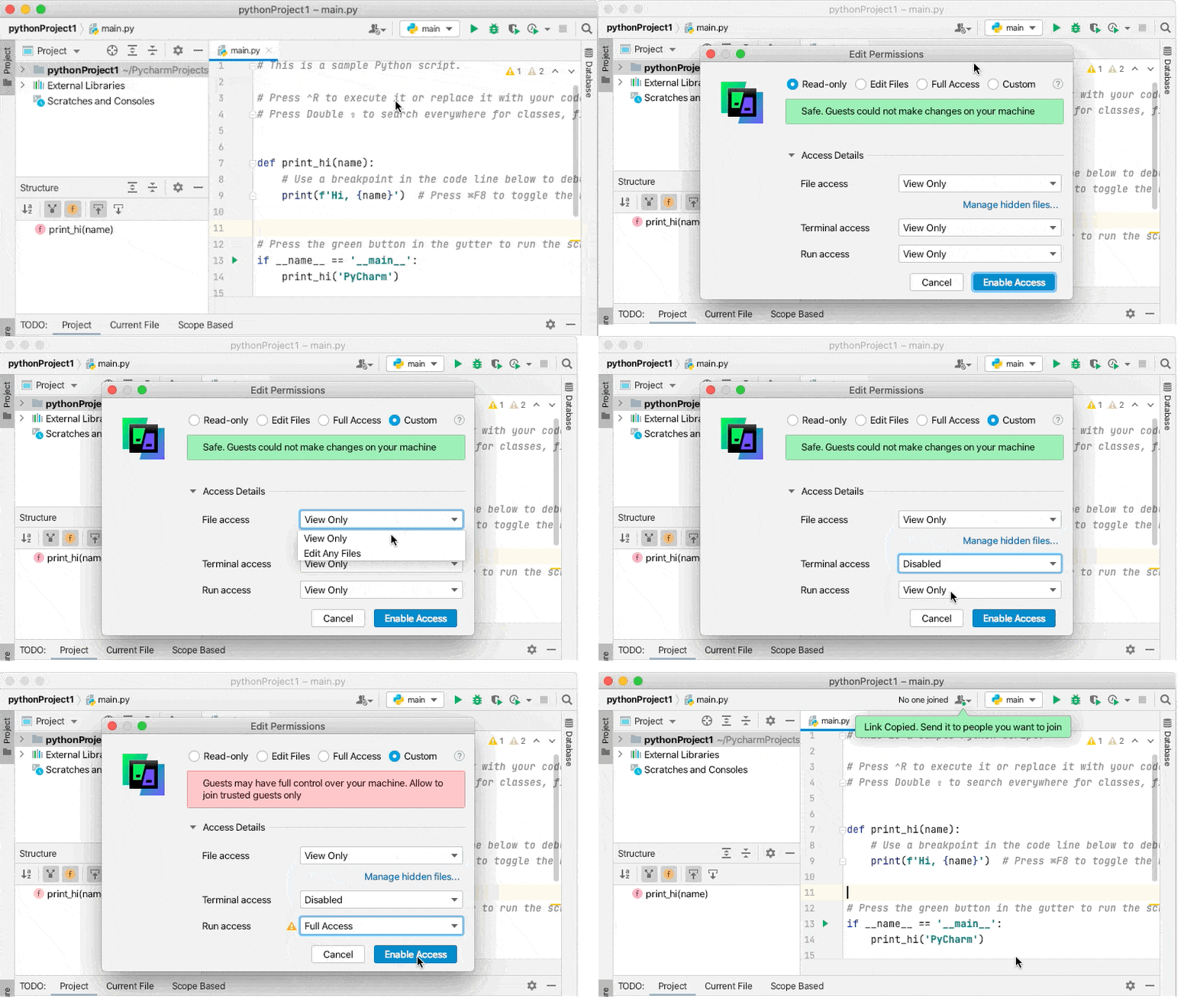
PyCharm EAP 2020.3 now includes Code with Me features by default. If you are practicing pair programming or teaching Python online, it is definitely a tool you will fall in love with.

As a host you can define the level of permissions you want to grant to your guest users. You can allow others to edit files, access the terminal, and run code in your project. Alternatively, you can limit their access level to only viewing what happens while you are live coding.
codewme

Apart from the ability to develop collaboratively, a notable feature of Code With Me is its support of code insight features on the guest side, such as code navigation and autocompletion.

Learn more about Code With Me features in this blog post.

Grazie

Grazie provides intelligent spelling and grammar checks for text that you write in PyCharm. It recognizes natural language constructs in programming languages (Python, Java, and others), markup languages (Latex, Markdown, XML, and HTML), comments, commit messages, and more.

Grazie can help you check grammar in your text files (for example in README.md). To get the most out of it, you can also configure it to check textual elements in your source code such as string literals, comments, or commit messages.

Grazie is set to check English text by default, and you can enable over 15 other languages, including German, Russian, Chinese, and others, by opening Settings/Preferences and selecting Editor > Proofreading.

NOTE: All verification is performed locally, inside your IDE.

Learn more about Grazie’s functionality in the PyCharm Web Help.

Web development

Tailwind CSS plugin

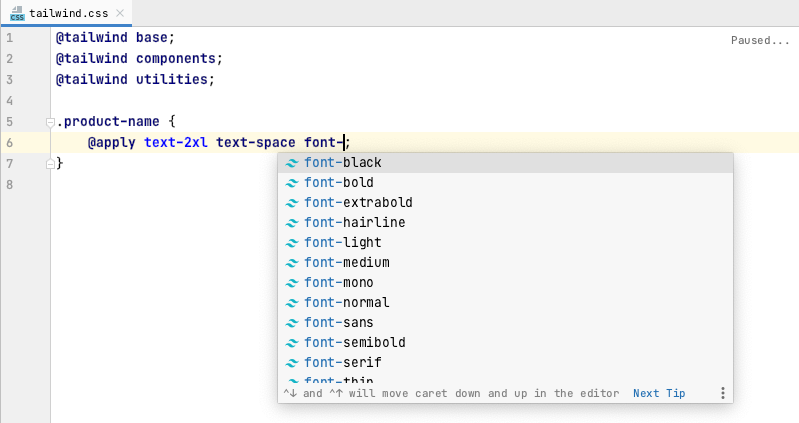
PyCharm 2020.3 now supports the Tailwind CSS plugin. Enjoy autocompletion of Tailwind classes in your HTML files and after the @apply directive. You can make customizations using tailwind.config.js files and get autocompletion for them too.

All you need to do is install the plugin from Settings/Preferences|Plugins|Marketplace > Tailwind CSS.
tailwind-css-plugin

Notable fixes

Ready to join the EAP?

Some ground rules

  • EAP builds are free to use and expire 30 days after the build date.
  • You can install an EAP build side by side with your stable PyCharm version.
  • These builds are not fully tested and can be unstable.
  • Your feedback is always welcome. Please use our issue tracker and make sure to mention your build version

How to download

Download this EAP from our website. Alternatively, you can use the JetBrains Toolbox App to stay up to date throughout the entire EAP. If you’re on Ubuntu 16.04 or later, you can use snap to get PyCharm EAP and stay up to date. You can find the installation instructions on our website.

This is all for today! For the full list of features and fixes present in this build, see our release notes. We also encourage you to stay tuned for more improvements, so come and share your feedback in the comments below, on Twitter, or via our issue tracker.

The PyCharm team


from PyCharm: the Python IDE for Professional Developers – PyCharm Blog | JetBrains
read more

Thursday, November 5, 2020

Webinar: “What It’s Like To Do Instructional Videos on YouTube” with Nelson Jamal

Want to learn about producing technical videos on YouTube and gaining an audience? Nelson Jamal, who has experience with both, joins us to take a deep look at his soon-to-be-released PyCharm tutorial on YouTube: planning, recording, and publishing. He’ll compare these with some of his other popular videos and what he’s learned along the way.

  • Thursday, November 19
  • 12:00 Eastern Standard Time
  • Register here

Speaking To You

Nelson is a Software Engineer and Entrepreneur. He provides easy to follow programming courses on Amigoscode and has a YouTube channel where he teaches and inspires people around the world how to code. You can also find him on Discord.

Nelson’s main goal is to encourage and inspire people from all ages to experience the career path of Software Development. He has a strong belief in programming and wants to make it accessible to anyone by providing intuitive and easy to learn programming courses and tutorials allowing students to get ready for job opportunities, university and bootcamps.


from PyCharm: the Python IDE for Professional Developers – PyCharm Blog | JetBrains
read more

Tuesday, November 3, 2020

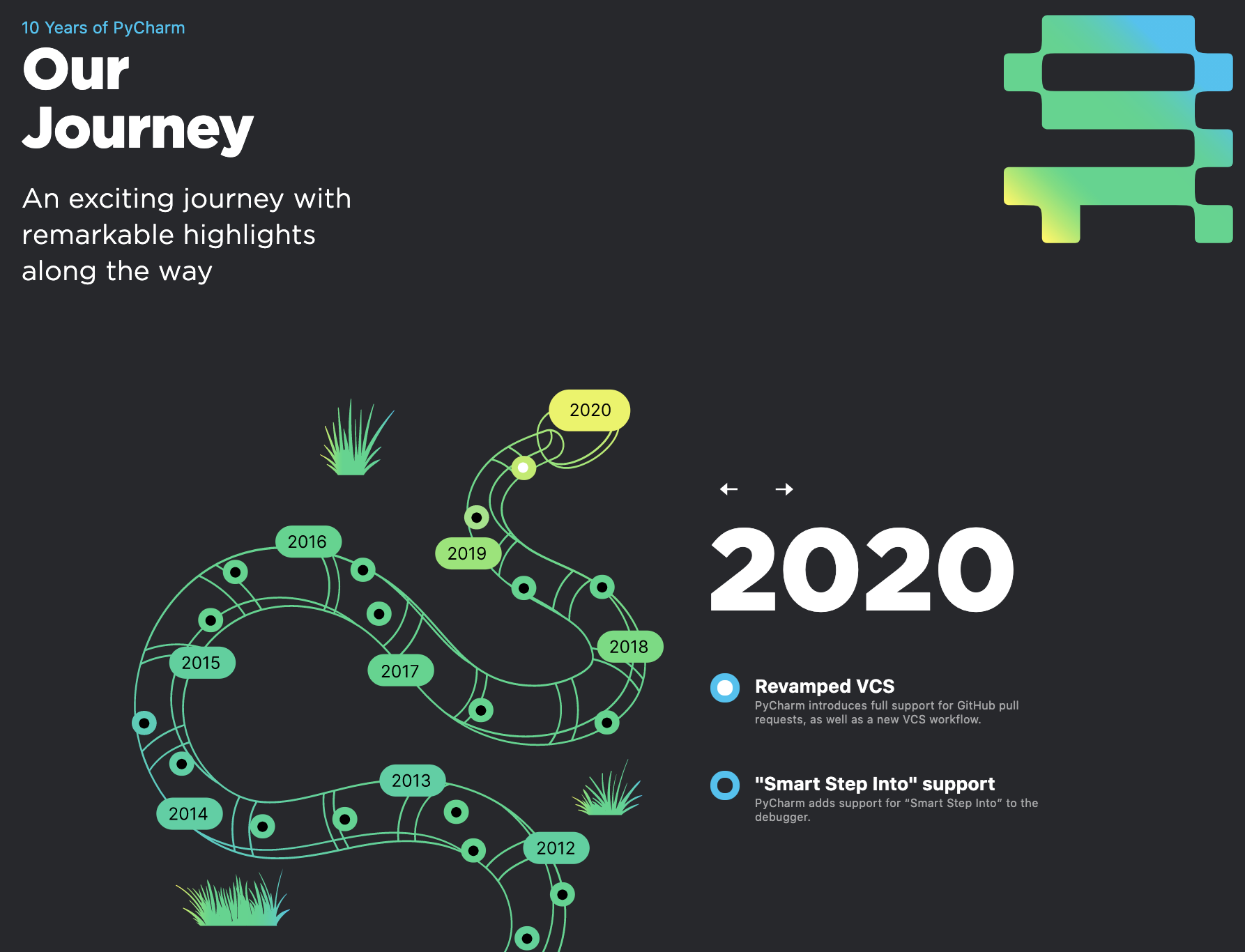
Let’s Celebrate PyCharm’s 10th!

PyCharm is celebrating its 10th anniversary. Over the last decade, PyCharm has grown alongside Python, carefully following changes in the language and adjusting to the feedback of Python developers. This whole time, the PyCharm team has spared no effort to make PyCharm more enjoyable and productive for its users to work with.

Looking back, we can clearly see that PyCharm is not just a purely commercial product – it’s also the result of community-driven development. Our users have contributed immensely to making PyCharm better through all these years.

We are proud of the work made up to these days, and prepared PyCharm birthday page with a special ‘thank you’ message to our users, as well as a timeline with important milestiones, and a challenge.

PyCharm timeline

The Podcast

If you feel more like listening to a story than reading it, a nice way to understand where PyCharm comes from is to listen to the latest episode of the Early Access PyCharm Podcast by our developer advocate Nafiul Islam, with one of the PyCharm originators, Dmitry Jemerov. Dmitry shares why PyCharm was created in the first place, and more importantly, why we released PyCharm Community Edition (spoiler: Dmitry loved Python so much that he wanted Python developers to have proper tooling, even if they were just beginning to learn Python).

The Challenge

As we celebrate PyCharm’s 10th anniversary, we want to thank every single PyCharm user and Python developer. You all helped us to get this far, so we think this is the perfect time to put the spotlight on you.

We are looking for 10 the most groundbreaking projects created with PyCharm in the last 10 years so we want to invite you to share the Python project that you are created using PyCharm, and vote for other projects in our showcase.

You can submit your projects in this Twitter thread until the 20th of November, then we will announce the shortlist so the community can vote. The 10 projects with the most votes will be awarded the title PyCharm Project of the Decade, and their authors will receive limited edition hoodies.

SUBMIT A PROJECT

Thank you all for using PyCharm. It has been a great decade and we look forward to the next one! Check out PyCharm’s 10th anniversary birthday page for all celebration details.


from PyCharm: the Python IDE for Professional Developers – PyCharm Blog | JetBrains
read more

Monday, November 2, 2020

Early Access PyCharm Podcast — Episode 4: The One Where We Talk About How It All Started

Welcome to Early Access PyCharm, a brand-new podcast that goes behind the scenes of how the PyCharm IDE is made and all the thinking that goes into it. In the upcoming episodes, you will hear from the people who work daily to make you more productive and your code even better.

Episode 4

This is a special episode! It has been a decade since PyCharm 1.0 was released and today we will look back and talk to the people who helped shape PyCharm from day one until nowadays. This episode tells the story of how it all started, and how it became what it is today.

Where to find

Early Access PyCharm is available in all the main Podcast platforms, make sure to subscribe!


from PyCharm: the Python IDE for Professional Developers – PyCharm Blog | JetBrains
read more

Wednesday, October 28, 2020

PyCharm 2020.3 EAP #3

The third build of PyCharm 2020.3 is now available in the Early Access Program with features and fixes for a smoother, more productive experience.

We invite you to join our EAP to try out the latest features we have coming up, test that they work properly in your environments, and help us make a better PyCharm for everyone!

pycharm EAP program

DOWNLOAD PYCHARM 2020.3 EAP

Highlights

Interpreter settings

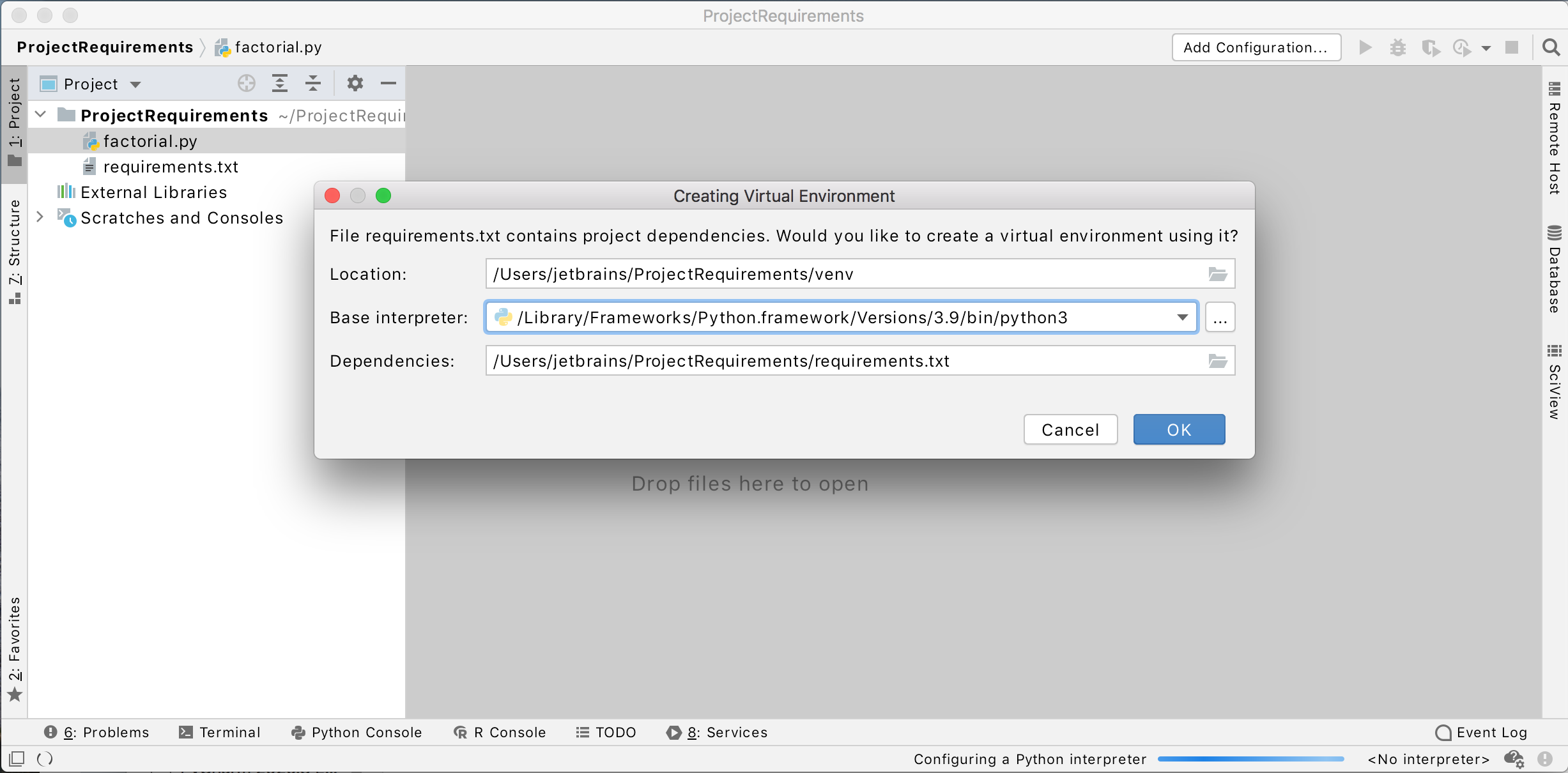
Now it is easier to create an environment for your project and set up all the dependencies at once.
When you clone a project from the repo, PyCharm checks if there is a requirements.txt, setup.py, environment.yml, or pipfile inside it. If there is, the IDE suggests per-project environment creation based on the detected files.

i2020_10_28_env

If you skip the environment creation at this step, autoconfiguration will still be available in the editor itself.

Inverting an “if” statement

Now you can easily invert “if” statements and switch them back in PyCharm. Kudos to Vasya Aksyonov, who contributed this feature to our open-source PyCharm Community Edition.

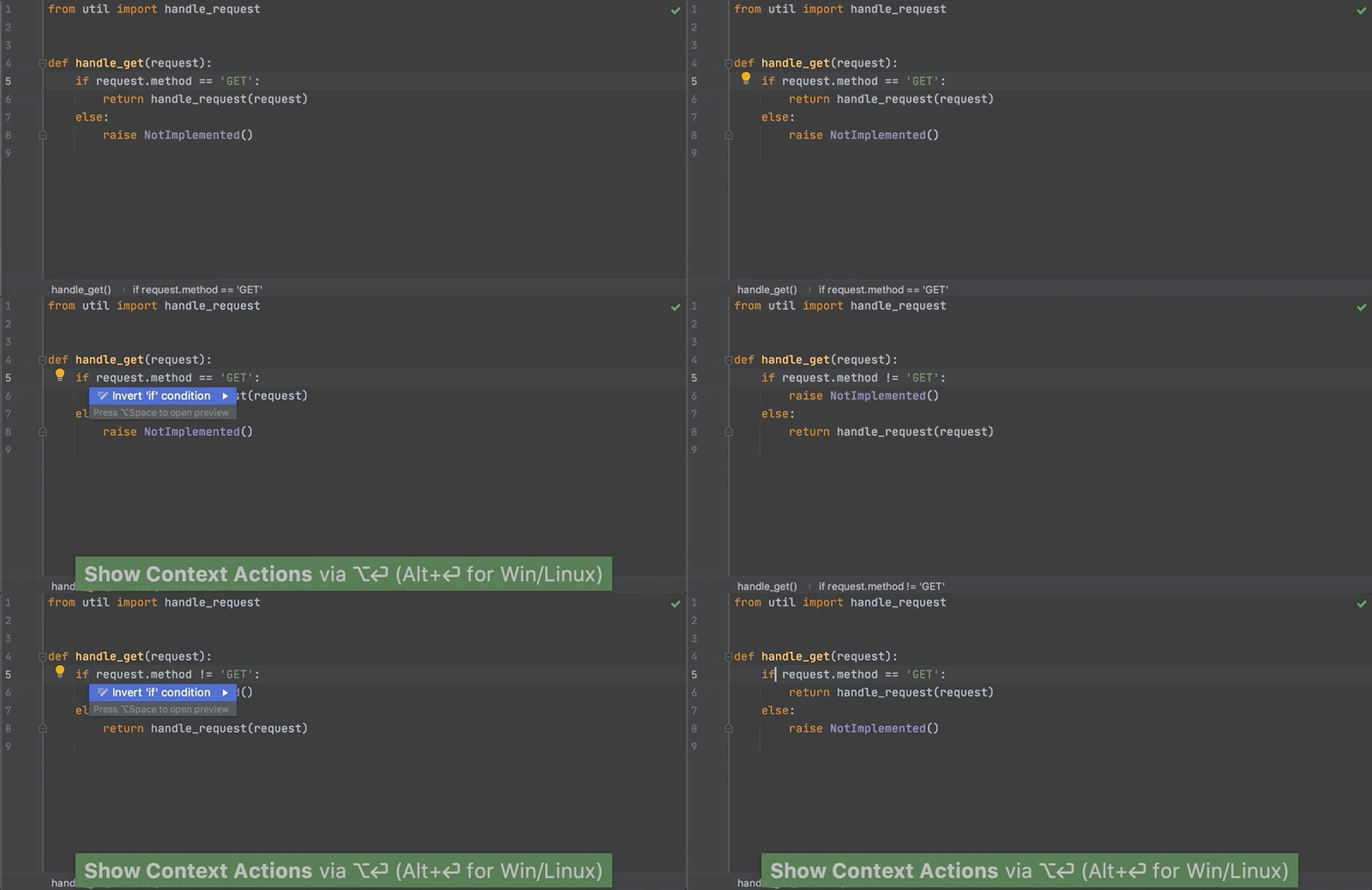
Go to the context menu for “if”, choose Show Context Actions, and then select “Invert ‘if’ condition”. The condition of the “if” statement will be inverted and the branches will switch places, preserving the initial semantics of the code.

invert_if

When there is an “if” statement without an “else”, then after it has been inverted a “pass” will be created for the “if” that was inverted and an “else” clause will be added to the statement.

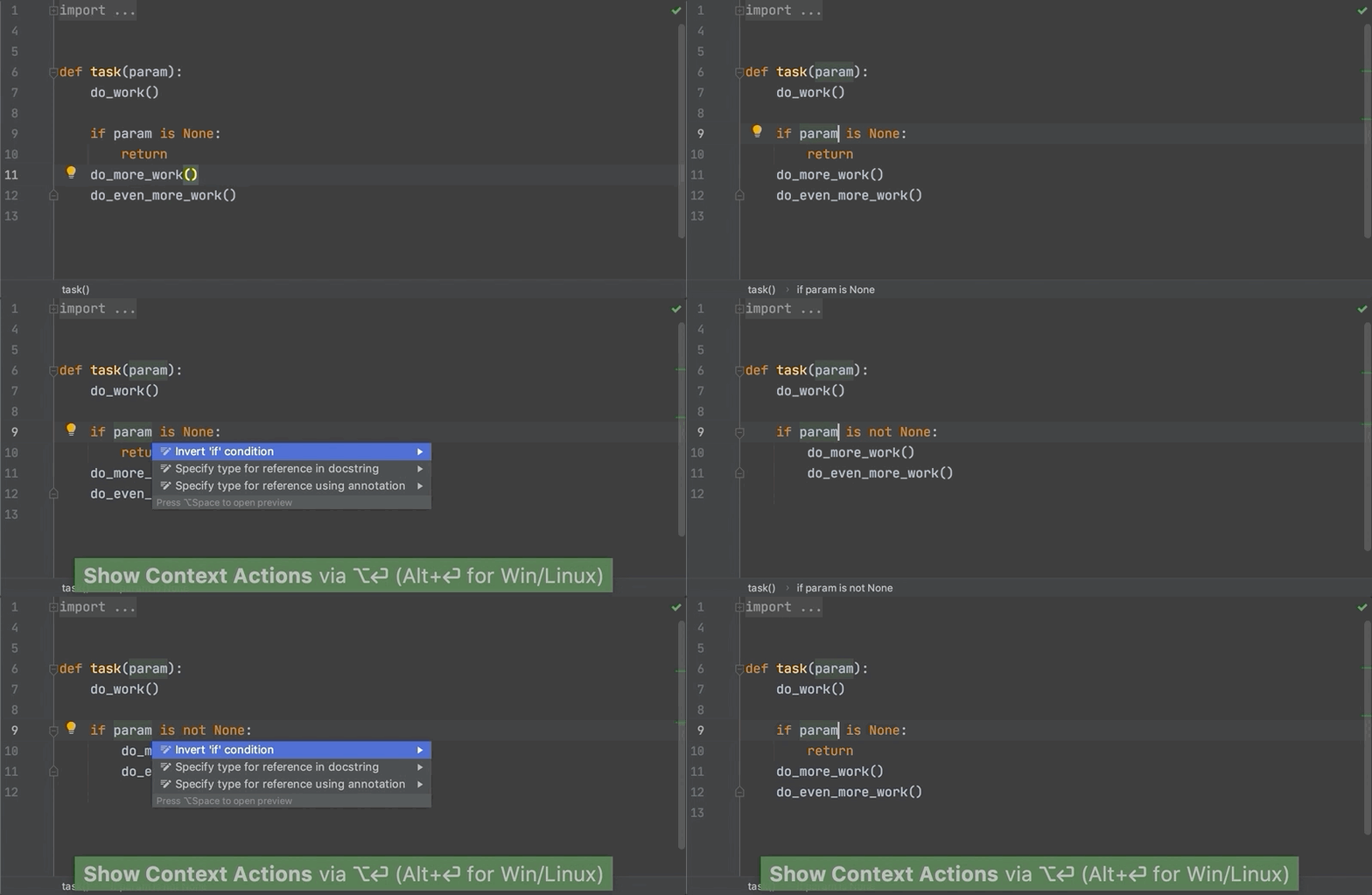
early_return

This feature works for all “if” statements without “elif” branches. The action also understands control flow, and can handle things like early return, producing sensible code.

Learn more.

VCS

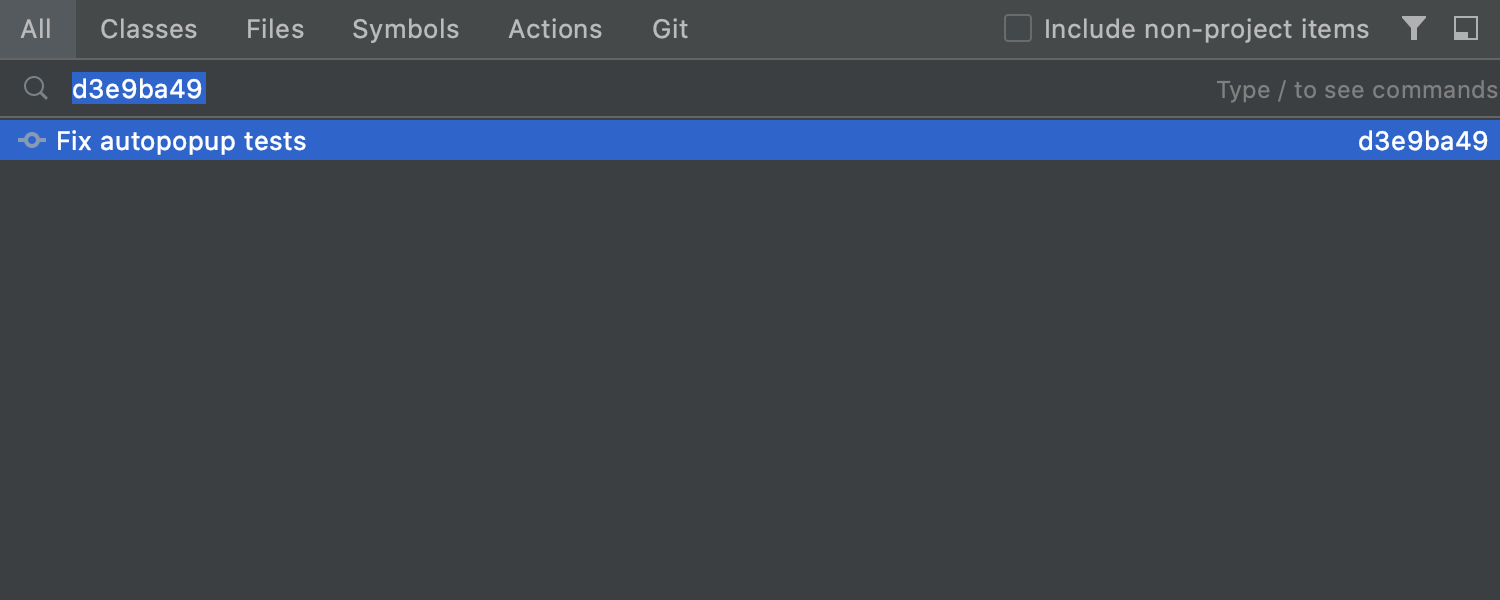
We’ve added a Git tab to the Search Everywhere dialog. In it you can find commit hashes and messages, tags, and branches.

ide_git

Web development

Create a React component from its usage

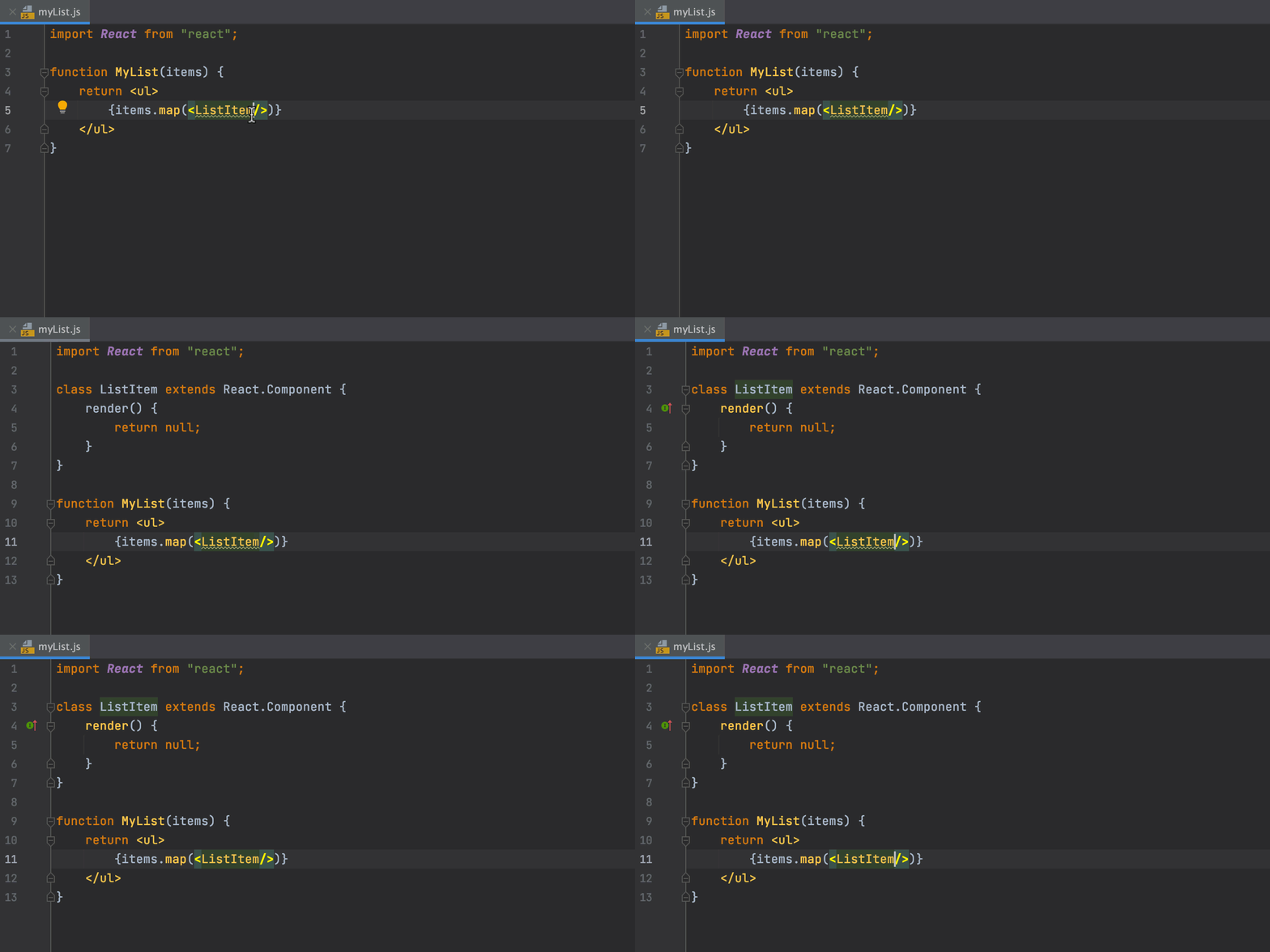
As you might know, PyCharm constantly checks that referenced variables and fields are valid. When they aren’t, in many cases it can suggest creating the relevant code construct for you. Now it can do this for React components, too. Place the caret at an unresolved component, press Alt+Enter, and then select the corresponding inspection. And you’re done!

create-react-component-from-usage

Plugins enabled per project

We have taken plugin customization one step further. In Settings | Preferences / Plugins, the drop-down list next to the plugin name has been replaced with a new gear icon that has all the activation options. You can enable the plugin just for the current project or for all of them by selecting Enable for Current Project or Enable for All Projects.

Reader Mode

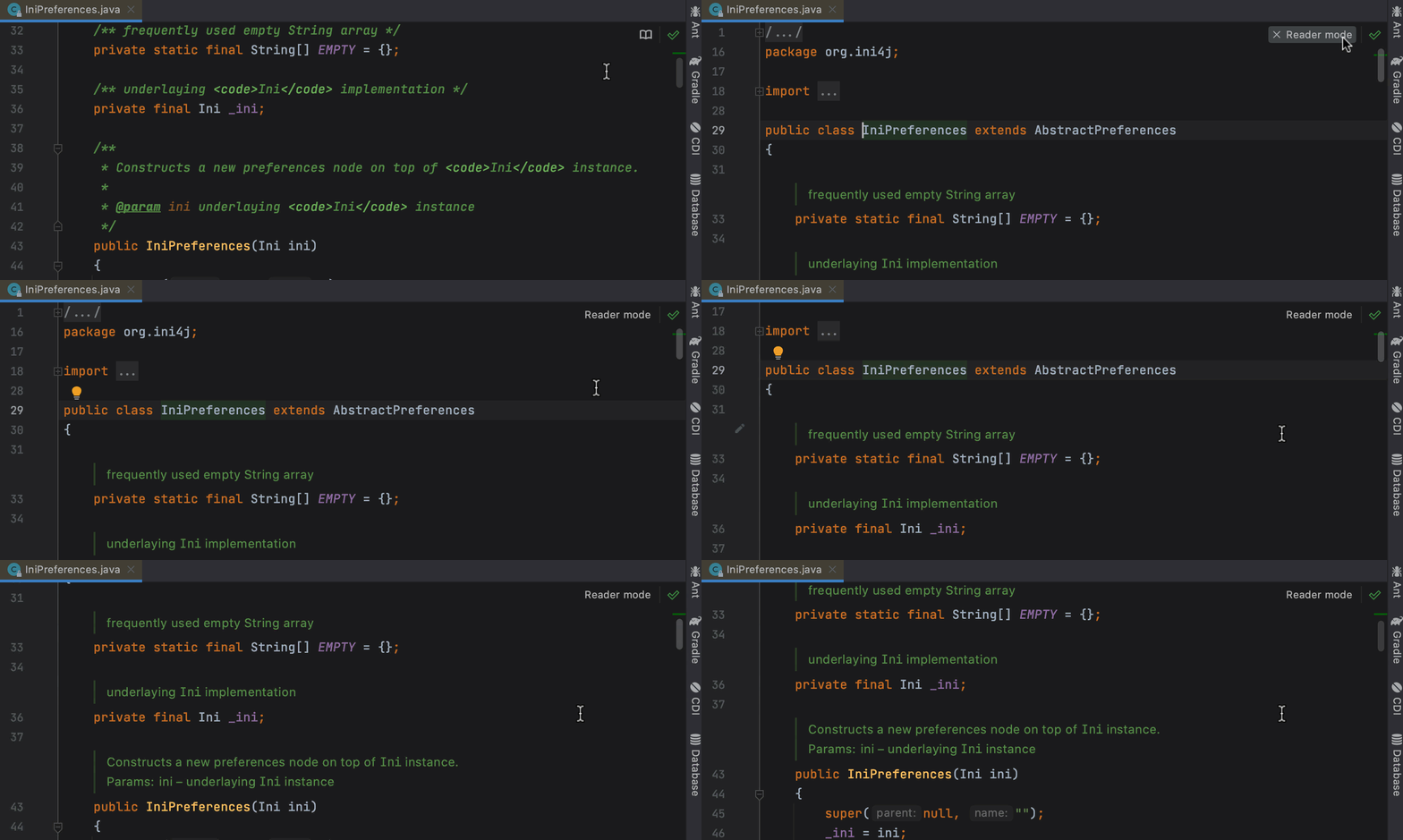
To make reading comments easier, we’ve implemented Reader Mode for read-only files and files from External Libraries. We’ve added a nicer display for font ligatures, code vision hints with the number of usages, and more. To configure the new mode, go to Preferences | Settings / Editor / Reader Mode.

ide_reader_mode-1

Other updates

  • PyCharm now supports the Couchbase Query service.
  • The Concurrency Diagram button is now moved to the Profiler Executors group panel in the top right-hand corner of the editor.
  • PyCharm now recognizes Python 3.10. Yes, we are already getting ready for it!

Notable fixes

The problem that caused copying the prompt together with the code when copying multiline commands is now fixed.

Ready to join the EAP?

Some ground rules

  • EAP builds are free to use and expire 30 days after the build date.
  • You can install an EAP build side by side with your stable PyCharm version.
  • These builds are not fully tested and can be unstable.
  • Your feedback is always welcome. Please use our issue tracker and make sure to mention your build version

How to download

Download this EAP from our website. Alternatively, you can use the JetBrains Toolbox App to stay up to date throughout the entire EAP. If you’re on Ubuntu 16.04 or later, you can use snap to get PyCharm EAP and stay up to date. You can find the installation instructions on our website.

This is all for today! For the full list of features and fixes present in this build, see our release notes. We also encourage you to stay tuned for more improvements, so come and share your feedback in the comments below, on Twitter, or via our issue tracker.

The PyCharm team


from PyCharm: the Python IDE for Professional Developers – PyCharm Blog | JetBrains
read more

Thursday, October 22, 2020

Webinar Recording: “virtualenv – a deep dive” with Bernat Gabor

PyCharm virtual environments are an important but challenging topic. We recently hosted Bernat Gabor to discuss this, as well as his rewrite of virtualenv, the hugely-popular command-line tool for creating virtual environment. The recording is now available.

This was a very engaging webinar, with lots of questions, and many thanks to Bernat for taking the time to give thoughtful replies.

Contents

01:00 – Basics of virtual environments
03:50 – Activation script
07:24 – First batch of questions
17:00 – Why a rewrite of virtualenv?
22:19 – Next questions
30:58 – What’s hard about Python packaging
40:27 – Next questions
46:00 – Alternate non-install of virtualenv using zipapps
48:37 – Last questions

Speaking To You

Bernat Gabor has been using Python since 2011 and has been a busy participant in the open-source Python community. He is the maintainer of the virtualenv package, which allows the creation of Python virtual environments for all Python versions and interpreter types, including CPython, Jython, and PyPy. He also maintains tox and has contributed to various other Python packages.

Bernat works at Bloomberg, a technology company with more than 6,000 software engineers around the world – 2,000 of whom use Python in their daily roles. Finally, he is part of the company’s Python Guild, a group of engineers dedicated to improving the adoption, usage, and best practices of Python within the company.


from PyCharm: the Python IDE for Professional Developers – PyCharm Blog | JetBrains
read more
Monday, October 12, 2020

Datalore by JetBrains: Online Jupyter Notebooks Editor With PyCharm’s Code Insight

If you work with Jupyter Notebooks and want to run code, produce heavy visualizations, and render markdown online – give Datalore a try. It comes with cloud storage, real-time collaboration, notebook publishing, and PyCharm’s code insight. In this blog post we’ll give you a quick introduction to what you can do in Datalore.

Datalore

Try Datalore

Jupyter notebooks in the cloud

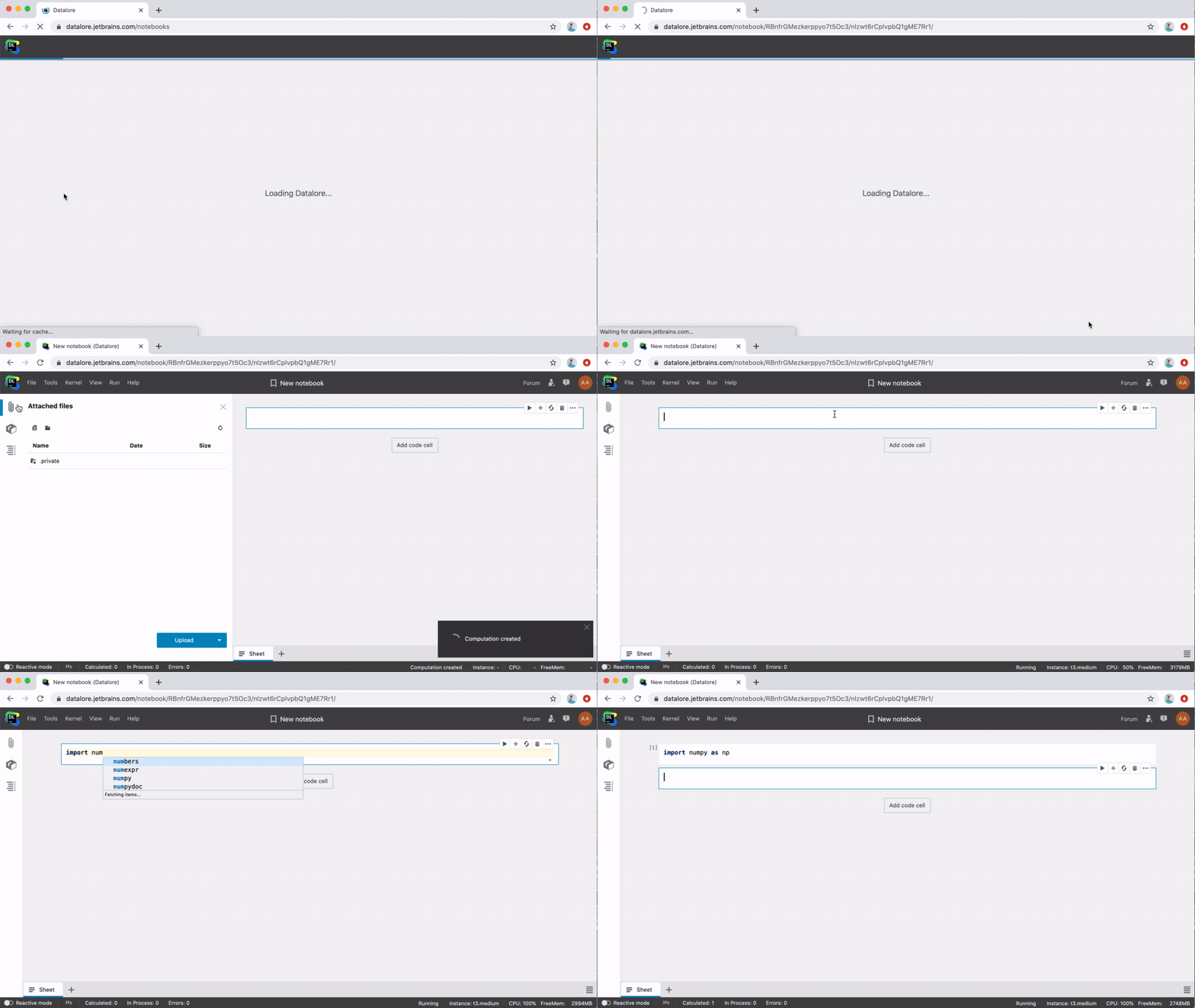
Once you register a Datalore account, you can get your first notebook up and running in seconds. No setup is required, and the most popular data science libraries such as NumPy, Matplotlib, pandas, TensorFlow, etc., are already preinstalled.

As soon as you create a new notebook or upload an existing one, you can attach dataset files to it. In Datalore, files are uploaded to cloud storage and then attached to the notebook. The free Datalore plan comes with 10 GB of storage space.

Code insight in Datalore

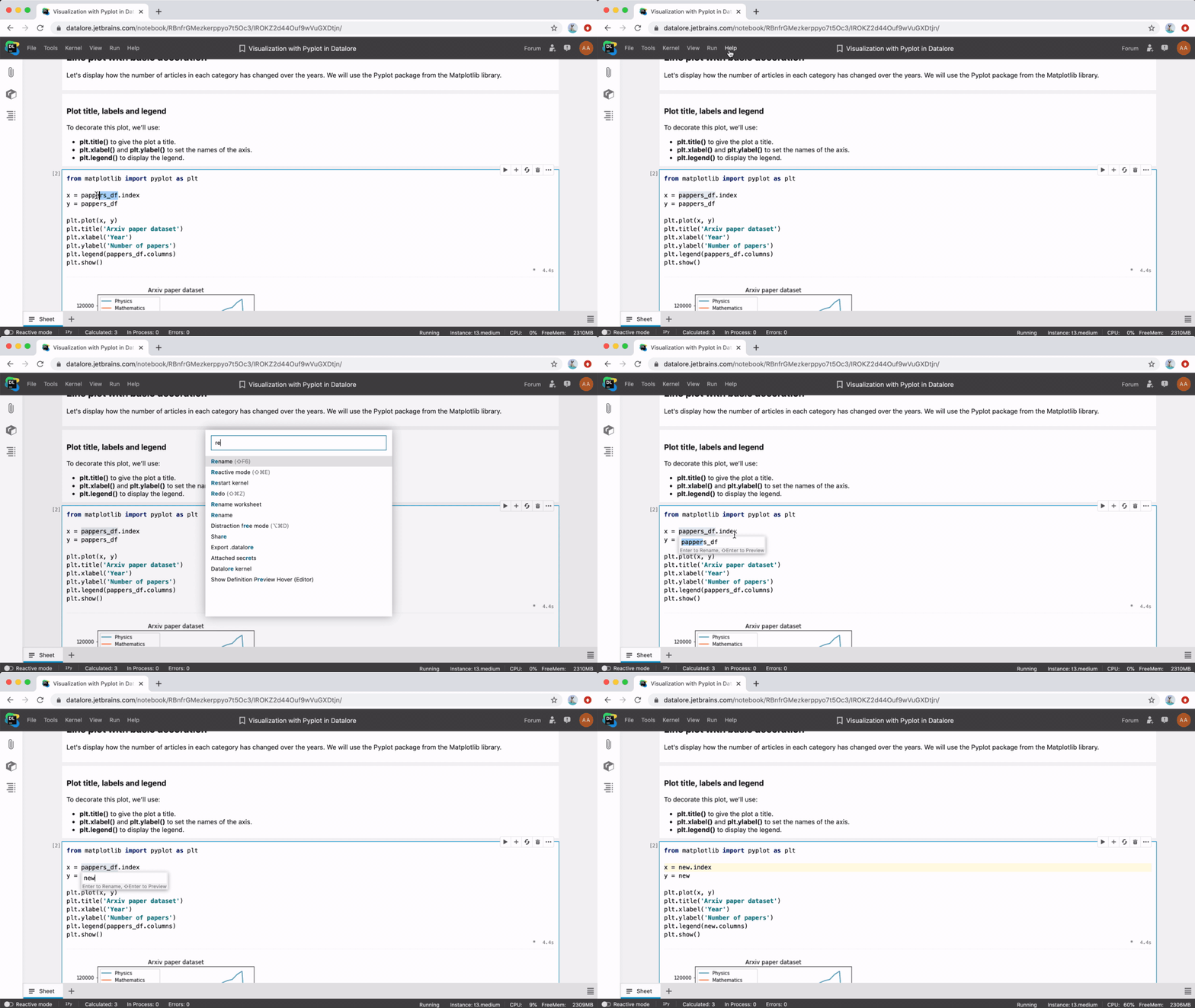
One of the best features of Datalore is its coding assistance, which it borrows directly from PyCharm.

We firmly believe that code completion, quick-fixes, auto-imports, rename, and reformatting options help make your online coding experience far more productive. Try out the coding assistance and let us know what you think!

Online editor experience

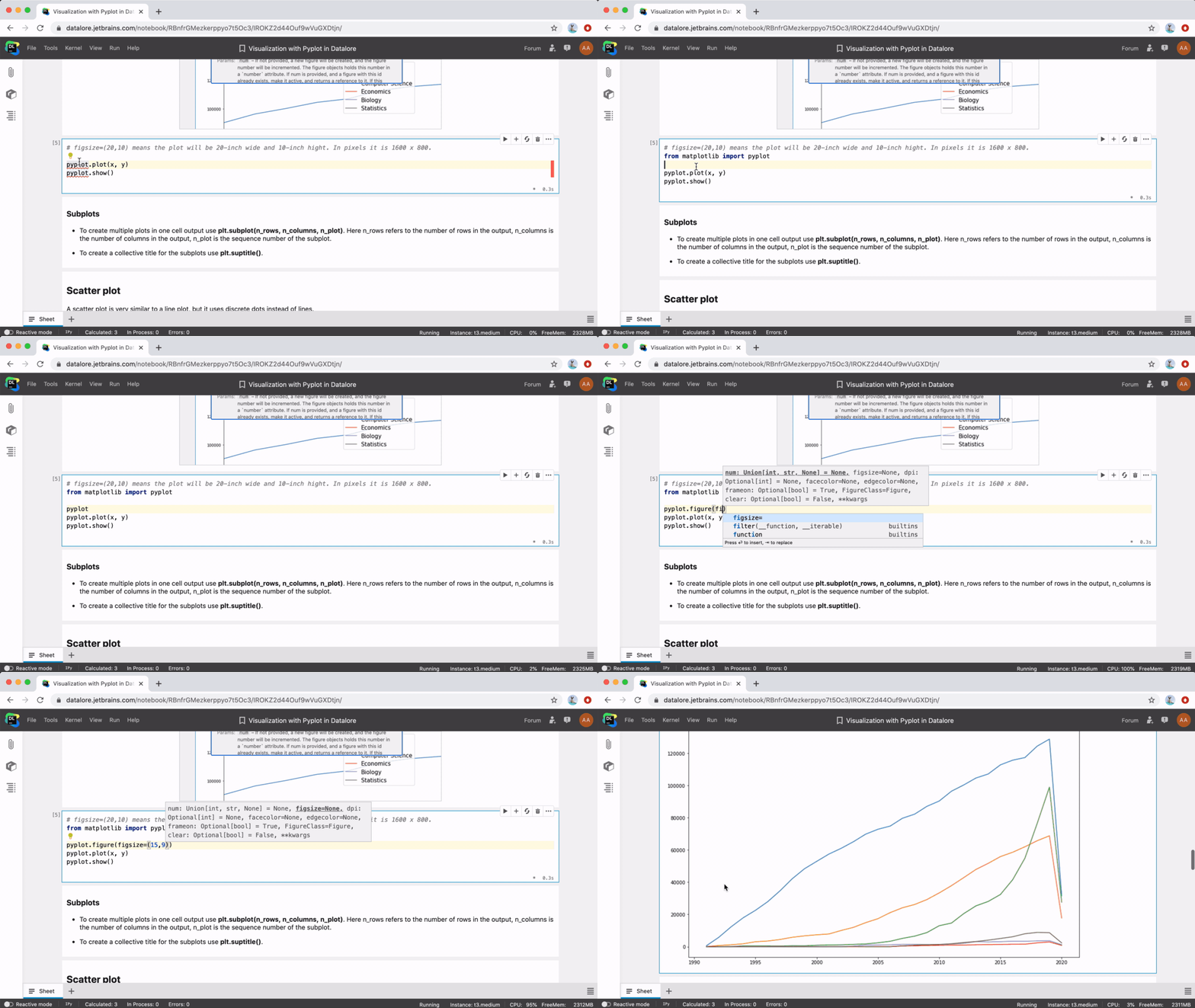
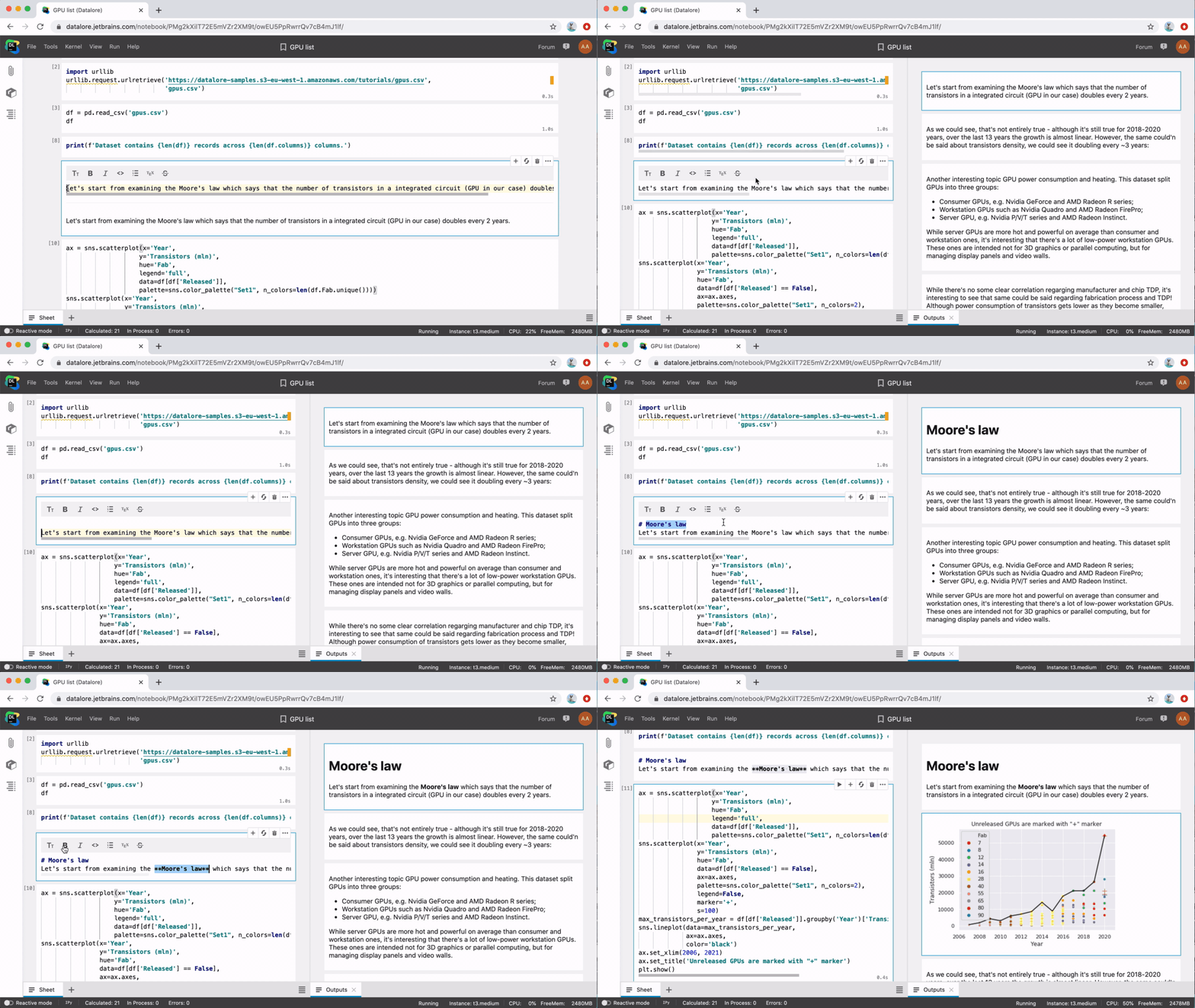
Datalore supports Markdown and LaTeX. All computations are run in the cloud, which improves the time it takes for visualizations and markdown cells to be rendered.

We also support common Jupyter shortcuts and documentation popups. You can find the full list of available action shortcuts in the Help → Command palette menu tab.

Collaboration in Datalore

There are 4 ways to collaborate in Datalore.

1. Share your notebooks

Share your notebooks with your team via File → Share and collaborate in real time. The cursors of your team members will appear with color highlights and name tags. If something goes wrong you can revert to a history checkpoint via Tools → History.

2. Publish your notebooks

Publish your notebooks when you want to share insights and receive comments. Published notebooks can then be shared using a link.

3. Share whole workspaces

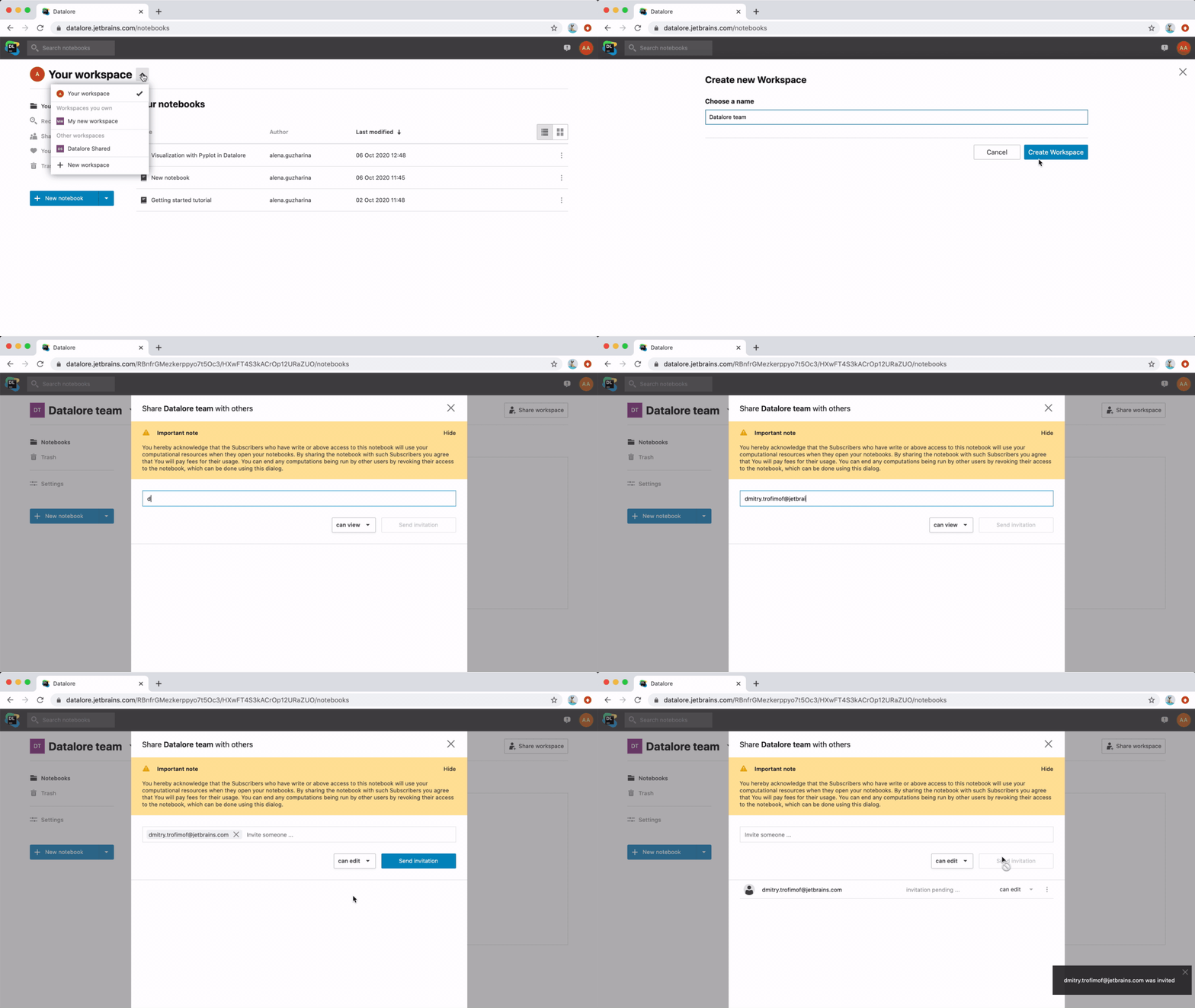
Share whole workspaces and work together with colleagues on multiple notebooks. Notebooks and attached files will be shared among all the workspace members. You can create a shared workspace via the Workspace menu on Datalore’s home screen.

4. Publish PyCharm notebooks

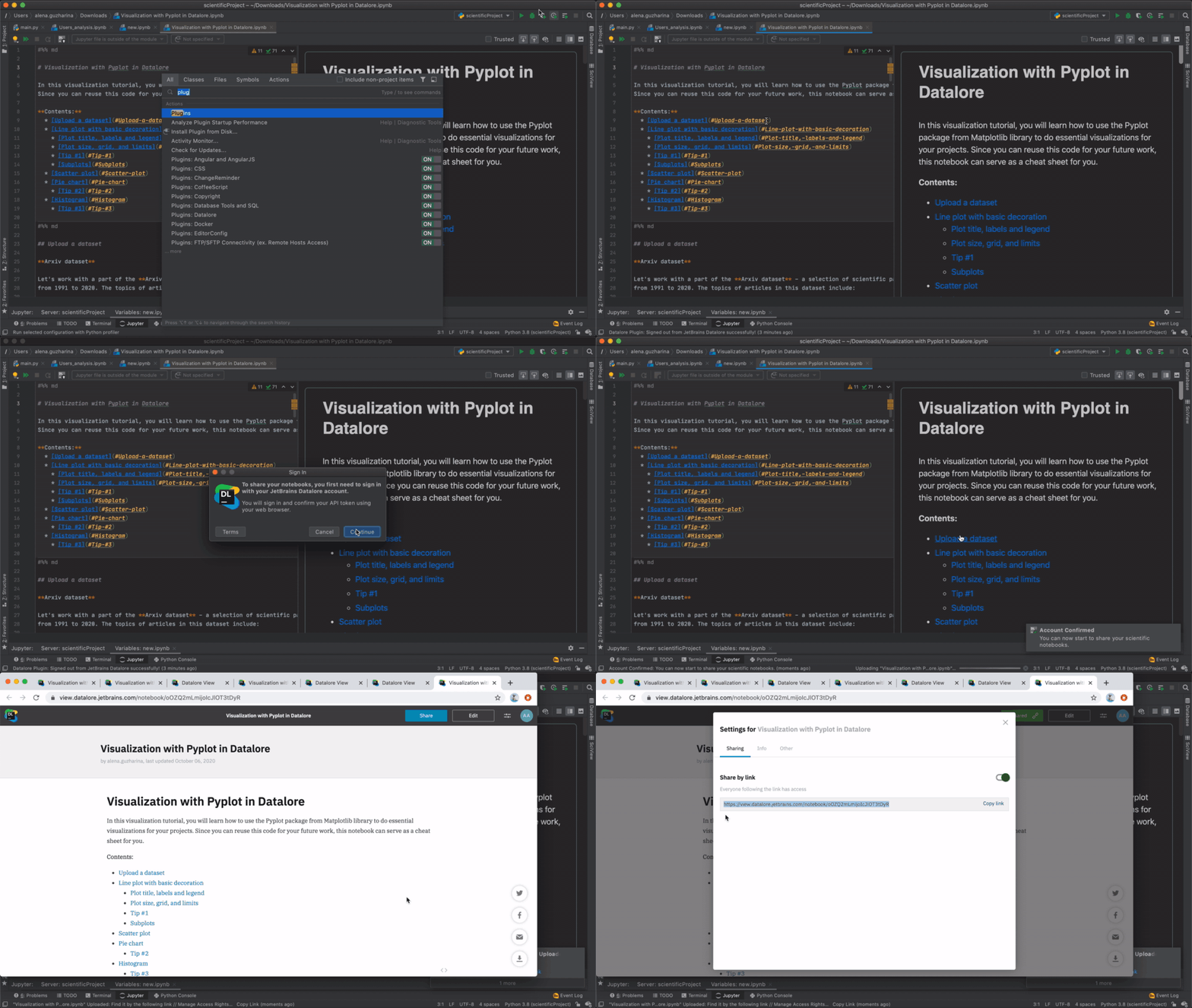
Publish PyCharm notebooks to share the results with your colleagues. You can upload them to Datalore from PyCharm IDE via the pre-installed Datalore plugin. Just make sure you are using version 0.1.18 or later.

Give Datalore a try!

Learn more about Datalore’s features from the Datalore blog. The Datalore team is always eager to hear your feedback! Please don’t hesitate to write to us in the comments or post in our forum.

Enjoy your data science journey,

Your Datalore and PyCharm teams


from PyCharm: the Python IDE for Professional Developers – PyCharm Blog | JetBrains
read more
Thursday, October 8, 2020

Better user experience with updates in the R plugin

Over more than one and a half months, we introduced many improvements in the plugin to make your work with it more productive and comfortable.

New UI capabilities for managing R interpreters

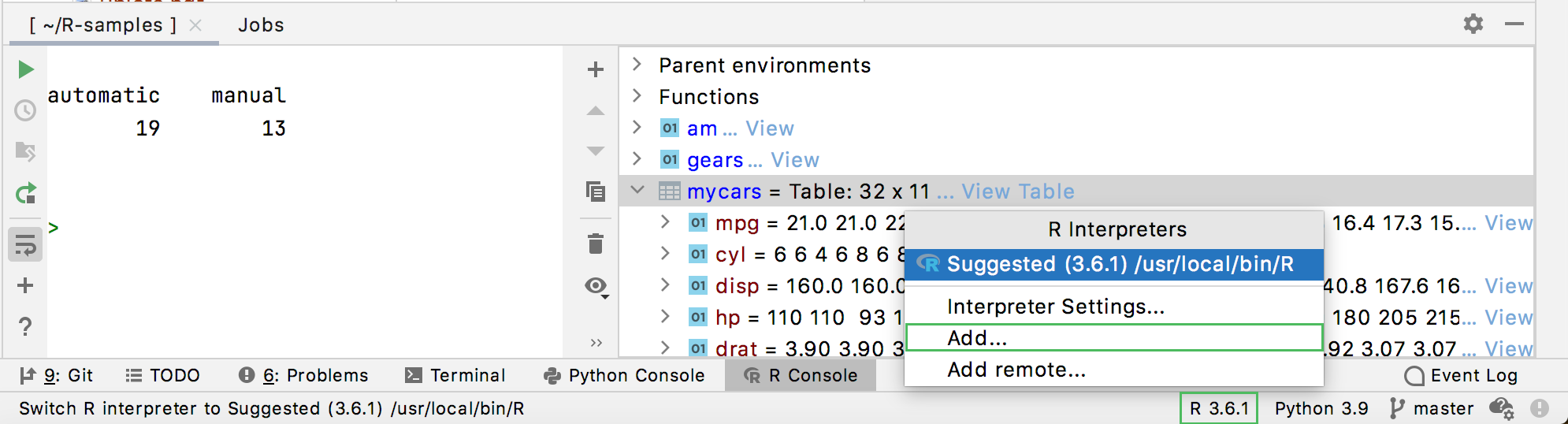
You can easily switch between R interpreters, or create new ones with the R interpreter selector that is located in the IDE Status Bar.
R interpreter selector
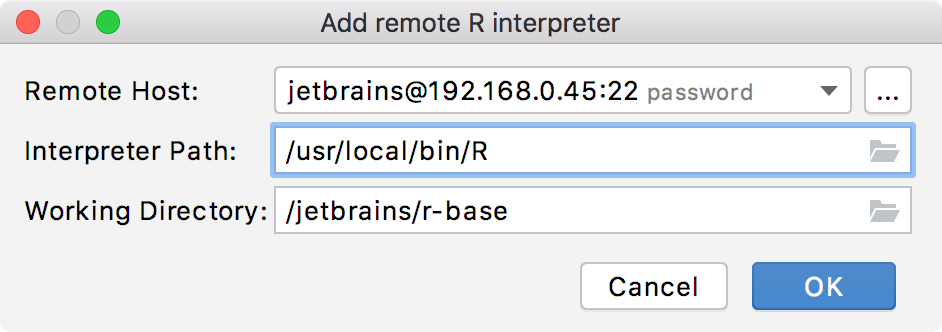
Also, we modified the remote interpreter configuration: in addition to the host and interpreter path, you can specify the working directory on the remote server.

remote R interpreter

Better code assistance for R

With this release, R plugin provides additional support for code insight features:

  • Static code completion for dplyr
  • Code assistance for Shiny including HTML, Markdown, and CSS highlighting
  • Support for S4 classes

Convenient import of data sets

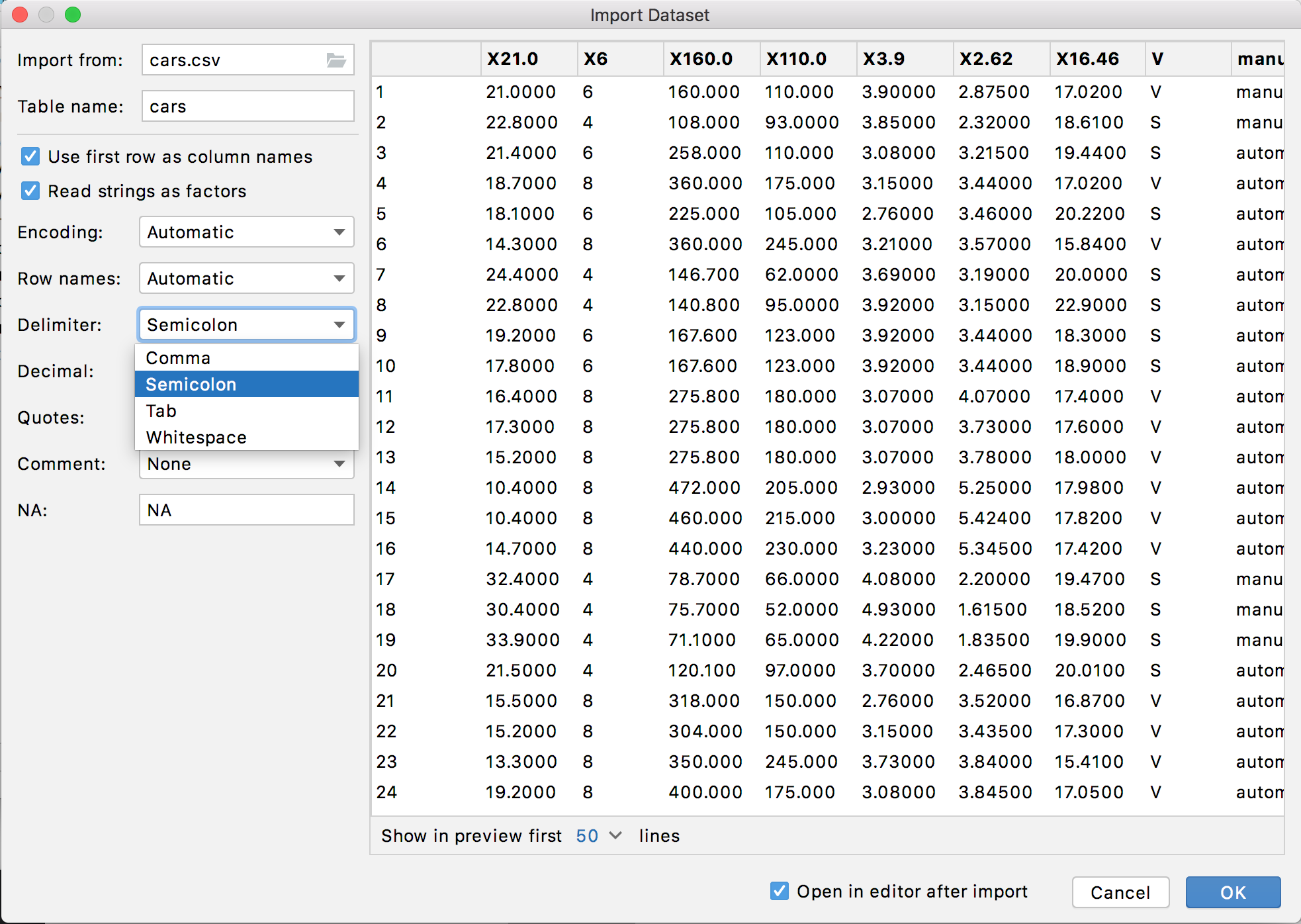
We improved the workflow for importing data sets from CSV, TSV, or XLS files: reworked the UI and added a field to prompt an appropriate table name.

import data sets

Improved testing of R packages

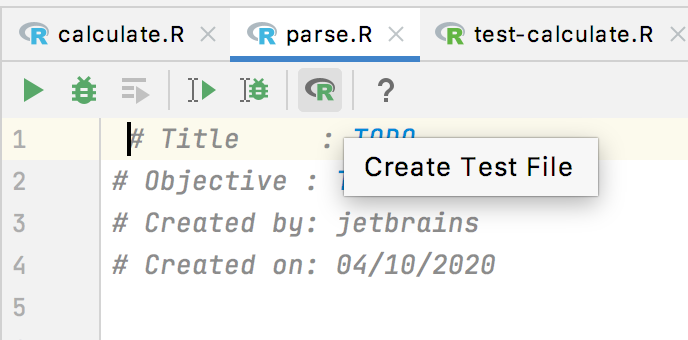
With the recenly added UI elements, you can easily create new tests for R source files in your packages and navigate from a source to a test.
Use the corresponding icon on the editor toolbar:

create a test file for an R source
The same action can be found on the context menu of an R file in the Project tool window.

R Studio API support

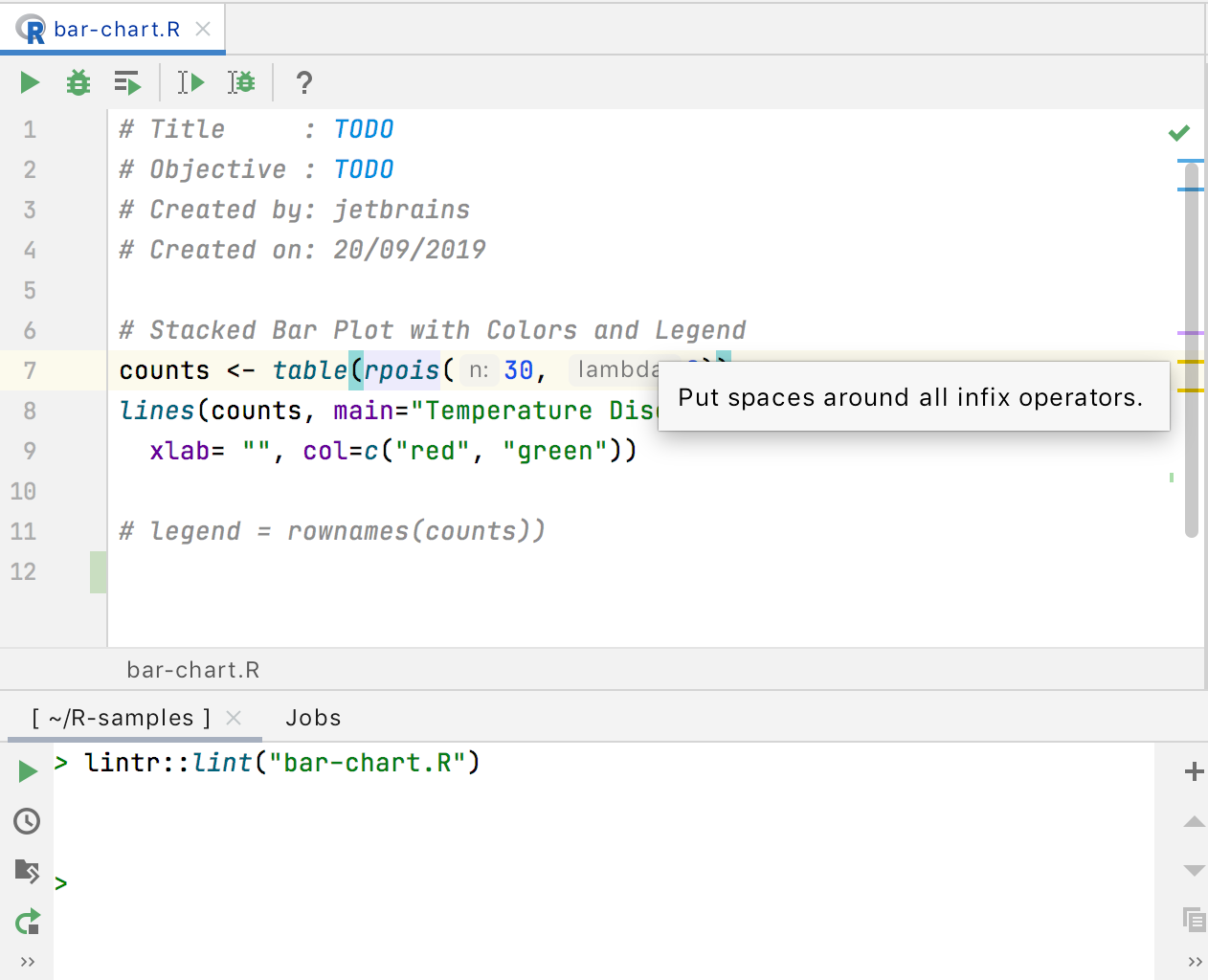
With the support for R Studio API, you can now use its powerful features. For example, check R files with lintr:

file

You can also use the most popular functions: navigateToFile, askForPassword, and showQuestion. More features are to be supported in the next update releases of the plugin.

Interested?

Download PyCharm from our website and install the R plugin. See more details and installation instructions in PyCharm documentation.


from PyCharm: the Python IDE for Professional Developers – PyCharm Blog | JetBrains
read more
PyCharm 2020.3 EAP #2

The second build of PyCharm 2020.3 is now available in the Early Access Program with features and fixes that will make your experience smoother and more productive.

We invite you to join the program to test, share your thoughts, and help us make a better PyCharm for you and all our users!

pycharm EAP program

DOWNLOAD PYCHARM 2020.3 EAP

Highlights

Fast-track setup and reworked Welcome screen

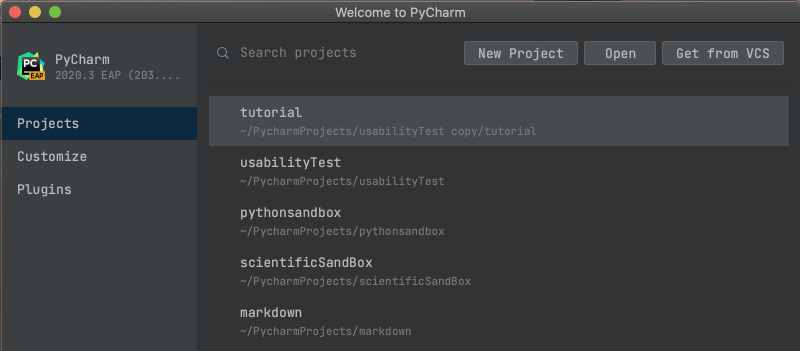
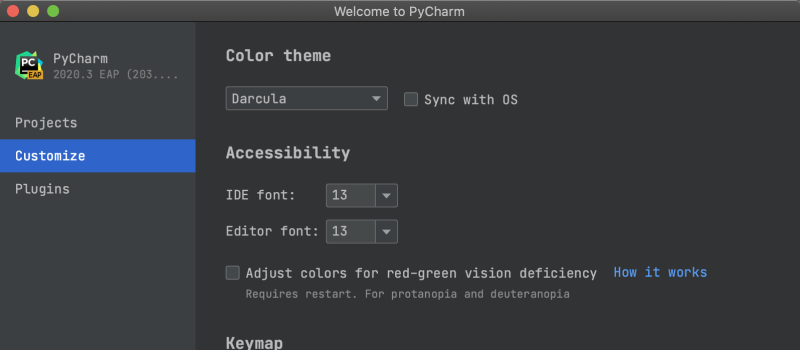
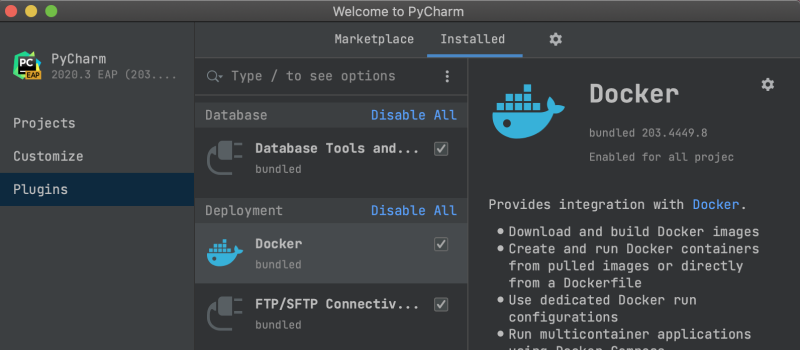
Once PyCharm is installed, you’ll come to a new Welcome screen that includes, besides the project selection, also a variety of dialogs to help you customize your IDE even before starting it!

First of all, the "Projects" page has more space so you can see more projects and easily find the one you are looking for. If your list is too big to fit on the screen, you can always use the search bar that is, now, easier to spot on the top of the dialog modal.

The “Customize” tab lets you configure primary interface settings like the color theme, IDE font size, keymap, and more.

Finally, the “Plugins” tab enables you to browse the plugins marketplace and install any plugins you need (even before opening your project).

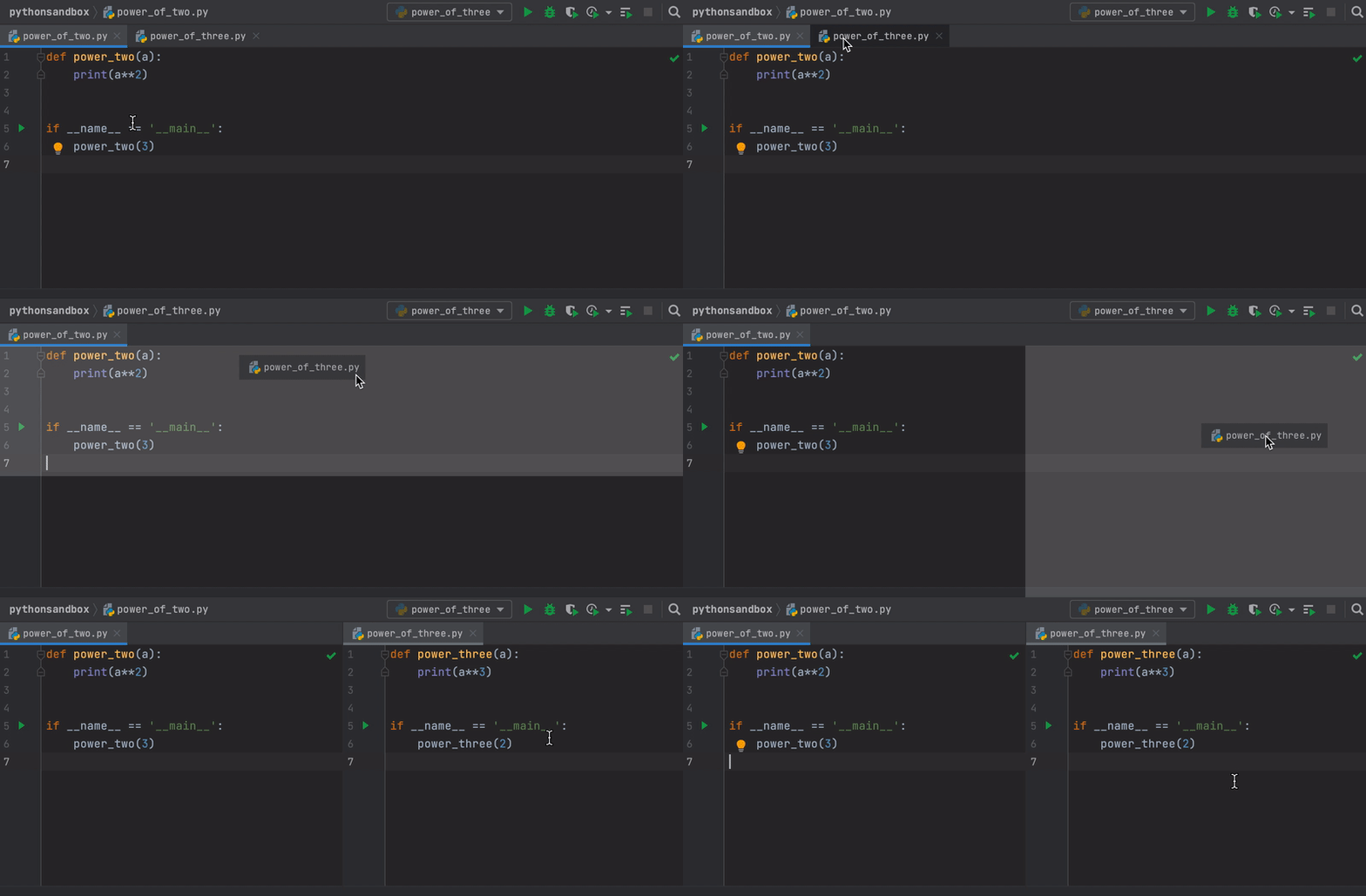
Splitting the editor with drag and drop tabs

This is a nice usability improvement! Have you ever needed to split your screen to edit more than one tab at the same time? This approach (very common when coding in TDD mode) used to require a couple of clicks from your side. Not anymore!

In PyCharm 2020.3, if you want to keep several tabs open and visible simultaneously on your screen, you can just drag and drop the tab into the desired position.

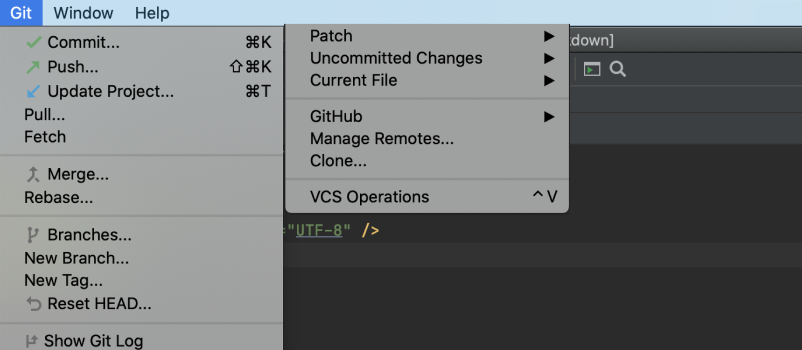
Rearranged VCS menu

The VCS menu will, now, match the version control system that you are currently using. Meaning that if you are, for instance, using Git, the VCS menu will look like the one below. The goal is to make the menu more specific and discoverable by making the most useful actions more prominent and no longer hidden in a submenu.

Notable fixes

Ready to join?

Some ground rules

  • EAP builds are free to use and expire 30 days after the build date
  • You can install an EAP build side-by-side with your stable PyCharm version
  • These builds are not fully tested and can be unstable
  • Your feedback is always welcome, use our issue tracker and make sure to mention your build version

How to download

Download this EAP from our website. Alternatively, you can use the JetBrains Toolbox App to stay up to date throughout the entire EAP. If you’re on Ubuntu 16.04 or later, you can use snap to get PyCharm EAP and stay up to date. You can find the installation instructions on our website.

This is all for today! For the full list of features and fixes present in this build check our release notes. We also encourage you to stay tuned for more improvements to come and share your feedback in the comments below, on Twitter, or via our issue tracker.

The PyCharm team.


from PyCharm: the Python IDE for Professional Developers – PyCharm Blog | JetBrains
read more
Wednesday, October 7, 2020

PyCharm 2020.2.3

PyCharm 2020.2.3 is ready to be downloaded and brings some fixes that will improve your productivity. Update from within PyCharm (Help | Check for Updates), from the JetBrains Toolbox, or by downloading the new version from our website.

Included in this build:

For the full list of improvements check the release notes.

Getting the New Version

You can update PyCharm by choosing Help | Check for Updates (or PyCharm | Check for Updates on macOS) in the IDE. PyCharm will be able to patch itself to the new version, there should no longer be a need to run the full installer.
If you’re on Ubuntu 16.04 or later, or any other Linux distribution that supports snap, you should not need to upgrade manually, you’ll automatically receive the new version.


from PyCharm: the Python IDE for Professional Developers – PyCharm Blog | JetBrains
read more
Monday, October 5, 2020

Early Access PyCharm Podcast — Episode 3: The One where Kirill talks about Version Control

Welcome to Early Access PyCharm, a brand-new podcast that goes behind the scenes of how the PyCharm IDE is made and all the thinking that goes into it. In the upcoming episodes, you will hear from the people who work daily to make you more productive and your code even better.

Episode 3

In this episode, we talk to Kirill, a proud member of the VCS (Version Control System) team, here at JetBrains. This is the team behind all your git support in your IDE. This is an interesting conversation, because the world of Version Control was not always so uniform.

A decade ago there were many competing applications, but most recently, git has come out victorious. Kirill talks about how the initial version control program in IntelliJ came to be, and how it supported both distributed and centralised systems.

Where to find

Early Access PyCharm is available in all the main Podcast platforms, make sure to subscribe!


from PyCharm: the Python IDE for Professional Developers – PyCharm Blog | JetBrains
read more
Friday, September 25, 2020

Webinar Recording: “From The Docs: PyCharm Skills, Beginner to Advanced” with Alla Redko

PyCharm has broad, useful, up-to-date documentation. How does it get made? Who works on it? What are some hidden gems? Last week we had a webinar covering this with Alla Redko, technical writer for PyCharm, and the recording is now available.

We covered a bunch of ground in this video:

  • Background on the PyCharm docs, how it feeds into the development process

  • A tour of the docs for Code completion with a demo section

  • Same for and intermediate demo on Configuring Python Interpreters with a long discussion about the help docs for this

  • An audience-participation segment discussing "onboarding" and what we can do to improve this

Lots of useful questions from the audience, so thanks to all the PyCharmers who participated and helped.


from PyCharm: the Python IDE for Professional Developers – PyCharm Blog | JetBrains
read more
Thursday, September 24, 2020

Webinar: “virtualenv – a deep dive” with Bernat Gabor

virtualenv is a tool that builds virtual environments for Python. It was first created in September 2007 and just went through a rewrite from scratch. Did you ever want to know what parts virtual environments can be broken down into? Or how they work? And how does virtualenv differ from the Python builtin venv? This is the webinar you want.

  • Wednesday, October 7
  • 17h (CET) / 11 AM (EDT)
  • Register here
  • Intermediate audience – for those who want to get a better understanding of the virtual environments in Python

Speaking To You

Bernat Gabor has been using Python since 2011 and has been a busy participant in the open-source Python community. He is the maintainer of the virtualenv package, which allows the creation of Python virtual environments for all Python versions and interpreter types, including CPython, Jython, and PyPy. He also maintains tox and has contributed to various other Python packages.

Bernat works at Bloomberg, a technology company with more than 6,000 software engineers around the world – 2,000 of whom use Python in their daily roles. Finally, he is part of the company’s Python Guild, a group of engineers dedicated to improving the adoption, usage, and best practices of Python within the company.


from PyCharm: the Python IDE for Professional Developers – PyCharm Blog | JetBrains
read more
Wednesday, September 23, 2020

PyCharm 2020.3 EAP – Starts now!

The Early Access Program for our next major release, PyCharm 2020.3, is now open! If you are always looking forward to the next ‘big thing’ we encourage you to join the program and share your thoughts on the latest PyCharm improvements!

pycharm EAP program

If you are not familiar to our EAP programs, here are some ground rules:

  • EAP builds are free to use and expire 30 days after the build date
  • You can install an EAP build side-by-side with your stable PyCharm version
  • These builds are not fully tested and can be unstable
  • Your feedback is always welcome, use our issue tracker and make sure to mention your build version

Highlighted feature

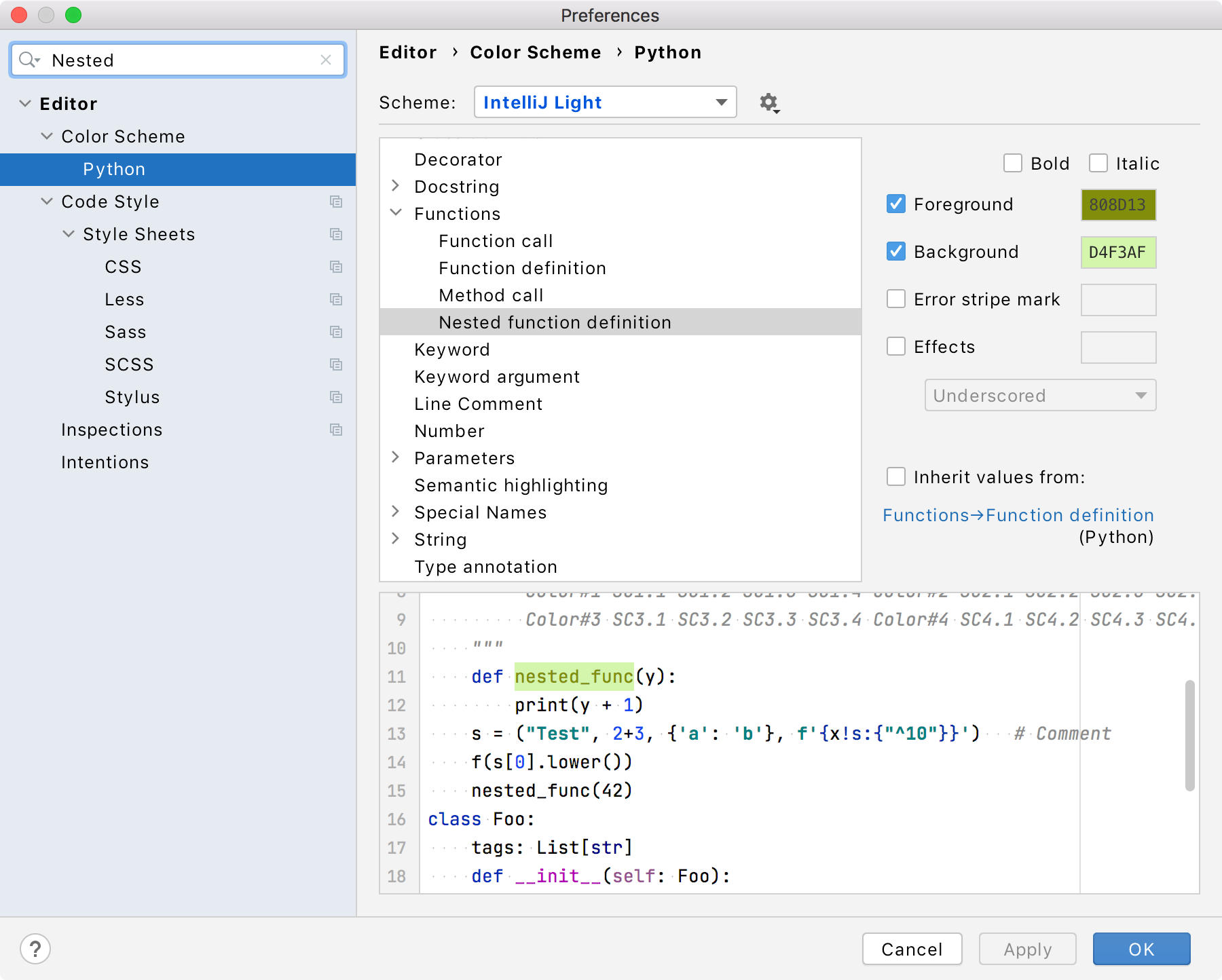
Configurable syntax highlighting for inner functions (PY-33235)

  1. In the Settings/Preferences dialog, go to Editor | Color Scheme | Python.
  2. Select any code element you want to customize and clear the corresponding Inherit values from the checkbox to change inherited color settings for this element; then specify your color and font settings.

    For example, you can set a color highlighting for nested functions. From the list of the code elements, select Nested function definitions, clear the Inherit values from the checkbox, and specify the element foreground and background colors. Click OK to save the changes.

Define custom font and color settings for Python

More features and fixes present on this EAP build

Interested?

Download this EAP from our website. Alternatively, you can use the JetBrains Toolbox App to stay up to date throughout the entire EAP.
If you’re on Ubuntu 16.04 or later, you can use snap to get PyCharm EAP and stay up to date. You can find the installation instructions on our website.


from PyCharm: the Python IDE for Professional Developers – PyCharm Blog | JetBrains
read more
Thursday, September 17, 2020

PyCharm 2020.2.2

PyCharm 2020.2.2 is out now with important fixes to improve your usability and productivity. Update from within PyCharm (Help | Check for Updates), using the JetBrains Toolbox, or by downloading the new version from our website.

Fixes in this build:

We also had important fixes in our console subsystem:

  • We fixed a bug that threw a FutureWarning in the console while using Pandas.
  • We fixed a problem that made the console hang after a period of inactivity.

And many more small fixes, see our release notes for more details.

Getting the New Version

You can update PyCharm by choosing Help | Check for Updates (or PyCharm | Check for Updates on macOS) in the IDE. PyCharm will be able to patch itself to the new version, there should no longer be a need to run the full installer.
If you’re on Ubuntu 16.04 or later, or any other Linux distribution that supports snap, you should not need to upgrade manually, you’ll automatically receive the new version.


from PyCharm: the Python IDE for Professional Developers – PyCharm Blog | JetBrains
read more
Tuesday, September 8, 2020

Finding and fixing Python vulnerabilities in PyCharm with Snyk’s new plugin

This guest blog post is brought to you by Snyk.

snyk-logoSnyk offers a developer-first solution for open source security and presents now its new PyCharm plugin to help Python developers easily test their open source dependencies for security issues.

We’re happy to inform PyCharm users that a new Snyk plugin is now available, allowing Python developers to find and fix security vulnerabilities in their open source dependencies from within their favorite IDE!

“Shift left” is an important component of any DevSecOps motion but does not guarantee its success. The only way to ensure developers can successfully take on more responsibility for security is by providing them with developer-friendly tooling that integrates seamlessly into their existing workflows.

Being PyCharm the most popular IDE for Python development (with a 54% combined share for PyCharm Professional and Community editions, according to the JetBrains 2020 State of Developer Ecosystem survey), Snyk wanted to ensure Python developers had the ability to easily test their open source dependencies for security issues. The new plugin – the only SCA plugin for PyCharm – enables that.

The Snyk PyCharm plugin is free to use and available in the Jetbrains marketplace here.

Getting started

To use the plugin, first sign up with Snyk for free here. Also, make sure that the Python dependencies have been installed.

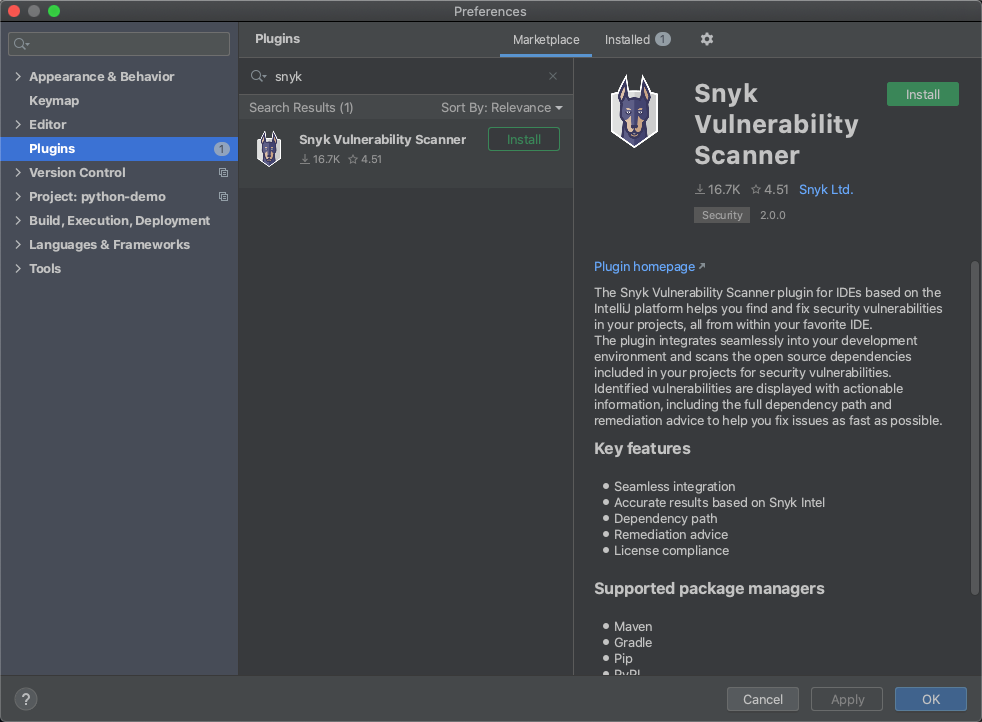
Installing the plugin itself is easy, exactly like any other plugin. From within PyCharm, go to Preferences → Plugins and search for “Snyk”. The Snyk plugin is displayed, and all you have to do is follow the instructions.

preferences_plugins_photo

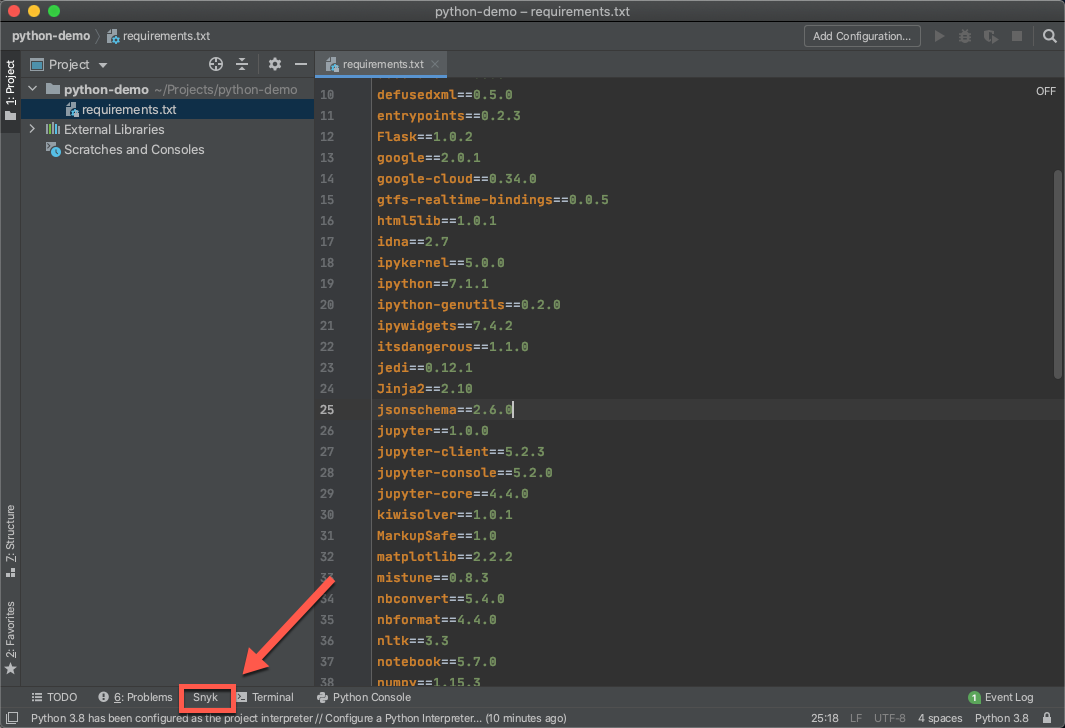
Hit the Install button – PyCharm downloads and installs the latest version of the Snyk CLI and a new Snyk tab appears at the bottom of PyCharm.

added_plugin

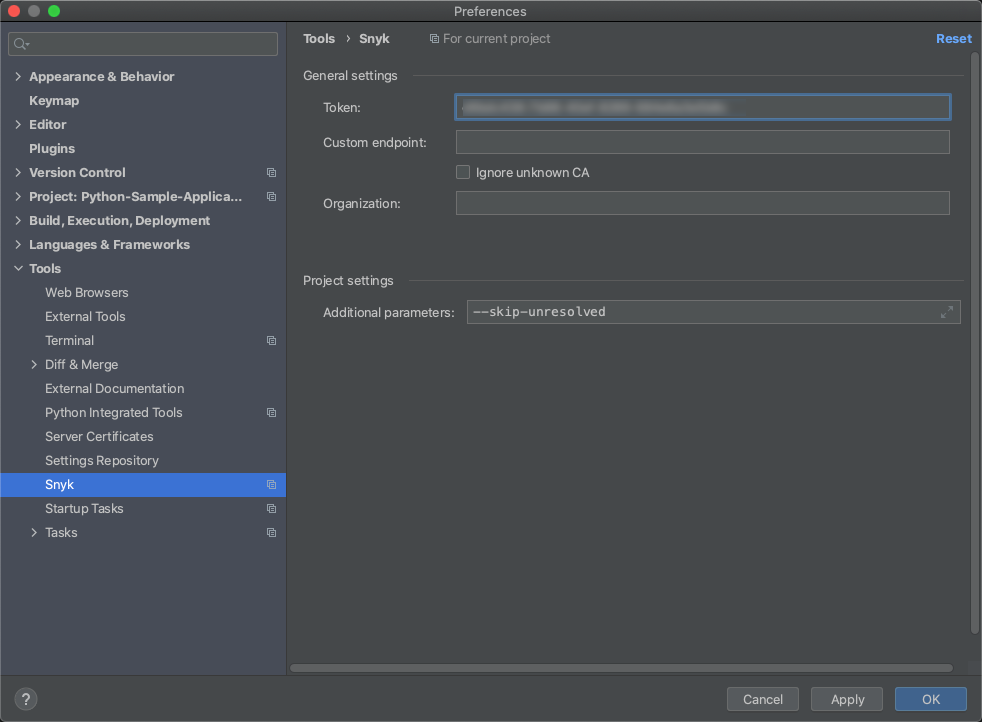
Before you start your first scan, be sure to authenticate your Snyk account. To do this, simply retrieve your API token from within Snyk and add it in the plugin’s settings, at: Preferences → Tools → Snyk:

plugin_settings

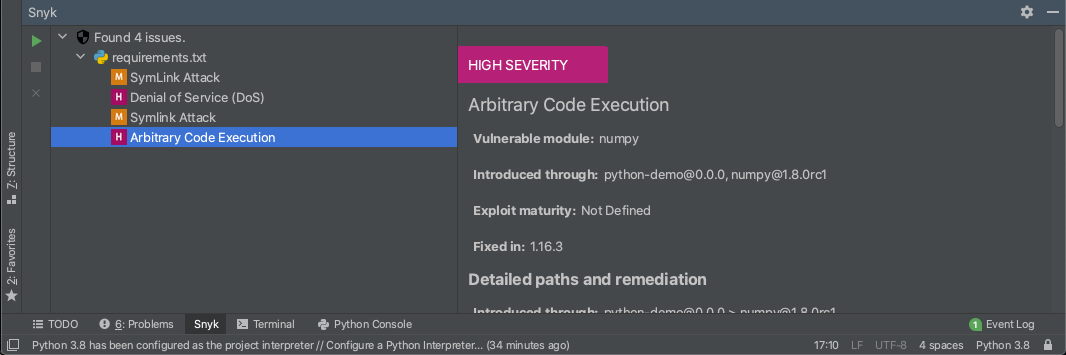
Once successfully authenticated, open the Snyk tab and hit the Scan button to commence Snyk’s security testing. Within a few seconds, should the plugin identify any vulnerabilities, a list of issues will be displayed:

vulns list

Scan results contain a wealth of information to help facilitate a quick fix, including the severity level for the vulnerability (based on CVSS) and the title/type of vulnerability. Additional details about the vulnerability expose how it was introduced by information on available exploits in the wild while an overview of the vulnerability explains how it can be exploited.

In terms of remediation, the Snyk plugin will help you fix the vulnerability by recommending the upgrade required. Snyk will always recommend the minimal path required to fix the specific issue to ensure minimal risk of breakage.

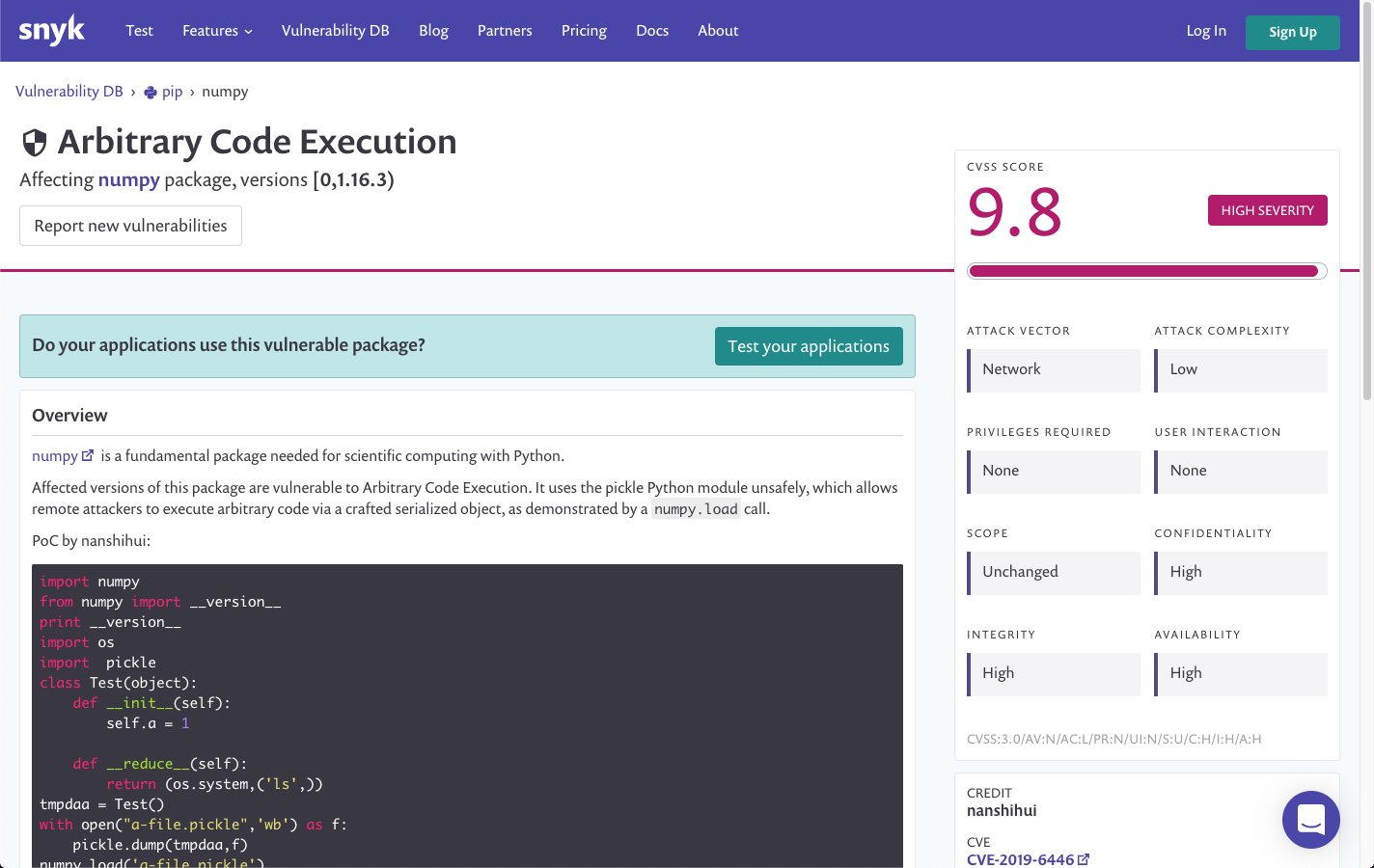
Clicking the details link at the bottom of the issue details takes you to Snyk’s vulnerability database, where you can gain more in-depth details on the vulnerability itself – severity scoring, version ranges, the way it can be exploited, and more.

vuln_details_db

Shifting left, the right way

When using open source, it’s important to check the risks being introduced. Testing the open source dependencies you pull into your Python projects for security issues is critical to ensure you are not sacrificing your organization’s security posture for fast development.

Shifting this testing left into your IDE enables you to surface issues early on in development and before even committing code into your repository. Instead of finding a critical vulnerability later on in the software delivery pipeline and having to re-engineer your code when it becomes more time consuming and technically difficult, testing your dependencies from the very moment you add them is simply more efficient and productive.

Adding to our existing IntelliJ and TeamCity plugins, this new PyCharm plugin is another step towards helping the JetBrains community of developers shift open source security left, the right way.


from PyCharm: the Python IDE for Professional Developers – PyCharm Blog | JetBrains
read more
Friday, August 28, 2020

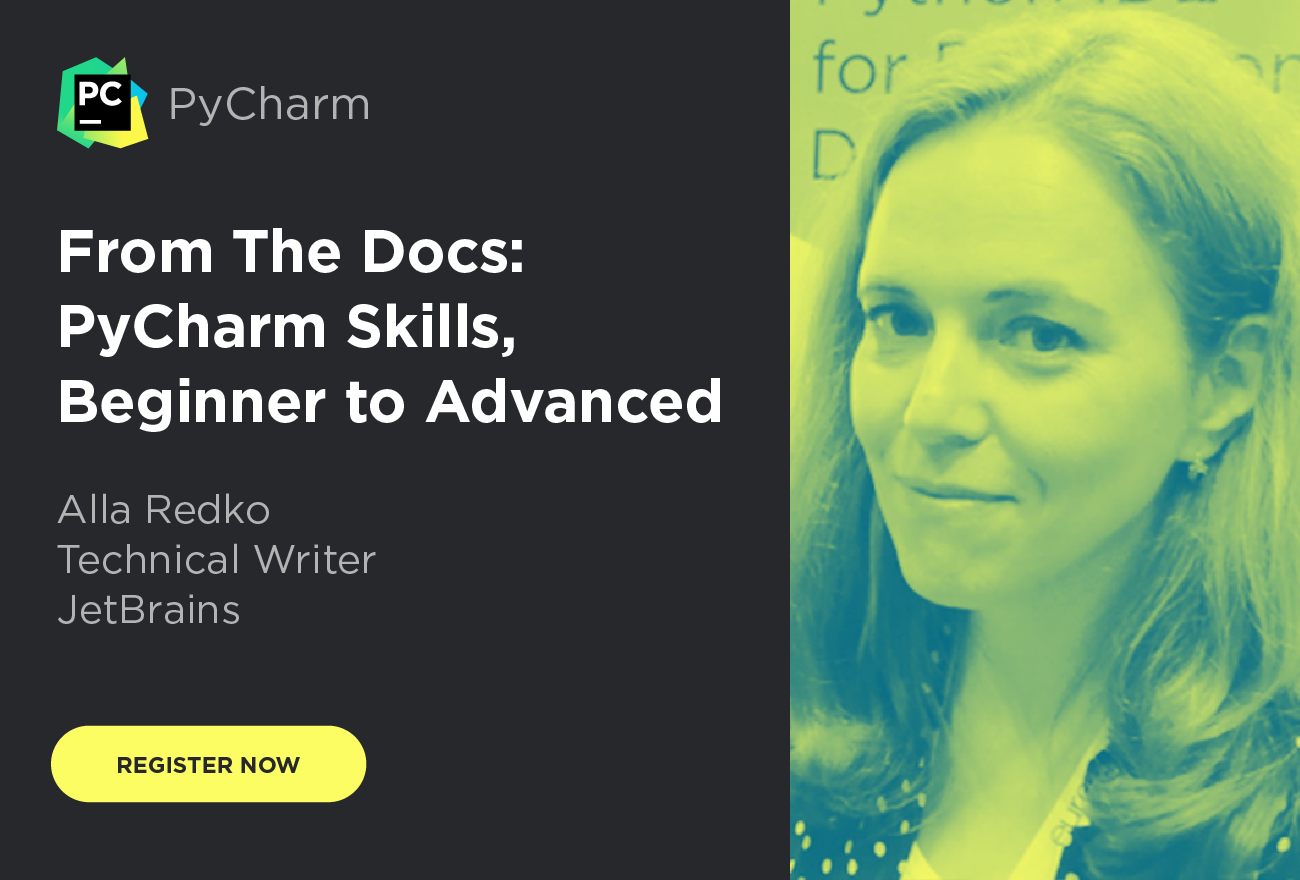
Webinar: “From The Docs: PyCharm Skills, Beginner to Advanced” with Alla Redko

PyCharm is a comprehensive IDE that also comes with comprehensive help. What’s available and what is it like working on the help? PyCharm’s Alla Redko joins us to discuss how the help gets made. As a bonus, we show 3 help topics — one for beginners, intermediate, and advanced — then demonstrate all the ways to that feature in PyCharm.

  • Thursday, September 17
  • 6:00PM, CEST
  • Aimed at beginner to intermediate Python/PyCharm developers
  • Register here
    Registration Link

Also, we’re putting thought into “onboarding”: how to get new users productive, quickly. We’d love to hear your thoughts on this. In particular, what can we do that will actually get used?

Outline

Speaking to You

Alla Redko is a technical writer at JetBrains. Alla is responsible for web help for the PyCharm IDE, R plugin, and Big Data Tools plugin. Before that, Alla worked for Sun Microsystems, Oracle, and Azul Systems, where she documented Java technologies including Java SE, Java ME, and Java FX.


from PyCharm: the Python IDE for Professional Developers – PyCharm Blog | JetBrains
read more
Thursday, August 27, 2020

Early Access PyCharm Podcast — Episode 2

Welcome to Early Access PyCharm, a brand-new podcast that goes behind the scenes of how the PyCharm IDE is made and all the thinking that goes into it. In the upcoming episodes, you will hear from the people who work daily to make you more productive and your code even better.

Episode 2

In this episode, we talk to Max, a proud member of the DataGrip team. Why DataGrip you might ask? Well, it turns out that PyCharm’s database features all come from the DataGrip.

We talk to Max about the new MongoDB support as well as plans for future Database support. This is one episode you don’t want to miss!

Where to find

Early Access PyCharm is available in all the main Podcast platforms, make sure to subscribe!


from PyCharm: the Python IDE for Professional Developers – PyCharm Blog | JetBrains
read more
PyCharm 2020.2.1

PyCharm 2020.2.1 is out with fixes for small issues, including usability problems introduced by version 2020.2. Update from within PyCharm (Help | Check for Updates), using the JetBrains Toolbox, or by downloading the new version from our website.

In this version of PyCharm:

  • Debugger binaries for Python 3.9
  • Ability to debug python script on WSL 2
  • Better performance experience for plotting matplotlib
  • Collapsed the “External Libraries” tree in new projects
  • JetBrains Runtime is rebased on top of OpenJDK 11.0.8
  • Better typing speed experience after switching to OpenJDK 11.0.8

Besides, the following known issues have been resolved:

  • Missing import os in Django settings.py (PY-43897)
  • Function completion errors (PY-43053)
  • Problems with changing the font size for Jupyter Notebook previews (PY-42955)
  • Incorrect behavior of the “Add alias” refactoring (PY-24482)
  • Incorrect Python version with Maya (PY-39469)

And many more small fixes, see our release notes for details.

Getting the New Version

You can update PyCharm by choosing Help | Check for Updates (or PyCharm | Check for Updates on macOS) in the IDE. PyCharm will be able to patch itself to the new version, there should no longer be a need to run the full installer.
If you’re on Ubuntu 16.04 or later, or any other Linux distribution that supports snap, you should not need to upgrade manually, you’ll automatically receive the new version.


from PyCharm: the Python IDE for Professional Developers – PyCharm Blog | JetBrains
read more
Thursday, August 6, 2020

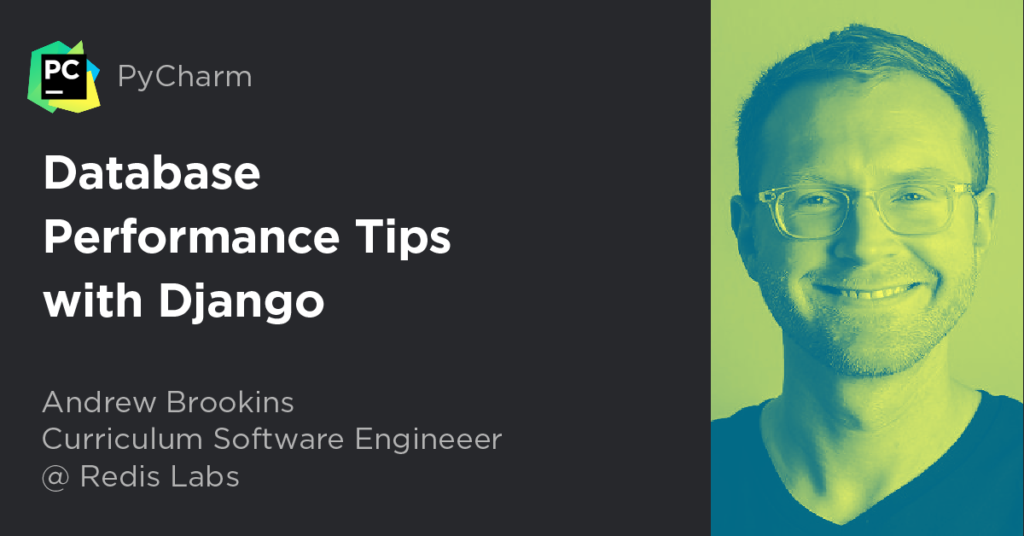
Webinar: “Django Database Performance Tips” with Andrew Brookins

Django is one of the most popular Python Web Frameworks. However, optimizing django performance can often be difficult. Most performance problems boil down to one thing: the database. According to our guest speaker, Andrew Brookins, the only way to master Django performance is to master database performance.

In this Webinar, Andrew is going to take us on a journey through an app that he created to demonstrate all the bottlenecks that arise when trying to optimize your Django app.

  • Monday, August 10
  • 7:00PM CEST – 1:00PM Eastern Daylight Time
  • Register here

Outline

  • Querying
    • Tackling the N+1 Problem: Reducing the number of queries to make your pages faster.
    • Annotations: Getting your database to do the heavy lifting for you
    • Iterator(): Get Django to chuck responses from your database
  • Indexing
    • Covering Indexes: Turning queries that take several hundred milliseconds to tens of milliseconds.
    • Materialized Views: One of the most powerful ways to have large queries created for you
  • Caching with Redis
    • Using Redis as a Cache
    • Custom Redis Authentication

About the Speaker

Andrew Brookins has over a decade of experience with Django and Relational Databases. That experience spans DevOps, application development, and platform engineering. He has worked on ecommerce sites, mobile APIs, comic book readers, particle simulation systems, learning and volunteering apps, and now works on a Databases as a Service at Redis Labs.

Andrew has also authored "Temple of Django Database Performance" which dives into the even greater detail than this webinar does. Furthermore, he has recently released a course on "Redis for Python Developers" at Redis University.

Andrew lives in Portland, Oregon with his wife and two wonderful children.


from PyCharm: the Python IDE for Professional Developers – PyCharm Blog | JetBrains
read more
TestDriven.io: Working with Static and Media Files in Django

This article looks at how to work with static and media files in a Django project, locally and in production. from Planet Python via read...