The post How to Convert a Pandas DataFrame to a NumPy Array appeared first on Erik Marsja.
In this short Python Pandas tutorial, we will learn how to convert a Pandas dataframe to a NumPy array. Specifically, we will learn how easy it is to transform a dataframe to an array using the two methods values and to_numpy, respectively. Furthermore, we will also learn how to import data from an Excel file and change this data to an array.
Now, if we want to carry out some high-level mathematical functions using the NumPy package, we may need to change the dataframe to a 2-d NumPy array.
Prerequisites
Now, if we want to convert a Pandas dataframe to a NumPy array we need to have Python, Pandas, and NumPy installed, of course. Check the post about how to install Python packages to learn more about the installation of packages. It is recommended, however, that we install Python packages in a virtual environment. Finally, if we install and download a Python distribution, we will get everything we need. Nice and easy!
How do you convert a DataFrame to an array in Python?
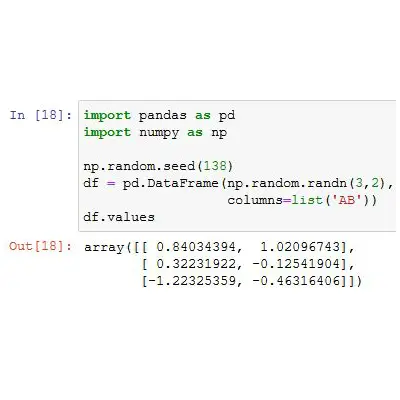
Now, to convert a Pandas DataFrame into a NumPy array() we can use the values method (DataFrame.values). For instance, if we want to convert our dataframe called df we can add this code: np_array = df.values.
Convert a Pandas Dataframe to a Numpy Array Example 1:
In this section, we are going to three easy steps to convert a dataframe into an array.
Step #1: Import the Python Libraries
In the first example of how to convert a dataframe to an array, we will create a dataframe from a Python dictionary. The first step, however, is to import the Python libraries we need:
import pandas as pd
import numpy as np
Step #2: Get your Data into a Pandas Dataframe
In the second step, we will create the Python dictionary and convert it to a Pandas dataframe:
<pre><code class="lang-py">data = {'Rank':[1, 2, 3, 4, 5, 6],
       'Language': ['Python', 'Java',
                   'Javascript',
                   'C#', 'PHP',
                   'C/C++'],
       'Share':[29.88, 19.05, 8.17,
               7.3, 6.15, 5.92],
       'Trend':[4.1, -1.8, 0.1, -0.1, -1.0, -0.2]}

df = pd.DataFrame(data)

display(df)</code></pre>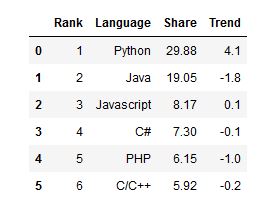
Check the post about how to convert a dictionary to a Pandas dataframe for more information on creating dataframes from dictionaries.
Step #3 Convert the Dataframe to an Array:
Finally, in the third step, we are ready to use the values method to convert the dataframe to a NumPy array:
<pre><code class="lang-py">df.values</code></pre>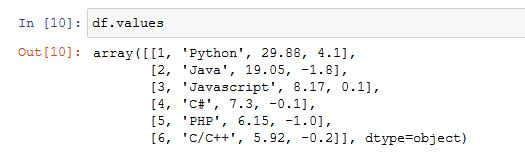
How to Change a Dataframe to a Numpy Array Example 2:
In the second example, we are going to convert a Pandas dataframe to a NumPy Array using the to_numpy() method. Now, the to_numpy() method is as simple as the values method. However, this method to convert the dataframe to an array can also take parameters.
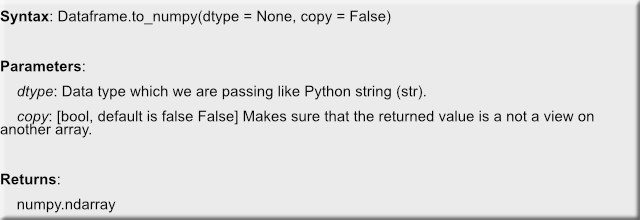
Now, here’s a simple convert example, generating the same NumPy array as in the previous the example;
df.to_numpy()If we want to convert just one column, we can use the dtype parameter. For instance, here we will convert one column of the dataframe (i.e., Share) to a NumPy array of NumPy Float data type;
<pre><code class="lang-py">df['Share'].to_numpy(np.float64)</code></pre>
Convert a Dataframe to a NumPy Array Example 3:
Now, if we only want the numeric values from the dataframe to be converted to NumPy array it is possible. Here, we need to use the select_dtypes method.
df.select_dtypes(include=float).to_numpy()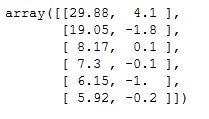
Note, when selecting the columns with float values we used the parameter float. If we, on the other hand, want to select the columns with integers we could use int.
Read an Excel File to a Dataframe and Convert it to a NumPy Array Example 4:
Now, of course, many times we have the data stored in a file. For instance, we may want to read the data from an Excel file using Pandas and then transform it into a NumPy 2-d array. Here’s a quick an example using Pandas to read an Excel file:
df = pd.read_excel('http://open.nasa.gov/datasets/NASA_Labs_Facilities.xlsx',
                  skiprows=1)

df.iloc[0:5, 0:5]
Now, in the code, above we read an Excel (.xlsx) file from a URL. Here, the skiprows parameter was used to skip the first empty row. Moreover, we used Pandas iloc to slice columns and rows, from this df and print it.
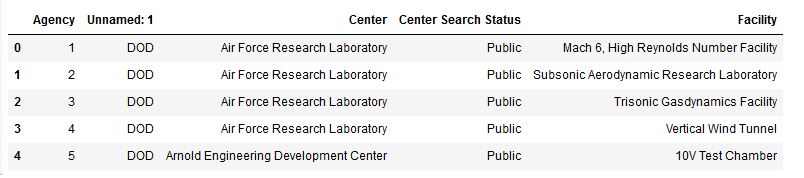
In the last example we will, again, use df.to_numpy() to convert the dataframe to a NumPy array:
np_array = df.to_numpy()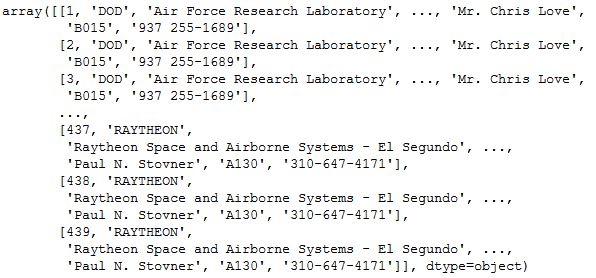
Summary Statistics of NumPy Array
In this last section, we are going to convert a dataframe to a NumPy array and use some of the methods of the array object.
data = {'Rank':[1, 2, 3, 4, 5, 6],
       'Language': ['Python', 'Java',
                   'Javascript',
                   'C#', 'PHP',
                   'C/C++'],
       'Share':[29.88, 19.05, 8.17,
               7.3, 6.15, 5.92],
       'Trend':[4.1, -1.8, 0.1, -0.1, -1.0, -0.2]}

df = pd.DataFrame(data)

np_array = df.select_dtypes(include=float).to_numpy()
First, we are going to summarize the two dimensions using the sum() method.
np_array.sum(axis=0)Second, we can calculate the mean values of the two dimensions using the mean():
np_array.sum(axis=0)Note, that we used the parameter axis and set it to “0”. Now, if we didn’t use this parameter and set it to “0” we would have calculated it along each row, sort of speaking, of the array.
Conclusion
In this Pandas dataframe tutorial, we have learned how to convert Pandas dataframes to NumPy arrays. It was an easy task and we learned how to do this using values and to_numpy.

The post How to Convert a Pandas DataFrame to a NumPy Array appeared first on Erik Marsja.
from Planet Python
via read more


No comments:
Post a Comment