Saturday, February 27, 2021

Friday, February 26, 2021
Peter Bengtsson: How MDN's site-search works
tl;dr; Periodically, the whole of MDN is built, by our Node code, in a GitHub Action. A Python script bulk-publishes this to Elasticsearch. Our Django server queries the same Elasticsearch via /api/v1/search. The site-search page is a static single-page app that sends XHR requests to the /api/v1/search endpoint. Search results' sort-order is determined by match and "popularity".
Jamstack'ing
The challenge with "Jamstack" websites is with data that is too vast and dynamic that it doesn't make sense to build statically. Search is one of those. For the record, as of Feb 2021, MDN consists of 11,619 documents (aka. articles) in English. Roughly another 40,000 translated documents. In English alone, there are 5.3 million words. So to build a good search experience we need to, as a static site build side-effect, index all of this in a full-text search database. And Elasticsearch is one such database and it's good. In particular, Elasticsearch is something MDN is already quite familiar with because it's what was used from within the Django app when MDN was a wiki.
Note: MDN gets about 20k site-searches per day from within the site.
Build
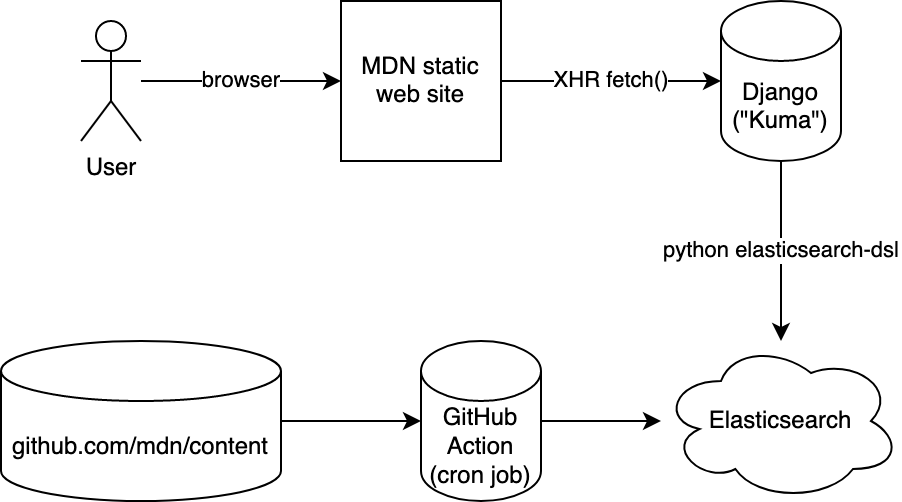
When we build the whole site, it's a script that basically loops over all the raw content, applies macros and fixes, dumps one index.html (via React server-side rendering) and one index.json. The index.json contains all the fully rendered text (as HTML!) in blocks of "prose". It looks something like this:
{
  "doc": {
    "title": "DOCUMENT TITLE",
    "summary": "DOCUMENT SUMMARY",
    "body": [
      {
        "type": "prose",
        "value": {
          "id": "introduction",
          "title": "INTRODUCTION",
          "content": "<p>FIRST BLOCK OF TEXTS</p>"
       }
     },
     ...
   ],
   "popularity": 0.12345,
   ...
}
You can see one here: /en-US/docs/Web/index.json
Indexing
Next, after all the index.json files have been produced, a Python script takes over and it traverses all the index.json files and based on that structure it figures out the, title, summary, and the whole body (as HTML).
Next up, before sending this into the bulk-publisher in Elasticsearch it strips the HTML. It's a bit more than just turning <p>Some <em>cool</em> text.</p> to Some cool text. because it also cleans up things like <div class="hidden"> and certain <div class="notecard warning"> blocks.
One thing worth noting is that this whole thing runs roughly every 24 hours and then it builds everything. But what if, between two runs, a certain page has been removed (or moved), how do you remove what was previously added to Elasticsearch? The solution is simple: it deletes and re-creates the index from scratch every day. The whole bulk-publish takes a while so right after the index has been deleted, the searches won't be that great. Someone could be unlucky in that they're searching MDN a couple of seconds after the index was deleted and now waiting for it to build up again.
It's an unfortunate reality but it's a risk worth taking for the sake of simplicity. Also, most people are searching for things in English and specifically the Web/ tree so the bulk-publishing is done in a way the most popular content is bulk-published first and the rest was done after. Here's what the build output logs:
Found 50,461 (potential) documents to index
Deleting any possible existing index and creating a new one called mdn_docs
Took 3m 35s to index 50,362 documents. Approximately 234.1 docs/second
Counts per priority prefixes:
    en-us/docs/web                 9,056
    *rest*                         41,306
So, yes, for 3m 35s there's stuff missing from the index and some unlucky few will get fewer search results than they should. But we can optimize this in the future.
Searching
The way you connect to Elasticsearch is simply by a URL it looks something like this:
https://USER:PASSWD@HASH.us-west-2.aws.found.io:9243
It's an Elasticsearch cluster managed by Elastic running inside AWS. Our job is to make sure that we put the exact same URL in our GitHub Action ("the writer") as we put it into our Django server ("the reader").
In fact, we have 3 Elastic clusters: Prod, Stage, Dev.
And we have 2 Django servers: Prod, Stage.
So we just need to carefully make sure the secrets are set correctly to match the right environment.
Now, in the Django server, we just need to convert a request like GET /api/v1/search?q=foo&locale=fr (for example) to a query to send to Elasticsearch. We have a simple Django view function that validates the query string parameters, does some rate-limiting, creates a query (using elasticsearch-dsl) and packages the Elasticsearch results back to JSON.
How we make that query is important. In here lies the most important feature of the search; how it sorts results.
In one simple explanation, the sort order is a combination of popularity and "matchness". The assumption is that most people want the popular content. I.e. they search for foreach and mean to go to /en-US/docs/Web/JavaScript/Reference/Global_Objects/Array/forEach not /en-US/docs/Web/API/NodeList/forEach both of which contains forEach in the title. The "popularity" is based on Google Analytics pageviews which we download periodically, normalize into a floating-point number between 1 and 0. At the of writing the scoring function does something like this:
rank = doc.popularity * 10 + search.score
This seems to produce pretty reasonable results.
But there's more to the "matchness" too. Elasticsearch has its own API for defining boosting and the way we apply is:
- match phrase in the
title: Boost = 10.0 - match phrase in the
body: Boost = 5.0 - match in
title: Boost = 2.0 - match in
body: Boost = 1.0
This is then applied on top of whatever else Elasticsearch does such as "Term Frequency" and "Inverse Document Frequency" (tf and if). This article is a helpful introduction.
We're most likely not done with this. There's probably a lot more we can do to tune this myriad of knobs and sliders to get the best possible ranking of documents that match.
Web UI
The last piece of the puzzle is how we display all of this to the user. The way it works is that developer.mozilla.org/$locale/search returns a static page that is blank. As soon as the page has loaded, it lazy-loads JavaScript that can actually issue the XHR request to get and display search results. The code looks something like this:
function SearchResults() {
  const [searchParams] = useSearchParams();
  const sp = createSearchParams(searchParams);
  // add defaults and stuff here
  const fetchURL = `/api/v1/search?${sp.toString()}`;

  const { data, error } = useSWR(
    fetchURL,
    async (url) => {
      const response = await fetch(URL);
      // various checks on the response.statusCode here
      return await response.json();
    }
  );

  // render 'data' or 'error' accordingly here
A lot of interesting details are omitted from this code snippet. You have to check it out for yourself to get a more up-to-date insight into how it actually works. But basically, the window.location (and pushState) query string drives the fetch() call and then all the component has to do is display the search results with some highlighting.
The /api/v1/search endpoint also runs a suggestion query as part of the main search query. This extracts out interest alternative search queries. These are filtered and scored and we issue "sub-queries" just to get a count for each. Now we can do one of those "Did you mean...". For example: search for intersections.
In conclusion
There are a lot of interesting, important, and careful details that are glossed over here in this blog post. It's a constantly evolving system and we're constantly trying to improve and perfect the system in a way that it fits what users expect.
A lot of people reach MDN via a Google search (e.g. mdn array foreach) but despite that, nearly 5% of all traffic on MDN is the site-search functionality. The /$locale/search?... endpoint is the most frequently viewed page of all of MDN. And having a good search engine that's reliable is nevertheless important. By owning and controlling the whole pipeline allows us to do specific things that are unique to MDN that other websites don't need. For example, we index a lot of raw HTML (e.g. <video>) and we have code snippets that needs to be searchable.
Hopefully, the MDN site-search will elevate from being known to be very limited to something now that can genuinely help people get to the exact page better than Google can. Yes, it's worth aiming high!
from Planet Python
via read more
PyCharm: PyCharm and WSL
Over the past few months, I’ve been monitoring a ticket closely. Over the course of two years, the ticket has accrued over 130 votes. It’s the one about WSL support in PyCharm, and by extension, the rest of the JetBrains IDEs. When I say it’s “the one”, it’s because this is the probably the most famous ticket with regards to WSL in our tracker. So, the question is, why is this taking so long to implement?
The History of WSL Support
As things stand right now, WSL and WSL2 are both supported on PyCharm. However, the issue is not with the support itself, but rather how it is supported. WSL is currently supported directly via wsl.exe. We initially used SSH and SFTP to run commands and transfer files. We needed to do this because this was the only way in which we could support WSL at the time.
There were multiple reasons for this. WSL showed tremendous promise for people who wanted to develop on open source technologies. However, we needed to make sure that we could adapt to changes in WSL. At the same time, we were dealing with technology that was not our own, and we needed to be careful about building support that would need to be re-done.
However, the biggest problem stems from a limitation of the IntelliJ platform at the time. IntelliJ expects that it is working with a real file system, and in the case of remote machines, you don’t have a real file system.
This is why, we have a copy of the files on your local machine, which is then uploaded via SFTP. This means that whenever you make changes, there will be delays before you can immediately run it.
However, taking a deeper look at this, we begin to see the core of the issue, and that is we need to have a way to support remote development in a better way. By remote, I mean any remote host. This means WSL, but also includes any host on a remote machine and that we would not have to build custom implementations for things like WSL from scratch. This is why, we began working on a project called “Targets”.
The Targets API
This new system provides a layer of abstraction over all remote hosts, whether it is WSL, an AWS, GCP or any other machine for that matter. Now, we use the term “remote” loosely here, because to us, a remote is anything that is not the file system or the operating system that PyCharm is running on.
This means that the way to support interpreters will also change fundamentally; it also means that there is a lot of refactoring involved.
Think of the API as a matrix. Not The Matrix, but a matrix. If you want to support a new remote, then you need to start filling out that matrix, and you need to provide answers to how the IDE will handle different scenarios. So, for example, if you wish to add direct support for Docker or WSL, you will need to fill out the entire matrix of behaviours that can be done from the IDE.
Through this approach, we can indeed pave a way for all future remote targets, but it means that the transition to this API will be gradual, as a lot of the current functionality will need to be re-written in order to take advantage of this.
This also means that when complete, cloud providers will have an easier way of adding all kinds of functionality, and editing should become as fluid as editing on the filesystem itself (or so we hope).
Progress Thus Far
Our plan is to implement the Targets API in 2021 although we’re still working through a few issues that arise from the implementation. It will implement some basic things such as docker support and remote interpreters, as the year progresses, we hope to add further support for WSL and bring it on part with all other remote targets.
Transcript
Nafiul: [00:00:00] Hello, all you beautiful PyCharmers. This is Early Access PyCharm with your host Nafiul Islam. Today I sit down with three people behind our WSL support and ask them some tough questions because a lot of people really want better support for WSL on PyCharm. So let’s get into it.
Ilya: [00:00:26] Well, we started to support WSL as a remote interpreter via SSH
because at the time it was the only way to support it.
Nafiul: [00:00:36] This is Ilya. He’s one of the people who works on the remote interpreter team, which supports WSL in PyCharm, along with Vladimir as well as, Alex .
Ilya: [00:00:47] So user had to run open SSH server inside of WSL. And connect to each and they connect to any other remote server.
And I believe a couple of years ago, we switched to a new approach. And so users can now launch the WSL processes directly. Under the hood we run WSL.exe and provide the whole path to the Python interpreter and to this script and so on. This is how it works now.
Nafiul: [00:01:19] So Vladimir, can you just tell me how this all started?
Not the WSL part, but also about remote interpreters in general.
Vladimir: [00:01:30] So it started even before we all had joined JetBrains. The oldest commits I’ve seen were made at 2012. If I’m not mistaken. So, I believe it’s time when it started.
Nafiul: [00:01:45] So is this something that came from the IntelJ platform or was this something that was made by the PyCharm team itself?
Vladimir: [00:01:51] No. As far as I am concerned initially it was made especially for PyCharm and just a few years ago it was moved to the whole platform.
Nafiul: [00:02:04] Okay. So something went out of PyCharm and became accepted in other IDEs. So that’s pretty cool. This is not something that usually happens here at JetBrains. Usually it’s IntelliJ that builds the platform. And the features just sort of end up in other IDEs.
So the question that I have is when you’re using something like WSL or say Apple comes up with a, with a fancy new mechanism for virtualization. We don’t know if that’s ever going to happen, but essentially what is preventing us from incorporating or providing native support for something like WSL from the get-go.
Ilya: [00:02:49] Well for WSL, we have a couple of problems. The first one that all IntelliJ products are initially configured to work with local files. Even if you have your project on some remote system, you still have to store your files locally and IntelliJ product will copy them to the remote server automatically.
Nafiul: [00:03:11] And how does the sync happen?
Ilya: [00:03:13] There is a special configuration called deployment and IntelliJ monitors your files, and when files are changed, they are copied to their remote server. Or in some cases they are copied before you launch your script.
Nafiul: [00:03:28] So essentially you have to copy the whole file.
You’re not changing the files themselves on the server. Like you just do a complete upload. Is that how it works?
Ilya: [00:03:37] Yes. Some products do support very limited file editing on the remote servers. As far as I know PhpStorm support, you can open one file and edit it, but the whole project should be stored on your local machine and you should use your locally installed version control and so on.
Nafiul: [00:04:00] I see. Okay. It makes sense, but explain this to me. You need to copy it back and forth, but so one of the issues that we have with WSL for example, is support for virtual environments, right? That does not seem to be limited by copying and pasting files that are being edited inside of the editor.
So what is kind of holding us back in terms of giving users that support on virtual machines or WSL or whatever.
Ilya: [00:04:31] It’s more like a historical problem. We had a very different approach to use it for a virtual environment and different interpreter types. But now we are trying to unify all this things together and want to finish this job.
We should have, like you need API, which will give us ability to create a virtual environment on any interpreter type, be it a WSL or SSH or whatever.
Sasha: [00:05:01] Yes, actually Ilya said exactly what our plan plans are, as for now. There is quite a lot of differences between the local execution and local file system and local file system actions and working with files and executing files with the remote machines.
So basically now we have two different implementations for almost each feature. Like we have some extention points that are implemented differently for local machine and SSH machines. So this, I think this holds us back for some features that we are not exposing to users for remote development, like creating virtualenvs.
But generally the plan is that we are going to provide an API that allows us to use one base code for each of the feature we provide and let this feature run on local machine as well as on SSH and even on Docker or some AWS instances and so on.
Nafiul: [00:06:12] So essentially what you’re saying is the reason we haven’t solved this problem is because we want to solve this problem, not just for WSL, but for problems like WSL in the future as well.
So that different kinds of machines, virtual, remote… whatever it is … can be supported with a minimum level of effort instead of having to build everything from scratch over and over again. Am I correct in understanding that?
Sasha: [00:06:40] Yeah, it is quite correct.
Nafiul: [00:06:43] So how difficult is this?
Sasha: [00:06:46] As we already have a lot of source code for different type of targets that we have, like local machine, SSH, Docker.
We need to bring all this together and get a single code for each of these features and hide the differences of these targets under the API implementation. So ..
Nafiul: [00:07:11] what you’re telling me is you have to change a lot of existing code, make sure that that doesn’t break, unify all of that into a framework and then support all the stuff we already support.
And then you can have WSL.
Sasha: [00:07:29] I mean, then we will have some WSL features that we don’t have now, because now we have a WSL support for project execution
Nafiul: [00:07:39] Yes, absolutely. But essentially what I’m saying is a lot of the features that we have right now will probably need to be reimplemented in order for everything to work and that we’ll probably need to be tested.
Is that what you’re telling me? Like the mother of all refactorings.
Sasha: [00:07:57] Yeah, something like that. We did a lot of refactorings for example, for SSH subsystem, I started it some time ago, I think three years ago. And then, Vladimir came to our company, joined…
Nafiul: [00:08:10] You basically made him do all the hard work. Is that what you’re saying?
Sasha: [00:08:13] Yes, he made the next iteration, actually, of the refactoring. So yeah. We’ve got a lot of refactoring tasks and because we face new problems and sometimes it requires complete, not complete, but a general rewrite of the code. Yeah.
Nafiul: [00:08:34] Okay. That’s that seems like a lot of work. So the question that I have is once this target API is done, Does that mean whenever somebody comes out with a new cloud, with a new way of doing things, with a new API, say for IBM cloud or for XYZ cloud or whatever, it will be far easier for them also to implement functionality within PyCharm.
Vladimir: [00:09:01] Yes. I believe the whole idea of targets API is to generalize infrastructure for running process, for synchronized files from some high-level syncs like virtual environments, like path interpreters and so on. So yes, we want to make a simple API that would allow various cloud companies like IBM cloud, like Amazon and so on and so on just to implement some interface about running some extra process, about synchronizing files between machines and we’ll keep all the things about virtualenv and so on away from that API.
Nafiul: [00:09:50] I see, well, thank you very much, Vova, Ilya and Alexander. Thank you for answering some very tough questions and I hope to book you again soon.
Ilya: [00:09:59] Bye!
Nafiul: [00:10:00] And thank you for listening. If you want more of these podcasts, let us know on Twitter.
The post PyCharm and WSL first appeared on JetBrains Blog.

from Planet Python
via read more
Python Software Foundation: Python Software Foundation Fellow Members for Q4 2020
It's that time of year! Let us welcome the new PSF Fellows for Q4! The following people continue to do amazing things for the Python community:
Batuhan Osman Taskay
Elaine Wong
Nicole Harris
Pablo Rivera
Philip James
Thank you for your continued contributions. We have added you to our Fellow roster online.
The above members help support the Python ecosystem by contributing to CPython, contributing to the PyLadies community, maintaining Python libraries, creating educational material, improving UX/UI for our infrastructure, organizing Python events and conferences, starting Python communities in local regions, and overall being great mentors in our community. Each of them continues to help make Python more accessible around the world. To learn more about the new Fellow members, check out their links above.
Let's continue to recognize Pythonistas all over the world for their impact on our community. The criteria for Fellow members is available online: https://www.python.org/psf/fellows/. If you would like to nominate someone to be a PSF Fellow, please send a description of their Python accomplishments and their email address to psf-fellow at python.org. We are accepting nominations for quarter 2 through May 20, 2021 (Q1 cut-off has already passed!).
Work Group Needs Members
The Fellow Work Group is looking for more members from all around the world! If you are a PSF Fellow and would like to help review nominations, please email us at psf-fellow at python.org. More information is available at: https://ift.tt/2uR4Vrh.


from Planet Python
via read more
PyBites: 10 Cool Pytest Tips You Might Not Know About
Here are 10 things we learned writing pytest code that might come in handy:
1. Testing package structure
People new to pytest are often thrown off by this:
$ tree
.
├── src
│   ├── __init__.py
│   └── script.py
└── tests
    └── test_script.py

2 directories, 3 files

$ more src/script.py
def hello():
    return 'hello'

$ more tests/test_script.py
from src.script import hello


def test_hello():
    assert hello() == "hello"

$ pytest
...
ImportError while importing test module '/Users/bobbelderbos/Downloads/demo/tests/test_script.py'.
Hint: make sure your test modules/packages have valid Python names.
Traceback:
/Library/Frameworks/Python.framework/Versions/3.8/lib/python3.8/importlib/__init__.py:127: in import_module
    return _bootstrap._gcd_import(name[level:], package, level)
tests/test_script.py:1: in <module>
    from src.script import hello
E   ModuleNotFoundError: No module named 'src'
============================================================================================= short test summary info ==============================================================================================
ERROR tests/test_script.py
!!!!!!!!!!!!!!!!!!!!!!!!!!!!!!!!!!!!!!!!!!!!!!!!!!!!!!!!!!!!!!!!!!!!!!!!!!!!!!!!!!!!!! Interrupted: 1 error during collection !!!!!!!!!!!!!!!!!!!!!!!!!!!!!!!!!!!!!!!!!!!!!!!!!!!!!!!!!!!!!!!!!!!!!!!!!!!!!!!!!!!!!!
================================================================================================= 1 error in 0.42s =================================================================================================
$ touch tests/__init__.py
$ pytest
...

tests/test_script.py .                                                                                                                                                                                       [100%]
================================================================================================ 1 passed in 0.19s =================================================================================================
So the tests directory needs an __init__.py file as well.
Setting your project up with Poetry makes this a lot easier / automatic.
If you don't turn your code directory into a package (so not including an __init__.py file), you might want to use pytest-pythonpath:
... a py.test plugin for adding to the PYTHONPATH from the pytests.ini file before tests run.
Thanks Martin for telling us about this plugin.
2. Organize your fixtures
You can use a conftest.py file to create your fixtures (setup and tear down code) for reuse across your test modules.
See more info in the documentation and a practical example in one of our projects. This will definitely make your test modules leaner.
3. Filter out particular tests
You can use pytest's -k switch to filter tests by expression:
  -k EXPRESSION         only run tests which match the given substring
                        expression. An expression is a python evaluatable
                        expression where all names are substring-matched
                        against test names and their parent classes. Example:
                        -k 'test_method or test_other' matches all test
                        functions and classes whose name contains
                        'test_method' or 'test_other', while -k 'not
                        test_method' matches those that don't contain
                        'test_method' in their names. ...
Or you can mark them with @pytest.mark, for example:
@pytest.mark.slow
def test_func_slow():
    pass
Then target those "marked" tests individually. The docs show a good example of how to do this.
This can be useful if you want to target fast vs. slow tests for example.
Another cool use case is @pytest.mark.skipif to skip a test based on a condition:
# comments.py (code with a syntax error)
def time_printer():
    this line should be commented

# test_comments.py
import pytest

def _can_import():
    try:
        import comments  # noqa F401
        return True
    except IndentationError:
        return False

def test_import_fails_because_not_all_garbage_commented():
    if not _can_import():
        raise pytest.fail(…

@pytest.mark.skipif(not _can_import(), reason="Only run if import works")
def test_output_time_printer_with_time_arg_returns_string(capfd):
    # tests past successful import ...

# nicer output + skip other test
$ pytest [output truncated]
E           Failed: comments.py raised an IndentationError, did you comment it properly?
=== 1 failed, 1 skipped in 0.05 seconds ===
4. Testing floats
Ever hit this when testing floats?
E       assert 0.30000000000000004 == 0.3
E        +  where 0.30000000000000004 = sum_numbers(0.1, 0.2)
Yikes!
No worries though, pytest's approx has your back, this passes:
assert sum_numbers(0.1, 0.2) == approx(0.3)
5. Working with temporary files
Creating and cleaning up temporary files can be a lot of work, but pytest makes this quite effortlessly.
In this example taken from Bite 161 we create 5 files in a temporary directory and assert that count_dirs_and_files returns a tuple of counts (0 directories and 5 files):
def test_only_files(tmp_path):
    for i in range(1, 6):
        path = tmp_path / f'{i}.txt'
        with open(path, 'w') as f:
            f.write('hello')
    assert count_dirs_and_files(tmp_path) == (0, 5)
The files were created in a temporary directory and I did not have to clean anything up manually.
6. Testing exceptions
Here is an example from Intro Bite #10 that uses pytest.raises(...) to test an exception:
@pytest.mark.parametrize("numerator, denominator", [
    (2, 's'),
    ('s', 2),
    ('v', 'w'),
])
def test_divide_numbers_raises_value_error(numerator, denominator):
    with pytest.raises(ValueError):
        divide_numbers(numerator, denominator)
7. Enhance your parametrized tests
For this tip I changed divide_numbers to have test_divide_numbers_raises_value_error fail:
FAILED test_division.py::test_divide_numbers_raises_value_error[2-s] - TypeError: unsupported operand type(s) for /: 'int' and 'str'
This is ok, but we can make the [2-s] part a bit more readable.
We can wrap the parametrize list arguments inside pytest.param giving it test IDs (see here):
@pytest.mark.parametrize("numerator, denominator", [
    pytest.param(2, 's', id="denominator_wrong_type"),
    pytest.param('s', 2, id="numerator_wrong_type"),
    pytest.param('v', 'w', id="both_numerator_denominator_wrong_type"),
])
def test_divide_numbers_raises_value_error(numerator, denominator):
    with pytest.raises(ValueError):
        divide_numbers(numerator, denominator)
Now this string will show up in the failing test:
FAILED test_division.py::test_divide_numbers_raises_value_error[denominator_wrong_type] - TypeError: unsupported operand type(s) for /: 'int' and 'str'
And we can target these strings with pytest -k as well, for example pytest -k both_numerator runs only the third test of test_divide_numbers_raises_value_error, pytest -k numerator would run two tests.
8. Drop into the debugger upon failure
This is one the most useful tips in my opinion: when something breaks you want to be able to debug right then and there.
So in the previous failing example if we run the tests with pytest --pdb it drops into the debugger:
> /Users/bobbelderbos/code/bitesofpy/110/division.py(9)divide_numbers()
-> return int(numerator)/denominator
(Pdb)
For more variations check out the docs.
And in order to debug a hanging test, check out our related article.
9. Test logging
You can test logging with pytest's caplog fixture:
# script.py
import logging

def func():
    logging.debug("a debug message to ignore")
    logging.info("an info message")
    try:
        1 / 0
    except ZeroDivisionError:
        logging.exception("cannot divide by 0")

# test_script.py
import logging

from script import func

def test_func(caplog):
    caplog.set_level(logging.INFO)
    func()
    record1, record2 = caplog.records
    assert record1.levelname == "INFO"  # no debug
    assert record1.message == "an info message"
    assert record2.message == "cannot divide by 0"
    assert record2.exc_info[0] is ZeroDivisionError
Here we made a function called func that logs 3 messages: DEBUG, INFO and ERROR (by the way, logging.exception is really useful, it adds exception info the logging message!)
In the test we use the caplog fixture to grab those logging messages and test them.
10. Test standard output
How to test a function that prints to standard output (as opposed to returning something)?
You can use the capsys / capfd fixtures for this.
Here is an example from Intro Bite #01.
Code (spoiler alert!):
MIN_DRIVING_AGE = 18


def allowed_driving(name, age):
    """Print '{name} is allowed to drive' or '{name} is not allowed to drive'
       checking the passed in age against the MIN_DRIVING_AGE constant"""
    is_allowed = 'is allowed' if age >= MIN_DRIVING_AGE else 'is not allowed'
    print(f'{name} {is_allowed} to drive')
Tests:
from driving import allowed_driving


def test_not_allowed_to_drive(capfd):
    allowed_driving('tim', 17)
    output = capfd.readouterr()[0].strip()
    assert output == 'tim is not allowed to drive'

...
I hope you learned something new and that you can use any of this when you are writing pytest code.
If you want to share other cool pytest tips, please comment below ...
Keep Calm and Write more Tests!
-- Bob
from Planet Python
via read more
Real Python: The Real Python Podcast – Episode #49: The Challenges of Developing Into a Python Professional
What's the difference between writing code for yourself and developing for others? What new considerations do you need to take into account as a professional Python developer? This week on the show, we talk to Dane Hillard about his book "Practices of the Python Pro".
[ Improve Your Python With 🐍 Python Tricks 💌 – Get a short & sweet Python Trick delivered to your inbox every couple of days. >> Click here to learn more and see examples ]
from Planet Python
via read more
The Real Python Podcast – Episode #49: The Challenges of Developing Into a Python Professional
What's the difference between writing code for yourself and developing for others? What new considerations do you need to take into account as a professional Python developer? This week on the show, we talk to Dane Hillard about his book "Practices of the Python Pro".
[ Improve Your Python With 🐍 Python Tricks 💌 – Get a short & sweet Python Trick delivered to your inbox every couple of days. >> Click here to learn more and see examples ]
from Real Python
read more
Subscribe to:
Posts (Atom)
-
This blogpost was originally published on the Quansight Labs website . Spyder 4 will be released very soon with lots of interesting new fe...
-
Podcasts are a great way to immerse yourself in an industry, especially when it comes to data science. The field moves extremely quickly, an...
-
Dialogs are useful GUI components that allow you to communicate with the user (hence the name dialog ). They are commonly used for file Ope...


