Friday, February 4, 2022

The Best Vertex ML Metadata Alternatives

Last year, Google announced Vertex AI, a new managed machine learning platform aimed at making it easier for developers to deploy and maintain AI models. So, what are the benefits and drawbacks of Vertex AI? In this article, we’ll discuss Vertex AI and take a look at its alternatives, but first, let’s see why is […]

The post The Best Vertex ML Metadata Alternatives appeared first on neptune.ai.


from Planet SciPy
read more

Thursday, February 3, 2022

Talk Python to Me: #351: Machine Learning Ethics and Laws Panel

The world of AI is changing fast. And the AI / ML space is a bit out of the ordinary for software developers. Typically in software, we can prove that given a certain situations, the code will always behave the same. We can point to where and why a decision is made. <br/> <br/> ML isn't like that. We set it up and then it takes on a life of its own. Regulators and governments are starting to step in and make rules over AI. The EU is one of the first to do so. That's why it's great to have Ines Montani and Katharine Jarmul, both awesome data scientists and EU residents, here to give us an overview of the coming regulations and other benefits and pitfalls of the AI / ML space.<br/> <br/> <strong>Links from the show</strong><br/> <br/> <div><b>Katharine Jarmul on Twitter</b>: <a href="https://twitter.com/kjam" target="_blank" rel="noopener">@kjam</a><br/> <b>Katharine's site</b>: <a href="https://kjamistan.com/" target="_blank" rel="noopener">kjamistan.com</a><br/> <br/> <b>Ines Montani on Twitter</b>: <a href="https://twitter.com/_inesmontani" target="_blank" rel="noopener">@_inesmontani</a><br/> <b>Explosion AI</b>: <a href="https://explosion.ai/" target="_blank" rel="noopener">explosion.ai</a><br/> <br/> <b>EU proposes new Artificial Intelligence Regulation</b>: <a href="https://ift.tt/6Efz3bX" target="_blank" rel="noopener">nortonrosefulbright.com</a><br/> <b>The EU’s leaked AI regulation is ambitious but disappointingly vague</b>: <a href="https://ift.tt/dEN2PkU" target="_blank" rel="noopener">techmonitor.ai</a><br/> <b>EU ARTIFICIAL INTELLIGENCE ACT</b>: <a href="https://ift.tt/ueGa3Dy" target="_blank" rel="noopener">eur-lex.europa.eu/legal-content</a><br/> <br/> <b>Facial Recognition Technology Ban Passed by King County Council</b>: <a href="https://ift.tt/rKYpCnZ" target="_blank" rel="noopener">kingcounty.gov</a><br/> <br/> <b>On the Opportunities and Risks of Foundation Models paper</b>: <a href="https://ift.tt/8MVrHJt" target="_blank" rel="noopener">arxiv.org</a><br/> <b>thoughtworks</b>: <a href="https://ift.tt/4lQWGMz" target="_blank" rel="noopener">thoughtworks.com</a><br/> <br/> <b>I don't care about cookies extension</b>: <a href="https://ift.tt/d36EAkU" target="_blank" rel="noopener">chrome.google.com</a><br/> <b>Everybody hates “FLoC,” Google’s tracking plan</b>: <a href="https://ift.tt/3ljfxW9" target="_blank" rel="noopener">arstechnica.com</a><br/> <b>Watch this episode on YouTube</b>: <a href="https://www.youtube.com/watch?v=v3wsy8hlX88" target="_blank" rel="noopener">youtube.com</a><br/> <b>Episode transcripts</b>: <a href="https://ift.tt/sdyJjuA" target="_blank" rel="noopener">talkpython.fm</a><br/> <br/> <b>--- Stay in touch with us ---</b><br/> <b>Subscribe on YouTube</b>: <a href="https://ift.tt/LqEn5MS" target="_blank" rel="noopener">youtube.com</a><br/> <b>Follow Talk Python on Twitter</b>: <a href="https://twitter.com/talkpython" target="_blank" rel="noopener">@talkpython</a><br/> <b>Follow Michael on Twitter</b>: <a href="https://twitter.com/mkennedy" target="_blank" rel="noopener">@mkennedy</a><br/></div><br/> <strong>Sponsors</strong><br/> <a href='https://ift.tt/ihDv7f2 Error Monitoring, Code TALKPYTHON</a><br> <a href='https://ift.tt/QG1zVok> <a href='https://ift.tt/VIik4Fd Python Training</a>

from Planet Python
via read more

Python Bytes: #269 Get Rich and replace your cat

<p><strong>Watch the live stream:</strong></p> <a href='https://www.youtube.com/watch?v=7LkGcaehEek' style='font-weight: bold;'>Watch on YouTube</a><br> <br> <p><strong>About the show</strong></p> <p>Sponsored by Datadog: <a href="http://pythonbytes.fm/datadog"><strong>pythonbytes.fm/datadog</strong></a></p> <p>Special guest: Luciana</p> <p><strong>Brian #1:</strong><a href="https://github.com/textualize/rich-cli"><strong>rich-cli</strong></a></p> <ul> <li>suggested by Lance Reinsmith</li> <li><code>rich</code> on the command line.</li> <li>why? <ul> <li>syntax highlighting <ul> <li><code>rich example.py</code></li> <li><code>rich -m README.md</code> use <code>-m</code> for markdown <ul> <li>why Will? <code>.md</code> seems clear enough to me. </li> </ul></li> </ul></li> <li>comes with themes. ex: <code>--theme monokai</code> </li> <li>formats json, <code>--json</code> or <code>-j</code></li> </ul></li> <li>and a bunch of other features I probably won’t use, but you might. <ul> <li>alignment, maybe</li> <li>width, yeah, I’ll probably use <code>-w</code></li> <li>a bunch more</li> </ul></li> <li>In my .zshrc: <code>alias cat='rich --theme monokai'</code> <ul> <li>after <code>pipx install rich-cli</code></li> <li>feel free to tell me that I shouldn’t used cat for looking at file contents. (although, why not?)</li> <li>I’m not, I’m using rich. :)</li> </ul></li> </ul> <p><strong>Luciana</strong> <strong>#2:</strong> <a href="https://github.com/Microsoft/debugpy"><strong>debugpy</strong></a> - a debugger for Python</p> <ul> <li>The debugger we use in the Python extension for VS Code</li> <li>Super heplful features that can save up a lot of time and a lot of folks don’t seem to know about: <ul> <li><a href="https://code.visualstudio.com/Docs/editor/debugging#_conditional-breakpoints">Conditional breakpoints</a> <ul> <li>Helpful when you want the code to break only on a specific condition</li> <li>e.g. # of execution times, or when an expression is true </li> </ul></li> <li><a href="https://code.visualstudio.com/Docs/editor/debugging#_debug-console-repl">Debug console</a> <ul> <li>Helpful for quick testing using the context of the program at the breakpoint </li> <li>Temp edits on variable values, expresison evaluation, etc. </li> </ul></li> <li><a href="https://devblogs.microsoft.com/python/python-in-visual-studio-code-february-2020-release/#in-case-you-missed-it-jump-to-cursor">Jump to Cursor</a> (a.k.a. Set Next Statement) <ul> <li>Control on what is the next line the debugger will execute</li> <li>Including previously executed lines</li> </ul></li> </ul></li> </ul> <p><strong>Brian #3:</strong> <a href="https://simonwillison.net/2018/Jul/28/documentation-unit-tests"><strong>Documentation unit tests</strong></a></p> <ul> <li>Simon Willison</li> <li>Post talking about using pytest and tests to check documentation.</li> <li>Simon has test code that <ul> <li>introspects the code</li> <li>introspects the docs</li> <li>then makes sure some items are definitely in the docs</li> </ul></li> <li>This is used in Datasette, so you can look at the example in the repo</li> <li>What’s tested: <ul> <li>config options are all documented</li> <li>plugin hooks are documented</li> <li>views are all documented</li> </ul></li> <li>Cool use of parametrize to generate test cases based on introspection</li> <li>Nice use of fixtures</li> <li>Very cool idea</li> </ul> <p><strong>Luciana</strong> <strong>#4:</strong> <a href="https://www.python.org/dev/peps/pep-0673"><strong>PEP 673 — Self Type</strong></a></p> <ul> <li>Heard from Brett Cannon that it has been accepted!</li> <li>Interesting for me as I’m learning more about types in Python </li> <li>Adds a way to annotate methods that return an instance of their class </li> <li>Particularly interesting for subclasses, exemple they gave: from __future__ import annotations class Shape:</li> </ul> <pre><code>def set_scale(self, scale: float) -&gt; Shape: self.scale = scale return self class Circle(Shape): def set_radius(self, r: float) -&gt; Circle: self.radius = r return self Circle().set_scale(0.5) # *Shape*, not Circle Circle().set_scale(0.5).set_radius(2.7) # =&gt; Error: Shape has no attribute set_radius </code></pre> <p><strong>Extras</strong></p> <p>Luciana:</p> <ul> <li><a href="https://github.com/psf/black/releases/tag/22.1.0">Black</a> is no longer in beta! Version 22.1.0 is out 🥳</li> <li><a href="https://pretix.eu/pycascades/remote-2022/">PyCascades 2022</a> reminder (remote!)</li> </ul> <p><strong>Joke:</strong> </p> <p><img src="https://ift.tt/kXshSAH" alt="" /></p>

from Planet Python
via read more

Python Insider: Python 3.11.0a5 is available

We needed to tame some angry buildbots, but after a small fight, we won with just some scratches! Here you have a shiny new alpha release: Python 3.11.0a5.


Major new features of the 3.11 series, compared to 3.10

Among the new major new features and changes so far:

  • PEP 657 – Include Fine-Grained Error Locations in Tracebacks
  • PEP 654 –  Exception Groups and except*
  • PEP 673 –   Self Type
  • PEP 646 –  Variadic Generics
  • The Faster Cpython Project is already yielding some exciting results: this version of CPython 3.11 is ~19% faster on the geometric mean of the performance benchmarks, compared to 3.10.0.
  • (Hey, fellow core developer, if a feature you find important is missing from this list, let Pablo know.)

The next pre-release of Python 3.11 will be 3.11.0a6, currently scheduled for Monday, 2022-02-28.

More resources

And now for something completely different

In physics, the Poynting vector (Umov-Poynting vector) represents the directional energy flux (the energy transfer per unit area per unit time) or power flow of an electromagnetic field.  It is named after its discoverer John Henry Poynting who first derived it in 1884. Oliver Heaviside also discovered it independently in the more general form that recognises the freedom of adding the curl of an arbitrary vector field to the definition. The Poynting vector is used throughout electromagnetics in conjunction with Poynting's theorem, the continuity equation expressing conservation of electromagnetic energy, to calculate the power flow in electromagnetic fields.

We hope you enjoy the new releases!

Thanks to all of the many volunteers who help make Python Development and these releases possible! Please consider supporting our efforts by volunteering yourself or through organization contributions to the Python Software Foundation.


from Planet Python
via read more

Python Engineering at Microsoft: Python in Visual Studio Code – February 2022 Release

We are pleased to announce that the February 2022 release of the Python Extension for Visual Studio Code is now available. This release includes:

  • Smart Selection
  • Folding support
  • Improvements to the Python interpreters list
  • Improvements when using Anaconda

If you’re interested, you can check the list of improvements in our changelog.

Smart Selection

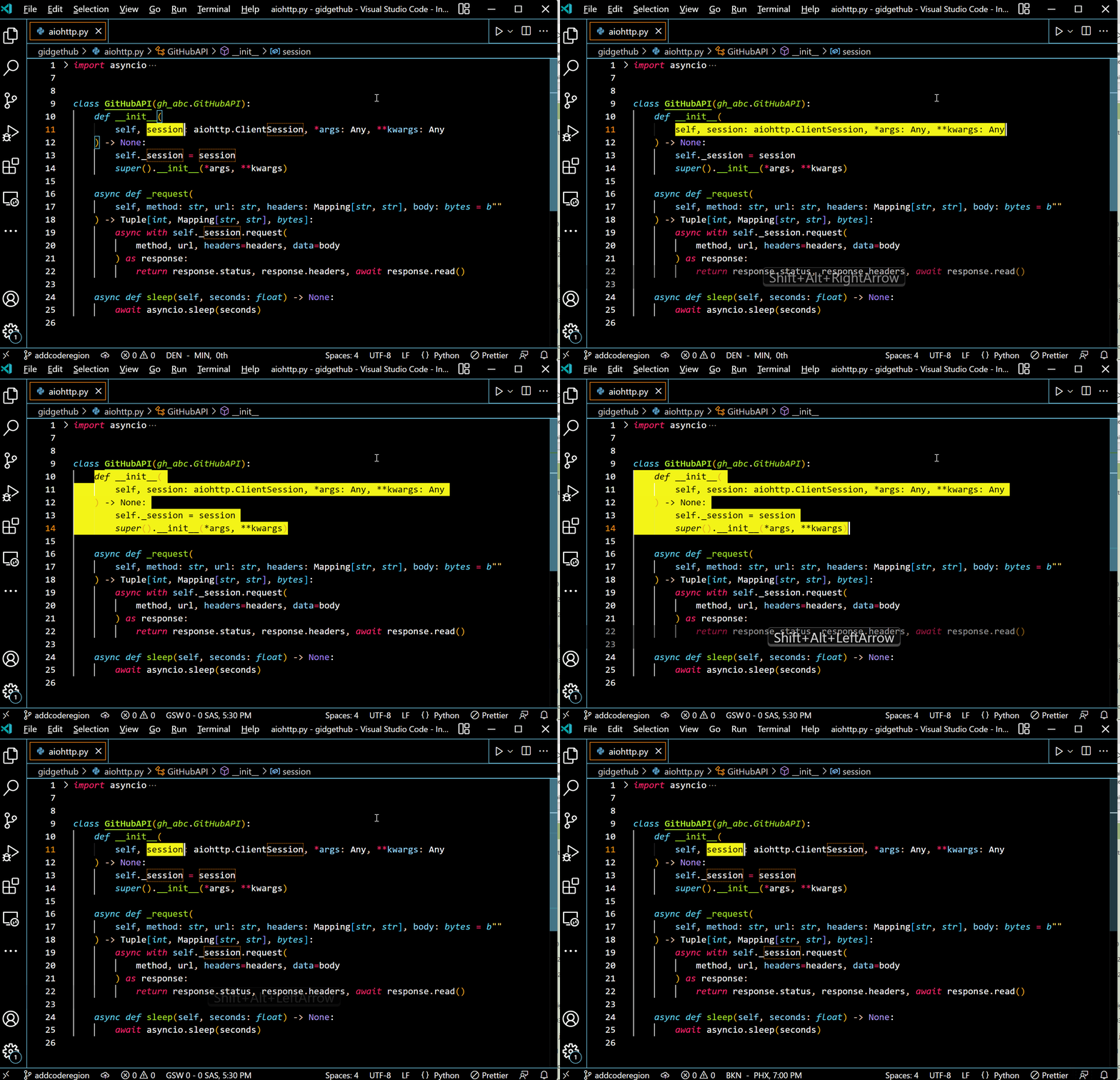
Selecting Python code using the keyboard takes fewer key presses now thanks to Smart Selection via Pylance. This was a highly requested feature, and it takes into account your code structure and heuristics to define the selection range. You can expand your code selection with Shift + Alt + Right Arrow or ⇧ + ⌥ + Right Arrow, and shrink it with Shift + Alt + Left Arrow or ⇧ + ⌥ + Left Arrow.

Expanding and shrinking code selection with keyboard short keys for smart selection. Theme: Monokai – High Contrast

Folding support

We’ve also made improvements to folding support via Pylance. Previously, the folding regions were defined just by indentation, which was not ideal for some cases, for example, with multi-line strings as pointed out in our issue tracker. Now folding regions take into account semantic information appropriately (this includes #region comments).

You can fold regions of source code using the folding icons on the gutter between line numbers and line start. Move the mouse over the gutter and click to fold and unfold regions. Use Shift + Click or ⇧ + Click on the folding icon to fold or unfold the region and all regions inside.

Folding and expanding sections of code in the editor Theme: Horizon Extended

Improvements to the Python interpreters list

Similarly to how kernels are display in the Jupyter extension, the Python extension’s interpreters list now displays Python interpreters grouped by type to make it easier to identify them:

List of interpreters grouped by type: workspace, venv, conda, pyenv and global.

Improvements when using Anaconda

This release includes several improvements to the experience when using Anaconda environments. Previously, there would be issues when debugging files and running tools using conda environments unless VS Code was initiated in an activated conda environment. To resolve several of these issues (#5559, #11205, #11638), the Python extension is using “conda run” to execute files and tools.

There are known issues when there are special characters in file paths, or when using custom command lines arguments in VS Code (although the Anaconda team is already working on fixing it). If you experience any of these issues, we recommend you check to see if conda has been released with a fix, otherwise start VS Code (“code .” command) from an activated conda environment from an external terminal.

Other Changes and Enhancements

We have also added small enhancements and fixed issues requested by users that should improve your experience working with Python in Visual Studio Code. Some notable changes include:

  • Improve select folder quickpick UI in multiroot workspaces. (#18256)
  • Drop support for Python 3.6 (as it reached end-of-life in December). (#18272)

We would also like to extend special thanks to this month’s contributors:

Try out these new improvements by downloading the Python extension from the Marketplace, or install it directly from the extensions view in Visual Studio Code (Ctrl + Shift + X or ⌘ + ⇧ + X). You can learn more about Python support in Visual Studio Code in the documentation. If you run into any problems or have suggestions, please file an issue on the Python VS Code GitHub page.

The post Python in Visual Studio Code – February 2022 Release appeared first on Python.


from Planet Python
via read more

CodersLegacy: Python Object Serialization with Pickle

Object Serialization is a fascinating programming concept, that is readily available in Python using the Pickle Library. Pickle provides a set of inbuilt functions and functionality that make dumping and loading objects to and from files a piece of cake.


What is Object Serialization?

Serialization is the process of converting an object to a byte stream, and the inverse of which is converting a byte stream back to a python object.

In simpler words, Object Serialization is the process of converting actual Python Objects into bytes, allowing the whole object to be preserved (with all it’s current values). This is commonly known as “pickling” or “dumping”, where we save the byte stream into a file.

The reverse process of this is where we convert these bytes back into a Python Object.

Object Serialization is super useful in many scenarios, such as creating save files to store things like game data or training models for AI/Machine Learning problems. It can take a long time for AI algorithms to generate a model, so instead of doing it every time you run the program, you could just dump it to a file once, and then read it from there each time, potentially speeding up your program by 100x times.


Dumping (Pickling) Objects

In this section we’ll explore how to dump (serialize) objects in Python, into Binary files.

Example# 1

All you have to do is use a little file handling to open up a file in binary mode, and then use the pickle.dump() function.

In order to open the file in binary mode, there must be a “b” present in the second parameter. Like instead of “w” for opening a normal file, use “wb” for writing to a binary file and so on. And remember, the file will not have an extension, so don’t bother including one.

The pickle.dump() method takes two parameters, the first being the object to be pickled/dumped, and the second being the file stream

import pickle

mydict = { "Apple": 20, "Meat" : 100, "Bread": 10 }

ofile = open("BinaryData",'wb')
pickle.dump(mydict,ofile)
ofile.close()

If you open up the Binary file where this Data was dumped, you will see something similar to what is shown below.
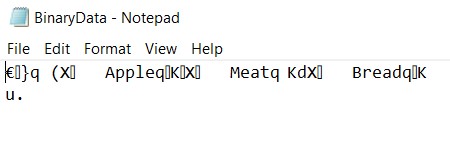
Python Pickle Object Serialization - Binary Data

As you can see, it doesn’t really make much sense, because it’s stored in Binary format. When you try to read it as text, it comes out all weird. But don’t worry, it doesn’t need to make sense to us. It’s only purpose is being saved in there, until we are ready to read it.


Example# 2

In this example let’s take a look at creating Objects of a Custom class, then dumping them into a Binary file.

We simply created three Objects of Class Student, added them into the list, and then dumped the whole list into the Binary file. Having all the data in one Data structure makes it easier to both dump and load data back and forth.

class Student:
    def __init__(self, Id, Name):
        self.Id = Id
        self.Name = Name

    def display(self):
        print("ID:", self.Id)
        print("Name:", self.Name)


list1 = [Student(1,"Bob"), Student(2,"Sam"), Student(3,"James")]

ofile = open("BinaryData2",'wb')
pickle.dump(list1,ofile)
ofile.close()

You can also choose to dump each student individually into the BinaryData file. However, this can be a little complicated, so we’ll bring this up again a bit later during this tutorial.


Loading (Un-Pickling) Objects

In this section we’ll explore how to load (Unpickle) objects in Python, from Binary files back into Pythonic Objects.

Example# 1

So we’ll be continuing our previous example and show you how to read data from the Binary file. We’ve created an entirely new file here, where we will write our loading code.

All you need to do is open the file in Binary read mode (“rb”), and then use the pickle.load() function. This function takes a single parameter, which is the file stream we opened up earlier.

import pickle

ifile = open("BinaryData",'rb')
mydict2 = pickle.load(ifile)
ifile.close()

print(mydict2["Apple"])
print(mydict2["Bread"])
print(mydict2["Meat"])

This produces the following output:

20
10
100

Example# 2

Here we will do the same as example#1 and reading data from example#2 back into a Python list.

Since we dumped/pickled objects of Class Student, we can now iterate over them and call the display() function to verify all has gone as planned.

import pickle

ifile = open("BinaryData2",'rb')
list2 = pickle.load(ifile)
ifile.close()

for student in list2:
    student.display()

The output:

ID: 1
Name: Bob
ID: 2
Name: Sam
ID: 3
Name: James

Multiple Pickles in One File

You may be wondering whether it’s possible to make multiple pickles (multiple dumps) in a single binary file. Well yes, it’s possible as the below examples show.

The order in which you dump them is going to be the order in which they are read (otherwise they will get mixed up). The below example demonstrates this pretty clearly.

class Student:
    def __init__(self, Id, Name):
        self.Id = Id
        self.Name = Name

    def display(self):
        print("ID:", self.Id)
        print("Name:", self.Name)


s1 = Student(1, "Bob")
s2 = Student(2, "Sam")
s3 = Student(3, "James")

ofile = open("BinaryData3",'wb')
pickle.dump(s1,ofile)
pickle.dump(s2,ofile)
pickle.dump(s3,ofile)
ofile.close()

ifile = open("BinaryData3",'rb')
s4 = pickle.load(ifile)
s5 = pickle.load(ifile)
s6 = pickle.load(ifile)
ifile.close()

s4.display()
s5.display()
s6.display()

Output:

ID: 1
Name: Bob
ID: 2
Name: Sam
ID: 3
Name: James

Making multiple pickles in a single file can be a little confusing however, as you need to keep track of the order or the pickles, and the number of pickles. An easier solution would be to have all the data wrapped in a container like a list or dictionary, then dumped to a file.

This is the same approach we have been using in the examples prior to this section.


UnPickable Types

As awesome as Pickle is, it can’t “pickle” everything. There are certain things that Pickle is unable to dump, and will throw an error if you try. The number of UnPickable Types is rather low, and they are often really complex structures. A situation like this occurring would actually be pretty rare, so don’t worry too much.

List of things Pickle can Pickle:

  • None, True, and False
  • integers, floating point numbers, complex numbers
  • strings, bytes, bytearrays
  • tuples, lists, sets, and dictionaries containing only picklable objects
  • functions defined at the top level of a module (using def, not lambda)
  • built-in functions defined at the top level of a module
  • classes that are defined at the top level of a module
  • instances of such classes whose __dict__ or the result of calling __getstate__() is picklable.

Alternatives:

  1. Dill Library: This is a special extension of the Pickle library with roughly the same syntax and functions. It’s able to Pickle more types of structures than the original Pickle library can, such as nested functions. It’s not able to handle 100% of all situations though, so it’s not a perfect solution.

Compressing Pickle Dumps (Bonus)

As a slight bonus, we’ll also explain how to compress Pickle File that we have already dumped. Pickle Dumps are all in binary format, so it’s pretty easy and simple to compress.

All we need is the use of the bzip2 compression library, which will handle all the hard work for us. We just have to call the right function, and our compressed file will be ready.

Here is the code with which we’ll be using. It’s the same as before, but with a 2D list instead, which has 100 copies of the original list with three Student objects. The reason for this was to make the difference between the non-compressed and compressed version noticeable. Otherwise due to overhead, it’s possible the non-compressed version could be smaller in size if the data is very small.

class Student:
    def __init__(self, Id, Name):
        self.Id = Id
        self.Name = Name

    def display(self):
        print("ID:", self.Id)
        print("Name:", self.Name)


list1= [Student(1,"Bob"),Student(2,"Sam"),Student(3,"James")] * 100

We’ll now try to dump the file with both the regular File handling method, and the bz2 method, and then compare the file sizes using the OS library’s getsize() method.

ofile = open("BinaryData2",'wb')
pickle.dump(list1,ofile)
ofile.close()
print(os.path.getsize("BinaryData2"))

The file size:

722

Now let’s try this with bz2.

ofile = bz2.BZ2File("BinaryData2",'wb')
pickle.dump(list1,ofile)
ofile.close()
print(os.path.getsize("BinaryData2"))

The file size:

155

Using bz2 to compress the data resulted in an almost 5x times improvement. And this is only the beginning. The larger the dataset, the more the compression will be noticeable and can result into 10x – 30x smaller files (depending on contents).

Note: The result of the above test may be slightly skewed, because the same data was written to the file 100 times. The compression efficiency is usually better is the data is similar (due to how compression techniques work).

If you wanna learn more about bz2 and it’s various compression and decompression functions, check out this bz2 (bzip2) tutorial.


This marks the end of the Python Object Serialization with Pickle Tutorial. Any suggestions or contributions for CodersLegacy are more than welcome. Questions regarding the tutorial content can be asked in the comments section below.

The post Python Object Serialization with Pickle appeared first on CodersLegacy.


from Planet Python
via read more

Matt Layman: Admin Interface For PDFs - Building SaaS with Python and Django #126

In this episode, I need tools to inspect some PDF reports that I’m building that customers of my homeschool app will use at the end of the school year. I build the admin tools that allow me to see these PDFs quickly.

from Planet Python
via read more

TestDriven.io: Working with Static and Media Files in Django

This article looks at how to work with static and media files in a Django project, locally and in production. from Planet Python via read...