Tuesday, November 2, 2021

Arize AI & Neptune AI Partnership: Continuous Monitoring, Continuous Improvements for ML Models

Delivering the best machine learning model to production should be as easy as training, testing, and deploying — right? Not quite! Models are far from perfect as they move from research to production, and maintaining model performance once in production is even more challenging. Once out of the offline research environment, the data a model consumes […]

The post Arize AI & Neptune AI Partnership: Continuous Monitoring, Continuous Improvements for ML Models appeared first on neptune.ai.


from Planet SciPy
read more

Dimensionality Reduction for Machine Learning

Data forms the foundation of any machine learning algorithm, without it, Data Science can not happen. Sometimes, it can contain a huge number of features, some of which are not even required. Such redundant information makes modeling complicated. Furthermore, interpreting and understanding the data by visualization gets difficult because of the high dimensionality. This is […]

The post Dimensionality Reduction for Machine Learning appeared first on neptune.ai.


from Planet SciPy
read more

Monday, November 1, 2021

Ned Batchelder: Coverage goals

There’s a feature request to add a per-file threshold to coverage.py. I didn’t add the feature, I wrote a proof-of-concept: goals.py.

Coverage.py has a --fail-under option that will check the total coverage percentage, and exit with a failing status if it is too low. This lets people set a goal, and then check that they are meeting it in their CI systems.

The feature request is to check each file individually, rather than the project as a whole, to exert tighter control over the goal. That sounds fine, but I could see that it would actually be more complicated than that, because people sometimes have more complicated goals: 100% coverage in tests and 85% in product code, or whatever.

I suggested implementing it as a separate tool that used data from a JSON report. Then, I did just that.

The goals.py tool is flexible: you give it a percentage number, and then a list of glob patterns. It collects up the files that match the patterns, and checks the coverage of that set of files. You can choose to measure the group as a whole, or each file individually. Patterns can be negated to remove files from consideration.

For example:

# Check all Python files collectively, except in the tests/ directory.

$ python goals.py --group 85 '**/*.py' '!tests/*.py'

# We definitely want complete coverage of anything related to html.
$ python goals.py --group 100 '**/*html*.py'

# No Python file should be below 90% covered.
$ python goals.py --file 90 '**/*.py'

Each run of goals.py checks one set of files against one goal, but you can run it multiple times if you want to check multiple goals.

If you want to have more control over your coverage goals, give goals.py a try. It might turn into a full-fledged coverage.py feature, or maybe it’s enough as it is.

Feedback is welcome, either here or on the original feature request.


from Planet Python
via read more

Tryton News: Tryton Release 6.2

We are proud to announce the 6.2 release of Tryton .
This release provides many bug fixes, fine tuning and many performance improvements. But it is also remarkable by the addition of not less than 13 new modules from which we can highlight the basis for a point of sale and an integration with Shopify.
You can give it a try on the demo server, use the docker image or download it here.
As usual migration from previous series is fully supported. No manual operations are required.

Here is a list of the most noticeable changes:

Changes for the User

It is now possible to import and export data from binary fields using CSV. The data is encoded into base64 in the file.

You can now customize the name of the records used in the report to construct the filename.

The code of the language must now be unique in the system. This remove possible ambiguity with the translations.

Web Client

The web client has now on each tree view, a button to fold/unfold the selected rows.
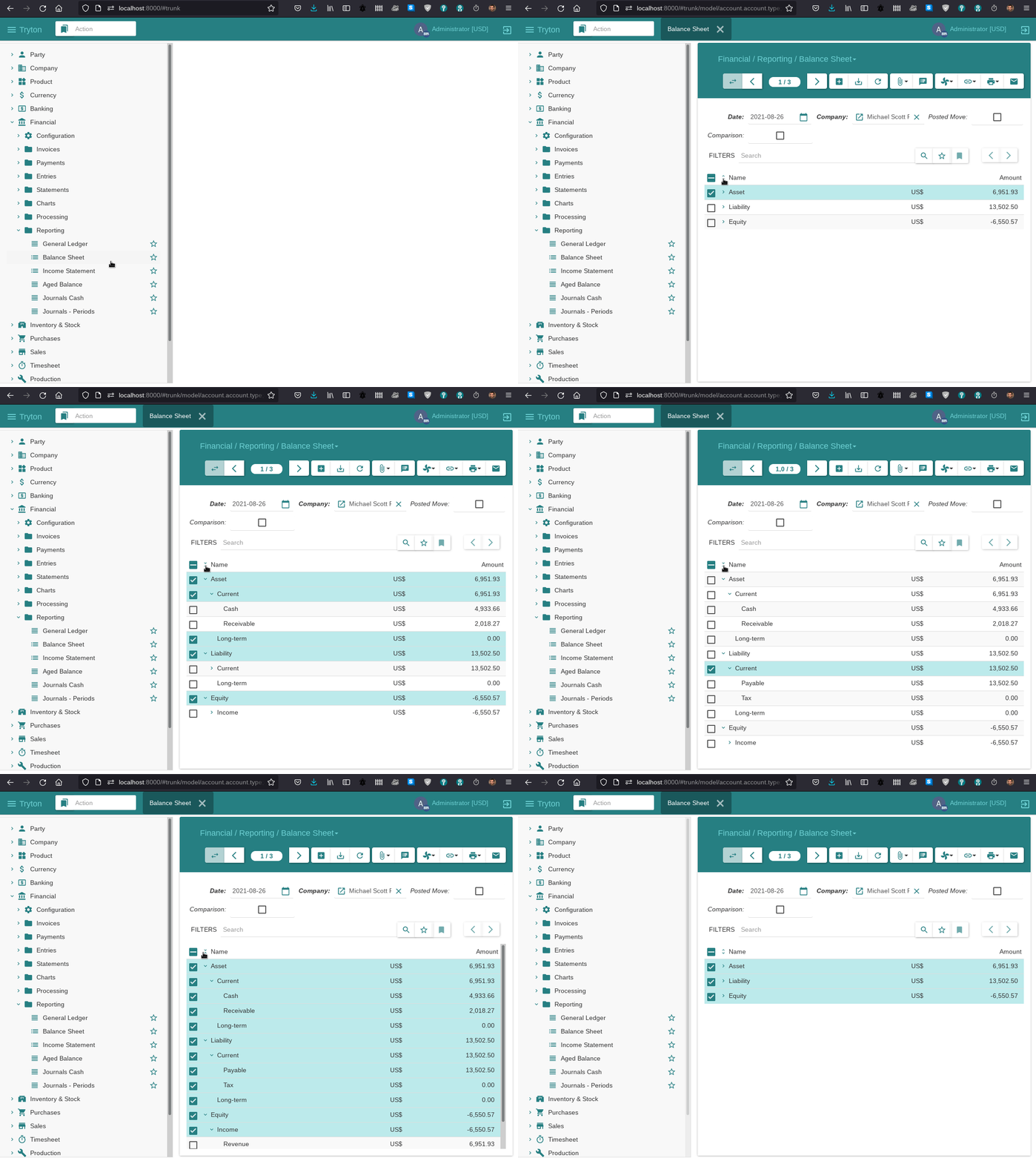
Web Client Fold/Unfold button

Keyboard shortcuts (aka accesskey) has been added to every widgets and buttons of the web client. By pressing CTRL+F1, the keys are shown next to each widget and button.

Accounting

It is now possible to configure rules to automatically debit the customer with a direct debit payment. This rules are compatible with all the payment modules like SEPA, Stripe or Braintree. The payments are created by launching a wizard from the payment menu.

The invoice and dunning form have now an action to launch a wizard to reschedule the payment terms. The wizard allow defining new terms by dividing the existing line.
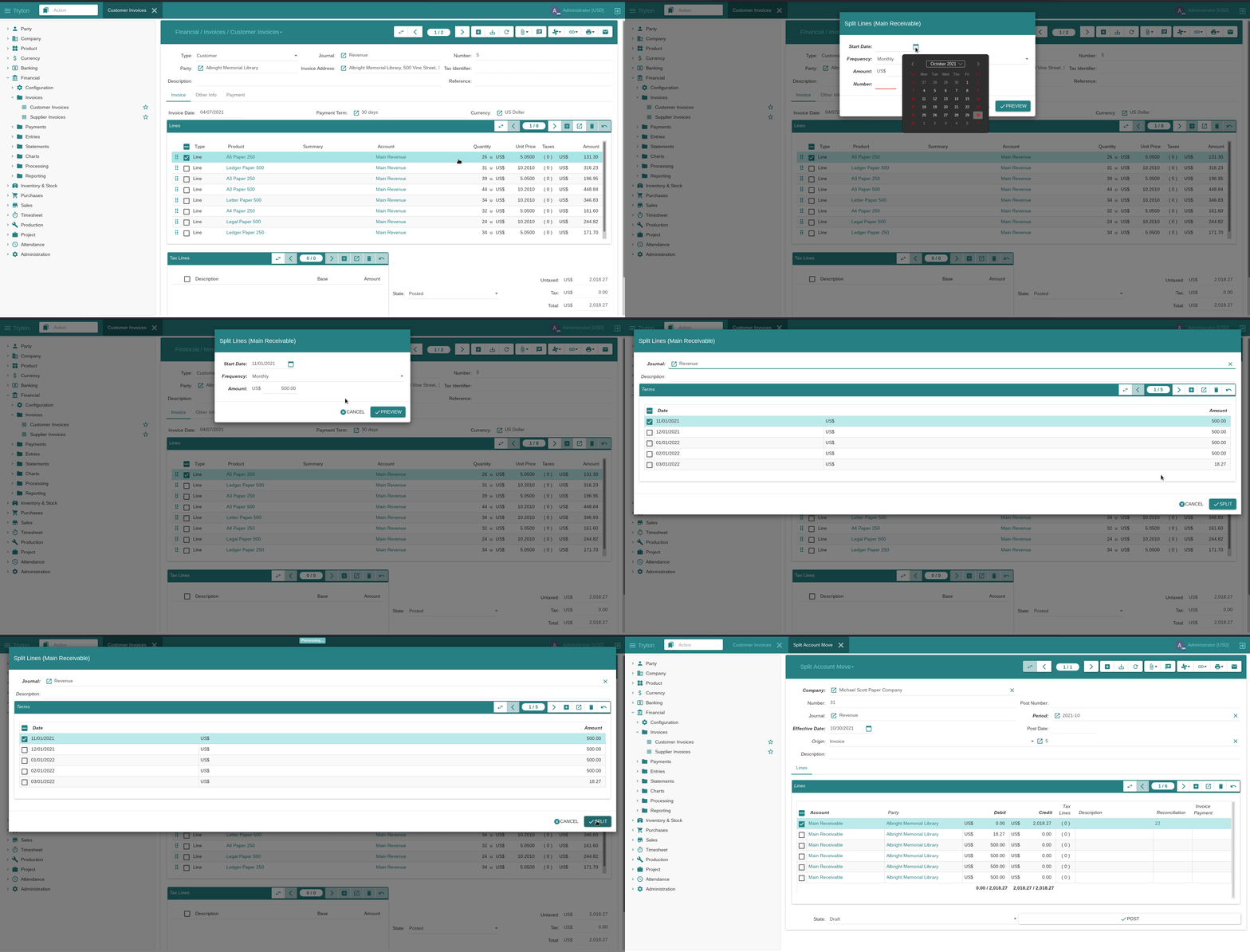
Reschedule Invoice

When updating an asset now, we store a revision which stores the updated data, a document as origin and a description.
It is also possible to reset to draft an asset that have not yet any posted lines. This gives a grace time to correct mistakes. But it is also possible to force the re-computation of the pending lines.

More (click for more details)

Commission

We have now reporting of commission per agent and period. The amount can be grouped per year, month or day and it is possible to filter only the invoiced commissions.

When creating commissions, it is not possible to select only some agents.

Customs

A country of origin can be defined for each product.

Party

It is now possible to define one contact mechanism of each type at the creation of a party. The main usage is to ease importing via CSV parties with their email, phone etc.

When a party is replaced by another, the identifiers of the former one are transferred to the new one but deactivated.

More (click for more details)

Product

We added a computed field on the variants that compute a name based on their attribute values. This avoid the need to define different suffix for each variant if the attributes are enough to distinct them.

The service and kit products can have now only a fixed cost price. The other methods are all based on stock move which practically does nothing for service nor kit.

More (click for more details)

Production

To allocate the production cost between the output products, Tryton use the list price. Now if one of the output product has not list price, the production will raise a warning before ignoring it.

Purchase

We compute the purchase date for the request created from a requisition. The computation is using the lead time of the defined supplier or the best one found.

Sale

The default invoice, shipment and shipment cost methods can now be defined by customer. If they are empty then the general default method is used.

We extended the existing sale reports to have one general without any grouping (useful to have grant total) and another grouped in a tree per customer category.

There is now a wizard to test the setup of a recurrence rule (used for subscription). As rules can be complex it is useful to be able to see the result based on a tested date.

More (click for more details)

Stock

We added a wizard on the customer shipment (and supplier return) to print all the package labels at once. And also reprint the label just for one package. The client can sent them directly to the default printer of the host machine. (This replace the dummy label report.)

It is again possible to group different warehouses under a view location.

Web Shop

The product images are now used for the web shops. There is a check box to mark the image as to be published on the web shops.

New Modules

Account Budget

The Account Budget Module provides the ability to set budgets for accounts over a defined period of time. These budgets can then be used to track the total amount from relevant transactions against the budgeted amount.

Account Move Line Grouping

The Account Move Line Grouping Module adds a view that displays move lines grouped.

Account Rule

The Account Rule Module allows rules which substitute default accounts with other accounts.

Account Stock Shipment Cost

The Account Stock Shipment Cost Module allocates shipment cost based on invoice.

Analytic Budget

The Analytic Budget Module provides the ability to set budgets for analytic accounts over a defined period of time. These budgets can then be used to track the total amount from relevant transactions against the budgeted amount.

Currency Romanian

The Currency RO Module adds the Romanian National Bank as a source for currency exchange rates.

Currency Serbian

The Currency RS Module adds the Serbian National Bank as a source for currency exchange rates.

Product Image

The Product Image Module adds images to each product and variant.

Product Image Attribute

The Product Image Attribute Module adds attributes to product images.

Sale Point

The Sale Point Module allows retail sales to be handled and recorded.

Stock Package Shipping MyGLS

The Stock Package Shipping MyGLS Module allows package labels to be generated for shipments using MyGLS webservices.

Stock Package Shipping Sendcloud

The Stock Package Shipping Sendcloud Module allows package labels to be generated for shipments made by any of Sendcloud’s supported carriers.

Web Shop Shopify

The Web Shop Shopify Module provides a way to manage Shopify stores. It uploads products, variants and collections to Shopify, and downloads orders, transactions and creates fulfillments.

Changes for the System Administrator

The non-interactive operations (like the scheduled or queued tasks) report now their possible errors in the entry “Administration → Scheduler → Errors”. When the problem has been solved, the administrator can mark it and it will be relaunch automatically.

The configuration wizard on the first login present now an easier step to activate easily new modules.

The trytond-stat command display the ID of the node in addition to the process ID. This allow to know from which node the request come.

More (click for more details)

Accounting

We added two groups which give access rights to edit the accounting fields on parties and products. This gives more flexibility to privilege separation.

Changes for the Developer

In addition to MPTT we support now another method which is based on stored path. This is a method that is faster when the tree is modified but it takes more space.
To simplify the choice, you must use MPTT for tree that are mainly static (like the chart of account) and Path for tree that are modified often (like the project tree).

We improved the management of the digits for numeric field. Now we can set the digits attribute as the name of a field that point to a DigitsMixin model (like the unit of measure).
Also the numeric widgets have now a grouping attribute which specify if the client must group digits or not.
We added also the SymbolMixin which define how to format a number with a symbol (like the unit of measure). The language and report has formatting methods that support the symbols but also empty digits.

We added on the user warning model a class method that standardize the format of warning name based on records.

We enforced even more data structure as immutable. The dictionary of the transaction context can only be changed thanks to the set_context context manager. The value of Dict field uses now tuple instead of list.

The ModelSQL.lock method locks the table when called without records.

When copying records, we do not copy the values of the record that still have the default value. This permits a user to copy record for which he does not have access right on some field if their values are still the default.

Tryton can now store in the global cache of the transaction the result of Function field if it is a read-only transaction. This improves the performance if we have Function fields that are using other Function fields to compute their values.

More (click for more details)

Scripting Client

Tryton is using slow hashing algorithm to prevent brute-force attack but so the scripting client was slow when used remotely because each call were authenticated by hashing the password. Now it is possible to configure the script to create a session and use it for further calls.

More (click for more details)

Accounting

We store the value of the keywords extracted from the statement origin. They can now be used by the rules to find a party for a similar statement origin.

We compute now the warehouse of each invoice line.

More (click for more details)

Currency

The currency module define a new Monetary field which can be used to store a numeric value linked to a currency field. Such field will have the proper symbol and monetary formatting set automatically.

The currency is now inheriting from DigitsMixin which permit to use it as digits attribute.

Party

The “Replace Party” wizard can now also update reference field to point to the new party.

Product

The unit of measure is now inheriting from DigitsMixin which permit to use it as digit attribute.

Production

The BoM can now have many inputs or outputs with the same product. We removed the unique constraint on the product of the lists.

Project

The projects and tasks are using now the path mechanism instead of MPTT to speed up searching on their tree structure.

Purchase

The process method have been refactored into different methods. This allowed a design which can process multiple purchases at once and improve the speed.

Sale

The process method have been refactored into different methods. This allowed a design which can process multiple sales at once and improve the speed.

In order to group inside the same shipment only moves with the same cost method, the cost method from the sale is now stored on the shipment.

Stock

We provide now a unique method that is used to sort the quantities to pick for assignation. This method can be extended to implement custom strategy like FIFO, LIFO or FEFO.

The move has now a property which returns the warehouse to which the move is linked. This property replace the previous cost warehouse.

1 post - 1 participant

Read full topic


from Planet Python
via read more

Python Morsels: Modules are cached

Transcript

Python caches modules.

Re-importing modules doesn't update them

We've have a points module here (a file called points.py) that contains a Point class:

class Point:
    def __init__(self, x, y):
        self.x, self.y = x, y

Let's say we're at the Python REPL (testing out this code) and we decide that the current string representation for a Point object isn't friendly enough:

>>> from points import Point
>>> p = Point(1, 2)
>>> p
<points.Point object at 0x7fc5ee136970>

So we modify our Point class to add a __repr__ method:

class Point:
    def __init__(self, x, y):
        self.x, self.y = x, y

    def __repr__(self):
        return f"Point({self.x}, {self.y})"

Then we save the points.py file that this Point class lives in. And then we re-import this module:

>>> from points import Point

And make a new instance of this class:

>>> p = Point(1, 2)

And then look at its string representation (expecting it to have changed):

>>> p
<points.Point object at 0x7fc5ef33f220>

But then we notice that the string representation hasn't actually changed! It's the same as it was before.

Restarting the Python REPL to force-update our module

In a desperate attempt to figure out why our Point class's string representation won't update, we exit the Python REPL, restart the Python REPL, and do everything all over again.

>>> exit()
$ python3
Python 3.10.0
Type "help", "copyright", "credits" or "license" for more information.
>>>

We import our Point class from our module, make a new instance of it, and then look at its string representation to see that it changed this time!

>>> from points import Point
>>> p = Point(1, 2)
>>> p
Point(1, 2)

What's going on here? Why did importing the module a second time not work but starting a new Python interpreter worked?

Python caches all imported modules

This all happened because Python caches modules.

In Python, every module that is imported is stored in a dictionary called sys.modules.

This dictionary maps the name of each module to the module object it represents:

>>> import sys
>>> sys.modules['points']
<module 'points' from '/home/trey/points.py'>

Each time the same module is imported again, Python doesn't actually reevaluate the code for that module: it just gives us back the same module object as before.

>>> import points
>>> points
<module 'points' from '/home/trey/points.py'>

Methods to clear the cache for a module

This module caching that Python does is a feature, not a bug: Python does this for performance reasons. But this feature does start to feel like a bug when we're testing our code from the Python REPL while also making changes to our code.

The easiest way to fix this problem is to exit the REPL and start a new REPL, starting a brand-new Python process (which has a brand new sys.modules dictionary). But there's other ways to do this as well.

You could also try to modify sys.modules, deleting things from it to clear the cache for that module:

>>> del sys.modules['points']

Or you could use the reload function from Python's importlib module, which reloads a module object:

>>> from importlib import reload

In either case, you might not actually fully fix your problem though. Because reloading a module doesn't delete references to old versions of classes as well as instances to old versions of classes. So the easiest way to fix this really is to exit the REPL and restart it.

Summary

Python caches modules. So while developing your code as you're testing your code in a Python REPL, keep in mind that when you re-import a module, Python will used the cached version of your module instead of reevaluating all the code in your module.

To really refresh a module, you should exit the Python REPL and start a new REPL.


from Planet Python
via read more

Trey Hunner: How to flatten a list in Python

You’ve somehow ended up with lists nested inside of lists, possibly like this one:

1
>>> groups = [["Hong", "Ryan"], ["Anthony", "Wilhelmina"], ["Margaret", "Adrian"]]

But you want just a single list (without the nesting) like this:

1
>>> expected_output = ["Hong", "Ryan", "Anthony", "Wilhelmina", "Margaret", "Adrian"]

You need to flatten your list-of-lists.

We’re looking for a “shallow” flatten

We can think of this as a shallow flatten operation, meaning we’re flattening this list by one level. A deep flatten operation would handle lists-of-lists-of-lists-of-lists (and so on) and that’s a bit more than we need for our use case.

The flattening strategy we come up with should work on lists-of-lists as well as any other type of iterable-of-iterables. For example lists of tuples should be flattenable:

1
>>> groups = [("Hong", "Ryan"), ("Anthony", "Wilhelmina"), ("Margaret", "Adrian")]

And even an odd type like a dict_items object (which we get from asking a dictionary for its items) should be flattenable:

1
2
3
4
>>> fruit_counts = {"apple": 3, "lime": 2, "watermelon": 1, "mandarin": 4}
>>> fruit_counts.items()
dict_items([('apple', 3), ('lime', 2), ('watermelon', 1), ('mandarin', 4)])
>>> flattened_counts = ['apple', 3, 'lime', 2, 'watermelon', 1, 'mandarin', 4]

Flattening iterables-of-iterables with a for loop

One way to flatten an iterable-of-iterables is with a for loop. We can loop one level deep to get each of the inner iterables.

1
2
for group in groups:
    ...

And then we loop a second level deep to get each item from each inner iterable.

1
2
3
for group in groups:
    for name in group:
        ...

And then append each item to a new list:

1
2
3
4
names = []
for group in groups:
    for name in group:
        names.append(name)

There’s also a list method that makes this a bit shorter, the extend method:

1
2
3
names = []
for group in groups:
    names.extend(group)

The list extend method accepts an iterable and appends every item in the iterable you give to it.

Or we could use the += operator to concatenate each list to our new list:

1
2
3
names = []
for group in groups:
    names += group

You can think of += on lists as calling the extend method. With lists these two operations (+= and extend) are equivalent.

Flattening iterables-of-iterables with a comprehension

This nested for loop with an append call might look familiar:

1
2
3
4
names = []
for group in groups:
    for name in group:
        names.append(name)

The structure of this code looks like something we could copy-paste into a list comprehension.

Inside our square brackets we’d copy the thing we’re appending first, and then the logic for our first loop, and then the logic for our second loop:

1
2
3
4
5
names = [
    name
    for group in groups
    for name in group
]

This comprehension loops two levels deep, just like our nested for loops did. Note that the order of the for clauses in the comprehension must remain the same as the order of the for loops.

The (sometimes confusing) order of those for clauses is partly why I recommend copy-pasting into a comprehension. When turning a for loop into a comprehension, the for and if clauses remain in the same relative place, but the thing you’re appending moves from the end to the beginning.

Could we flatten with * in a comprehension?

But what about Python’s * operator? I’ve written about the many uses for the prefixed asterisk symbol in Python.

We can use * in Python’s list literal syntax ([]) to unpack an iterable into a new list:

1
2
3
4
>>> numbers = [3, 4, 7]
>>> more_numbers = [2, 1, *numbers, 11, 18]
>>> more_numbers
[2, 1, 3, 4, 7, 11, 18]

Could we use that * operator to unpack an iterable within a comprehension?

1
2
3
4
names = [
    *group
    for group in groups
]

We can’t. If we try to do this Python will specifically tell us that the * operator can’t be used like this in a comprehension:

1
2
3
4
5
6
7
8
>>> names = [
...     *group
...     for group in groups
... ]
  File "<stdin>", line 2
    ]
     ^
SyntaxError: iterable unpacking cannot be used in comprehension

This feature was specifically excluded from PEP 448, the Python Enhancement Proposal that added this *-in-list-literal syntax to Python due to readability concerns.

Can’t we use sum?

Here’s another list flattening trick I’ve seen a few times:

1
>>> names = sum(groups, start=[])

This does work:

1
2
>>> names
['Hong', 'Ryan', 'Anthony', 'Wilhelmina', 'Margaret', 'Adrian']

But I find this technique pretty unintuitive.

We use the + operator in Python for both adding numbers and concatenating sequences and the sum function happens to work with anything that supports the + operator (thanks to duck typing). But in my mind, the word “sum” implies arithmetic: summing adds numbers together.

I find it confusing to “sum” lists, so I don’t recommend this approach.

What about itertools.chain?

There is one more tool that’s often used for flattening: the chain utility in the itertools module.

chain accepts any number arguments and it returns an iterator:

1
2
3
>>> from itertools import chain
>>> chain(*groups)
<itertools.chain object at 0x7fc1b2d65bb0>

We can loop over that iterator or turn it into another iterable, like a list:

1
2
>>> list(chain(*groups))
['Hong', 'Ryan', 'Anthony', 'Wilhelmina', 'Margaret', 'Adrian']

There’s actually a method on chain that’s specifically for flattening a single iterable:

1
2
>>> list(chain.from_iterable(groups))
['Hong', 'Ryan', 'Anthony', 'Wilhelmina', 'Margaret', 'Adrian']

Using chain.from_iterable is more performant than using chain with * because * unpacks the whole iterable immediately when chain is called.

Recap: comparing list flattening techniques

If you want to flatten an iterable-of-iterables lazily, I would use itertools.chain.from_iterable:

1
2
>>> from itertools import chain
>>> flattened = chain.from_iterable(groups)

This will return an iterator, meaning no work will be done until the returned iterable is looped over:

1
2
>>> list(flattened)
['Hong', 'Ryan', 'Anthony', 'Wilhelmina', 'Margaret', 'Adrian']

And it will be consumed as we loop, so looping twice will result in an empty iterable:

1
2
>>> list(flattened)
[]

If you find itertools.chain a bit too cryptic, you might prefer a for loop that calls the extend method on a new list to repeatedly extend the values in each iterable:

1
2
3
names = []
for group in groups:
    names.extend(group)

Or a for loop that uses the += operator on our new list:

1
2
3
names = []
for group in groups:
    names += group

Unlike chain.from_iterable, both of these for loops build up new list rather than a lazy iterator object.

If you find list comprehensions readable (I love them for signaling “look we’re building up a list”) then you might prefer a comprehension instead:

1
2
3
4
5
names = [
    name
    for group in groups
    for name in group
]

And if you do want laziness (an iterator) but you don’t like itertools.chain you could make a generator expression that does tha same thing as itertools.chain.from_iterable:

1
2
3
4
5
names = (
    name
    for group in groups
    for name in group
)

Happy list flattening!


from Planet Python
via read more

Real Python: Python's zipapp: Build Executable Zip Applications

A Python Zip application is a quick and cool option for you to bundle and distribute an executable application in a single ready-to-run file, which will make your end users’ experience more pleasant. If you want to learn about Python applications and how to create them using zipapp from the standard library, then this tutorial is for you.

You’ll be able to create Python Zip applications as a quick and accessible way to distribute your software products to your end users and clients.

In this tutorial, you’ll learn:

  • What a Python Zip application is
  • How Zip applications work internally
  • How to build Python Zip applications with zipapp
  • What standalone Python Zip apps are and how to create them
  • How to create Python Zip apps manually using command-line tools

You’ll also learn about a few third-party libraries for creating Zip applications that overcome some limitations of zipapp.

To better understand this tutorial, you need to know how to structure Python application layouts, run Python scripts, build Python packages, work with Python virtual environments, and install and manage dependencies with pip. You also need to be comfortable using the command line or terminal.

Free Bonus: Click here to get a Python Cheat Sheet and learn the basics of Python 3, like working with data types, dictionaries, lists, and Python functions.

Getting Started With Python Zip Applications

One of the most challenging problems in the Python ecosystem is finding an effective way to distribute executable applications, such as graphical user interface (GUI) and command-line interface (CLI) programs.

Compiled programming languages, such as C, C++, and Go, can generate executable files that you can run directly on different operating systems and architectures. This ability makes it easy for you to distribute software to your end users.

However, Python doesn’t work like that. Python is an interpreted language, which means that you need a suitable Python interpreter to run your applications. There’s no direct way to generate a standalone executable file that doesn’t need an interpreter to run.

There are many solutions out there that aim to solve this issue. You’ll find tools such as PyInstaller, py2exe, py2app, Nuitka, and more. Those tools allow you to create self-contained executable applications that you can distribute to your end users. However, setting these tools up can be a complex and challenging process.

Sometimes you don’t need that extra complexity. You just need to build an executable app from a script or a small program so that you can distribute it to your end users quickly. If your application is small enough and uses pure Python code, then you can be well-served with a Python Zip application.

What Is a Python Zip Application?

PEP 441 – Improving Python ZIP Application Support formalized the idea, terminology, and specification around Python Zip applications. This type of application consists of a single file that uses the ZIP file format and contains code that Python can execute as a program. These applications rely on Python’s ability to run code from ZIP files that have a __main__.py module at their root, which works as an entry-point script.

Python has been able to run scripts from ZIP files since versions 2.6 and 3.0. The steps to achieve that are pretty straightforward. You just need a ZIP file with a __main__.py module at its root. You can then pass that file to Python, which adds it to sys.path and executes __main__.py as a program. Having the application’s archive in sys.path allows you to access its code through Python’s import system.

As a quick example of how all that works, say you’re on a Unix-like operating system, such as Linux or macOS, and you run the following commands:

$ echo 'print("Hello, World!")' > __main__.py

$ zip hello.zip __main__.py
  adding: __main__.py (stored 0%)

$ python ./hello.zip
Hello, World!

You use the echo command to create a __main__.py file containing the code print("Hello, World!"). Then you use the zip command to archive __main__.py into hello.zip. Once you’ve done that, you can run hello.zip as a program by passing the filename as an argument to the python command.

To round up the internal structure of Python Zip applications, you need a way to tell the operating system how to execute them. The ZIP file format allows you to prepend arbitrary data at the beginning of a ZIP archive. Python Zip applications take advantage of that feature to include a standard Unix shebang line in the application’s archive:

#!/usr/bin/env python3

On Unix systems, this line tells the operating system which program to use for executing the file at hand so that you can run the file directly without the python command. On Windows systems, the Python launcher properly understands the shebang line and runs the Zip application for you.

Even with a shebang line, you can always execute a Python Zip application by passing the application’s filename as an argument to the python command.

In summary, to build a Python Zip application, you need:

  • An archive that uses the standard ZIP file format and contains a __main__.py module at its root
  • An optional shebang line that specifies the appropriate Python interpreter to run the application

Read the full article at https://realpython.com/python-zipapp/ »


[ Improve Your Python With 🐍 Python Tricks 💌 – Get a short & sweet Python Trick delivered to your inbox every couple of days. >> Click here to learn more and see examples ]


from Planet Python
via read more

TestDriven.io: Working with Static and Media Files in Django

This article looks at how to work with static and media files in a Django project, locally and in production. from Planet Python via read...