Tuesday, August 3, 2021

Using sleep() to Code a Python Uptime Bot

Have you ever needed to make your Python program wait for something? You might use a Python sleep() call to simulate a delay in your program. Perhaps you need to wait for a file to upload or download, or for a graphic to load or be drawn to the screen. You might even need to pause between calls to a web API, or between queries to a database. Adding Python sleep() calls to your program can help in each of these cases, and many more!

In this course, you’ll learn:

  • The basics of time.sleep()
  • How you can use timeit to measure your code’s execution time
  • How to use time.sleep() to build an uptime bot

[ Improve Your Python With 🐍 Python Tricks 💌 – Get a short & sweet Python Trick delivered to your inbox every couple of days. >> Click here to learn more and see examples ]


from Real Python
read more

PyBites: 5 Helpful Python Decorator Use Cases

Some time ago I asked on Twitter:

I was curious what you use #Python decorators for? 

And I got quite an amazing / insightful response:


The obvious next step for me was to look at some examples / use cases.

So below are 5 useful applications of decorators.

Study them, then apply similar things to your own work.

1. De-duplicate code

The first one was easiest, because @prashanttgs posted a great example:

It’s easier for me to do:

@conditional_function 
def fun(): 
...

… for multiple functions than doing this:

def fun():     
    if conditional_function ...

To me this shows the benefit of abstracting away repeated logic to make your functions (classes) leaner.
 

2. Protect against bad inputs

This is a great use case highlighted by @Halmsy

And a good example is the pydantic module and its validator decorator (@mikehawryluk):

https://github.com/samuelcolvin/pydantic/blob/master/pydantic/decorator.py#L42

3. pytest

As per @brianokken: pytest fixtures and marks, including parametrization 

Yep we use those decorators every day and we love them.

Source code of the fixture decorator: 

https://github.com/pytest-dev/pytest/blob/master/src/_pytest/fixtures.py#L1271

4. Logging

@Kay_Hoogland pointed to a cool project called memo.

There we see a cool time_taken decorator:

https://github.com/koaning/memo/blob/main/memo/_util.py

We also added a small timer decorator tip ourselves this week:

5. Authentication

It’s interesting to look at the decorators used for access control in major web frameworks:

https://flask.palletsprojects.com/en/1.1.x/patterns/viewdecorators/

https://github.com/django/django/blob/master/django/contrib/auth/decorators.py


I hope this has given you some inspiration to use this powerful design pattern more in your work.

If you want to write some of your own, check out the dedicated Decorators Learning Path on our platform:

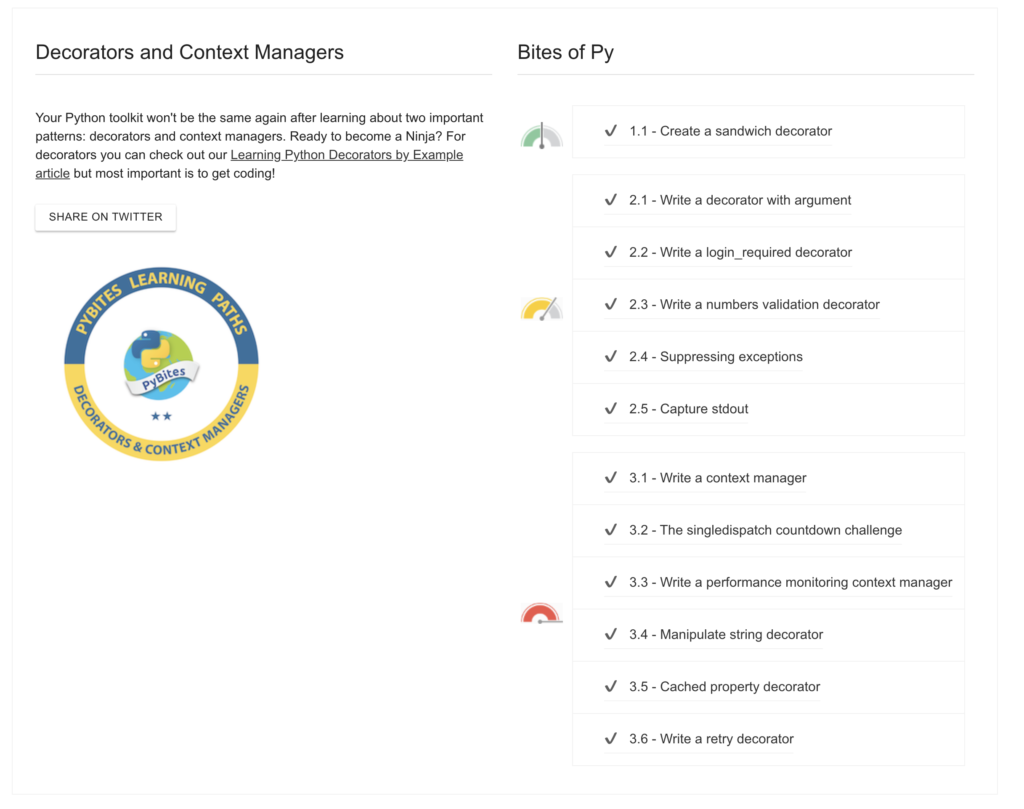
Code up some decorators on our CodeChalleng.es Python exercise platform.Your Python toolkit won’t be the same again after learning about two important patterns: decorators and context managers. You can code 12 related Bites on our platform …

OK that’s a wrap (Julian had me put that in, kidding [no he’s not! – Julian])

Happy coding!

— Bob


from Planet Python
via read more

STX Next: How to Build a Spark Cluster with Docker, JupyterLab, and Apache Livy—a REST API for Apache Spark


from Planet Python
via read more

Monday, August 2, 2021

Matthew Wright: Building Jupyter notebook workflows with scrapbook

The scrapbook library allows you to save state inside the notebook file itself, making it easier to develop workflows using Jupyter notebooks.

The post Building Jupyter notebook workflows with scrapbook appeared first on wrighters.io.


from Planet Python
via read more

PythonClub - A Brazilian collaborative blog about Python: Participe da Python Brasil 2021, a maior conferência de Python da América Latina

Python Brasil 2021, a maior conferência de Python da América Latina, acontecerá entre os dias 11 e 17 de outubro, reunindo pessoas desenvolvedoras, cientistas de dados e entusiastas da tecnologia.

alt text

A Python Brasil 2021, evento promovido pela comunidade brasileira de Python, traz nesta edição uma agenda imperdível para quem quer mergulhar no universo de uma das linguagens de programação mais utilizadas na atualidade.

Uma das principais novidades deste ano é a trilha de atividades em espanhol, que vai trazer ao evento palestras de toda a América Latina, criando um ambiente de muita diversidade onde as comunidades Python de língua espanhola vão poder se conectar e trocar experiências.

Em sua 17 edição, o evento será realizado de forma online, gratuito e aberto para qualquer pessoa de 11 a 17 de outubro. É esperado um público de mais de 10 mil participantes de todas as partes do Brasil e do mundo. Nos sete dias de imersão, os participantes poderão contribuir para projetos de software livre, participar de treinamentos e adquirir novos conhecimentos com outras pessoas da comunidade.

E que tal falar sobre aquele projeto inovador, dar dicas sobre carreira ou mostrar formas de usar a tecnologia para causar impacto social, tudo isso em um ambiente inclusivo, seguro e acolhedor?! Até o dia 12 de agosto você poderá submeter sua proposta para apresentação de palestras e tutoriais na maior conferência Python da América Latina.

Você poderá acompanhar a Python Brasil pelo YouTube em tempo real e também participar de atividades e interagir com toda a comunidade pelo servidor do Discord criado especialmente para o evento.

Não deixe de seguir o perfil do evento no Instagram ou Twitter para ficar por dentro das últimas novidades!


from Planet Python
via read more

Real Python: Python's ChainMap: Manage Multiple Contexts Effectively

Sometimes when you’re working with several different dictionaries, you need to group and manage them as a single one. In other situations, you can have multiple dictionaries representing different scopes or contexts and need to handle them as a single dictionary that allows you to access the underlying data following a given order or priority. In those cases, you can take advantage of Python’s ChainMap from the collections module.

ChainMap groups multiple dictionaries and mappings in a single, updatable view with dictionary-like behavior. Additionally, ChainMap provides features that allow you to efficiently manage various dictionaries, define key lookup priorities, and more.

In this tutorial, you’ll learn how to:

  • Create ChainMap instances in your Python programs
  • Explore the differences between ChainMap and dict
  • Use ChainMap to work with several dictionaries as one
  • Manage key lookup priorities with ChainMap

To get the most out of this tutorial, you should know the basics of working with dictionaries and lists in Python.

By the end of the journey, you’ll find a few practical examples that will help you better understand the most relevant features and use cases of ChainMap.

Free Bonus: 5 Thoughts On Python Mastery, a free course for Python developers that shows you the roadmap and the mindset you’ll need to take your Python skills to the next level.

Getting Started With Python’s ChainMap

Python’s ChainMap was added to collections in Python 3.3 as a handy tool for managing multiple scopes and contexts. This class allows you to group several dictionaries and other mappings together to make them logically appear and behave as one. It creates a single updatable view that works similar to a regular dictionary but with some internal differences.

ChainMap doesn’t merge its mappings together. Instead, it keeps them in an internal list of mappings. Then ChainMap reimplements common dictionary operations on top of that list. Since the internal list holds references to the original input mapping, any changes in those mappings affect the ChainMap object as a whole.

Storing the input mappings in a list allows you to have duplicate keys in a given chain map. If you perform a key lookup, then ChainMap searches the list of mappings until it finds the first occurrence of the target key. If the key is missing, then you get a KeyError as usual.

Storing the mappings in a list truly shines when you need to manage nested scopes, where each mapping represents a specific scope or context.

To better understand what scopes and contexts are about, think about how Python resolves names. When Python looks for a name, it searches in locals(), globals(), and finally builtins until it finds the first occurrence of the target name. If the name doesn’t exist, then you get a NameError. Dealing with scopes and contexts is the most common kind of problem you can solve with ChainMap.

When you’re working with ChainMap, you can chain several dictionaries with keys that are either disjoint or intersecting.

In the first case, ChainMap allows you to treat all your dictionaries as one. So, you can access the key-value pairs as if you were working with a single dictionary. In the second case, besides managing your dictionaries as one, you can also take advantage of the internal list of mappings to define some sort of access priority for repeated keys across your dictionaries. That’s why ChainMap objects are great for handling multiple contexts.

A curious behavior of ChainMap is that mutations, such as updating, adding, deleting, clearing, and popping keys, act only on the first mapping in the internal list of mappings. Here’s a summary of the main features of ChainMap:

  • Builds an updatable view from several input mappings
  • Provides almost the same interface as a dictionary, but with some extra features
  • Doesn’t merge the input mappings but instead keeps them in an internal public list
  • Sees external changes in the input mappings
  • Can contain repeated keys with different values
  • Searches keys sequentially through the internal list of mappings
  • Throws a KeyError when a key is missing after searching the entire list of mappings
  • Performs mutations only on the first mapping in the internal list

In this tutorial, you’ll learn a lot more about all these cool features of ChainMap. The following section will guide you through how to create new instances of ChainMap in your code.

Instantiating ChainMap

To create ChainMap in your Python code, you first need to import the class from collections and then call it as usual. The class initializer can take zero or more mappings as arguments. With no arguments, it initializes a chain map with an empty dictionary inside:

>>>
>>> from collections import ChainMap
>>> from collections import OrderedDict, defaultdict

>>> # Use no arguments
>>> ChainMap()
ChainMap({})

>>> # Use regular dictionaries
>>> numbers = {"one": 1, "two": 2}
>>> letters = {"a": "A", "b": "B"}

>>> ChainMap(numbers, letters)
ChainMap({'one': 1, 'two': 2}, {'a': 'A', 'b': 'B'})

>>> ChainMap(numbers, {"a": "A", "b": "B"})
ChainMap({'one': 1, 'two': 2}, {'a': 'A', 'b': 'B'})

>>> # Use other mappings
>>> numbers = OrderedDict(one=1, two=2)
>>> letters = defaultdict(str, {"a": "A", "b": "B"})
>>> ChainMap(numbers, letters)
ChainMap(
    OrderedDict([('one', 1), ('two', 2)]),
    defaultdict(<class 'str'>, {'a': 'A', 'b': 'B'})
)

Here, you create several ChainMap objects using different combinations of mappings. In each case, ChainMap returns a single dictionary-like view of all the input mappings. Note that you can use any type of mapping, such as OrderedDict and defaultdict.

You can also create ChainMap objects using the class method .fromkeys(). This method can take an iterable of keys and an optional default value for all the keys:

>>>
>>> from collections import ChainMap

>>> ChainMap.fromkeys(["one", "two","three"])
ChainMap({'one': None, 'two': None, 'three': None})

>>> ChainMap.fromkeys(["one", "two","three"], 0)
ChainMap({'one': 0, 'two': 0, 'three': 0})

If you call .fromkeys() on ChainMap with an iterable of keys as an argument, then you get a chain map with a single dictionary. The keys come from the input iterable, and the values default to None. Optionally, you can pass a second argument to .fromkeys() to provide a sensible default value for every key.

Read the full article at https://realpython.com/python-chainmap/ »


[ Improve Your Python With 🐍 Python Tricks 💌 – Get a short & sweet Python Trick delivered to your inbox every couple of days. >> Click here to learn more and see examples ]


from Planet Python
via read more

Python's ChainMap: Manage Multiple Contexts Effectively

Sometimes when you’re working with several different dictionaries, you need to group and manage them as a single one. In other situations, you can have multiple dictionaries representing different scopes or contexts and need to handle them as a single dictionary that allows you to access the underlying data following a given order or priority. In those cases, you can take advantage of Python’s ChainMap from the collections module.

ChainMap groups multiple dictionaries and mappings in a single, updatable view with dictionary-like behavior. Additionally, ChainMap provides features that allow you to efficiently manage various dictionaries, define key lookup priorities, and more.

In this tutorial, you’ll learn how to:

  • Create ChainMap instances in your Python programs
  • Explore the differences between ChainMap and dict
  • Use ChainMap to work with several dictionaries as one
  • Manage key lookup priorities with ChainMap

To get the most out of this tutorial, you should know the basics of working with dictionaries and lists in Python.

By the end of the journey, you’ll find a few practical examples that will help you better understand the most relevant features and use cases of ChainMap.

Getting Started With Python’s ChainMap

Python’s ChainMap was added to collections in Python 3.3 as a handy tool for managing multiple scopes and contexts. This class allows you to group several dictionaries and other mappings together to make them logically appear and behave as one. It creates a single updatable view that works similar to a regular dictionary but with some internal differences.

ChainMap doesn’t merge its mappings together. Instead, it keeps them in an internal list of mappings. Then ChainMap reimplements common dictionary operations on top of that list. Since the internal list holds references to the original input mapping, any changes in those mappings affect the ChainMap object as a whole.

Storing the input mappings in a list allows you to have duplicate keys in a given chain map. If you perform a key lookup, then ChainMap searches the list of mappings until it finds the first occurrence of the target key. If the key is missing, then you get a KeyError as usual.

Storing the mappings in a list truly shines when you need to manage nested scopes, where each mapping represents a specific scope or context.

To better understand what scopes and contexts are about, think about how Python resolves names. When Python looks for a name, it searches in locals(), globals(), and finally builtins until it finds the first occurrence of the target name. If the name doesn’t exist, then you get a NameError. Dealing with scopes and contexts is the most common kind of problem you can solve with ChainMap.

When you’re working with ChainMap, you can chain several dictionaries with keys that are either disjoint or intersecting.

In the first case, ChainMap allows you to treat all your dictionaries as one. So, you can access the key-value pairs as if you were working with a single dictionary. In the second case, besides managing your dictionaries as one, you can also take advantage of the internal list of mappings to define some sort of access priority for repeated keys across your dictionaries. That’s why ChainMap objects are great for handling multiple contexts.

A curious behavior of ChainMap is that mutations, such as updating, adding, deleting, clearing, and popping keys, act only on the first mapping in the internal list of mappings. Here’s a summary of the main features of ChainMap:

  • Builds an updatable view from several input mappings
  • Provides almost the same interface as a dictionary, but with some extra features
  • Doesn’t merge the input mappings but instead keeps them in an internal public list
  • Sees external changes in the input mappings
  • Can contain repeated keys with different values
  • Searches keys sequentially through the internal list of mappings
  • Throws a KeyError when a key is missing after searching the entire list of mappings
  • Performs mutations only on the first mapping in the internal list

In this tutorial, you’ll learn a lot more about all these cool features of ChainMap. The following section will guide you through how to create new instances of ChainMap in your code.

Instantiating ChainMap

To create ChainMap in your Python code, you first need to import the class from collections and then call it as usual. The class initializer can take zero or more mappings as arguments. With no arguments, it initializes a chain map with an empty dictionary inside:

>>>
>>> from collections import ChainMap
>>> from collections import OrderedDict, defaultdict

>>> # Use no arguments
>>> ChainMap()
ChainMap({})

>>> # Use regular dictionaries
>>> numbers = {"one": 1, "two": 2}
>>> letters = {"a": "A", "b": "B"}

>>> ChainMap(numbers, letters)
ChainMap({'one': 1, 'two': 2}, {'a': 'A', 'b': 'B'})

>>> ChainMap(numbers, {"a": "A", "b": "B"})
ChainMap({'one': 1, 'two': 2}, {'a': 'A', 'b': 'B'})

>>> # Use other mappings
>>> numbers = OrderedDict(one=1, two=2)
>>> letters = defaultdict(str, {"a": "A", "b": "B"})
>>> ChainMap(numbers, letters)
ChainMap(
    OrderedDict([('one', 1), ('two', 2)]),
    defaultdict(<class 'str'>, {'a': 'A', 'b': 'B'})
)

Here, you create several ChainMap objects using different combinations of mappings. In each case, ChainMap returns a single dictionary-like view of all the input mappings. Note that you can use any type of mapping, such as OrderedDict and defaultdict.

You can also create ChainMap objects using the class method .fromkeys(). This method can take an iterable of keys and an optional default value for all the keys:

>>>
>>> from collections import ChainMap

>>> ChainMap.fromkeys(["one", "two","three"])
ChainMap({'one': None, 'two': None, 'three': None})

>>> ChainMap.fromkeys(["one", "two","three"], 0)
ChainMap({'one': 0, 'two': 0, 'three': 0})

If you call .fromkeys() on ChainMap with an iterable of keys as an argument, then you get a chain map with a single dictionary. The keys come from the input iterable, and the values default to None. Optionally, you can pass a second argument to .fromkeys() to provide a sensible default value for every key.

Read the full article at https://realpython.com/python-chainmap/ »


[ Improve Your Python With 🐍 Python Tricks 💌 – Get a short & sweet Python Trick delivered to your inbox every couple of days. >> Click here to learn more and see examples ]


from Real Python
read more

TestDriven.io: Working with Static and Media Files in Django

This article looks at how to work with static and media files in a Django project, locally and in production. from Planet Python via read...