Thursday, July 29, 2021

Twisted Matrix Labs: Twisted 21.7.0 Released

 On behalf of the Twisted contributors I announce the final release of Twisted 21.7.0

This is mostly a bugfix release.

Python 3.5 is no longer a supported platform.
The minimum supported platform is Python 3.6.7.

The notable features are:
  • Python 3.10 beta is now a supported platform and should be ready for the final 3.10 release.
  • twisted.web.template.renderElement() now accepts any IRequest implementer instead of only twisted.web.server.Request. Add type hints to twisted.web.template. (#10184)
  • Type hinting was added to twisted.internet.defer, making this the first release  of Twisted where you might reasonably be able to use mypy without your own custom stub files. (#10017)
The full release notes are available at


Documentation is available at


Wheels for the release candidate are available on PyPI


    python -m pip install Twisted==21.7.0

Many thanks to everyone who had a part in Twisted - the supporters of the Twisted Software Foundation, the developers, and all the people testing and building great things with Twisted!

Enjoy the release

-Adi Roiban


from Planet Python
via read more

Wednesday, July 28, 2021

Lucas Cimon: Bonnes pratiques Gitlab CI

Logo Gitlab

À oui.sncf, je travaille au sein d'une équipe en charge de l'usine logicielle, qui administre depuis des années une instance Gitlab self-hosted.

Cet article contient quelques-unes de nos recommandations à l'intention des utilisateurs de notre Gitlab, ayant pour but à la fois améliorer les performances de leurs pipelines …

— Permalink


from Planet Python
via read more

PyCharm: Introducing PyCharm 2021.2!

This release comes with Python 3.10 support, auto-reload for browser HTML preview, and more!

Before we start the overview of the major PyCharm 2021.2 features, we have some important information to make you aware of.

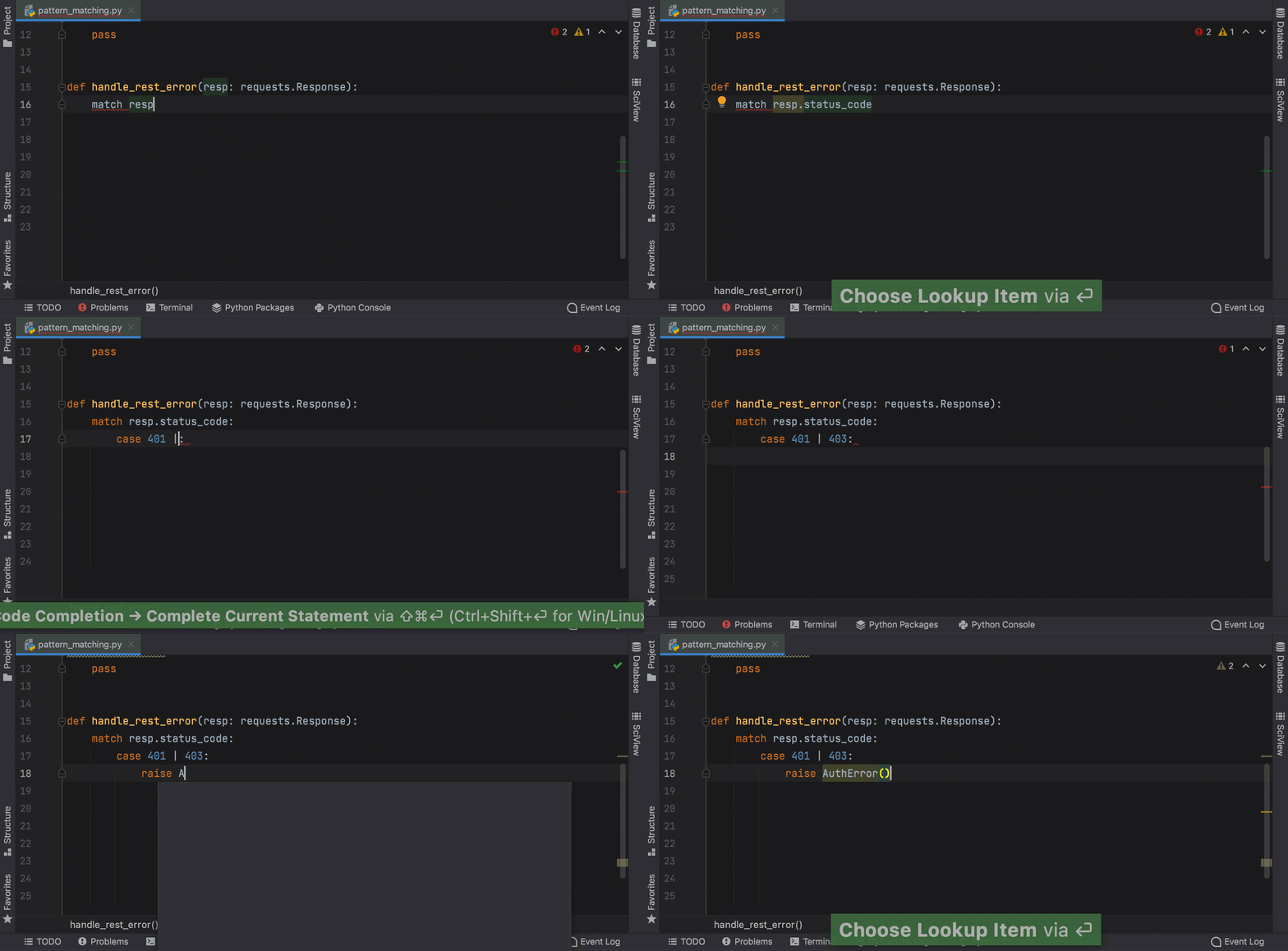
Complete_current_statement

First of all, we have good news for our Asian users. Starting with this version, you can enjoy a fully localized UI in Chinese, Korean, or Japanese. Localization is available as a non-bundled language pack plugin, which can be easily installed in your IDE.

Secondly, please note that we are planning to end support for several packages. Namely for mako, buildout, web2py. This change will be introduced later this year, starting from PyCharm 2021.3.

DOWNLOAD PYCHARM 2021.2

Python 3.10

Structural Pattern Matching is coming in Python 3.10. PyCharm provides a number of key features to help you adjust to its arrival, like the Unused local symbols and Unreachable code inspections, smart code completion and syntax highlighting for the match and case keywords, and the Complete Current Statement action.

Complete_current_statement

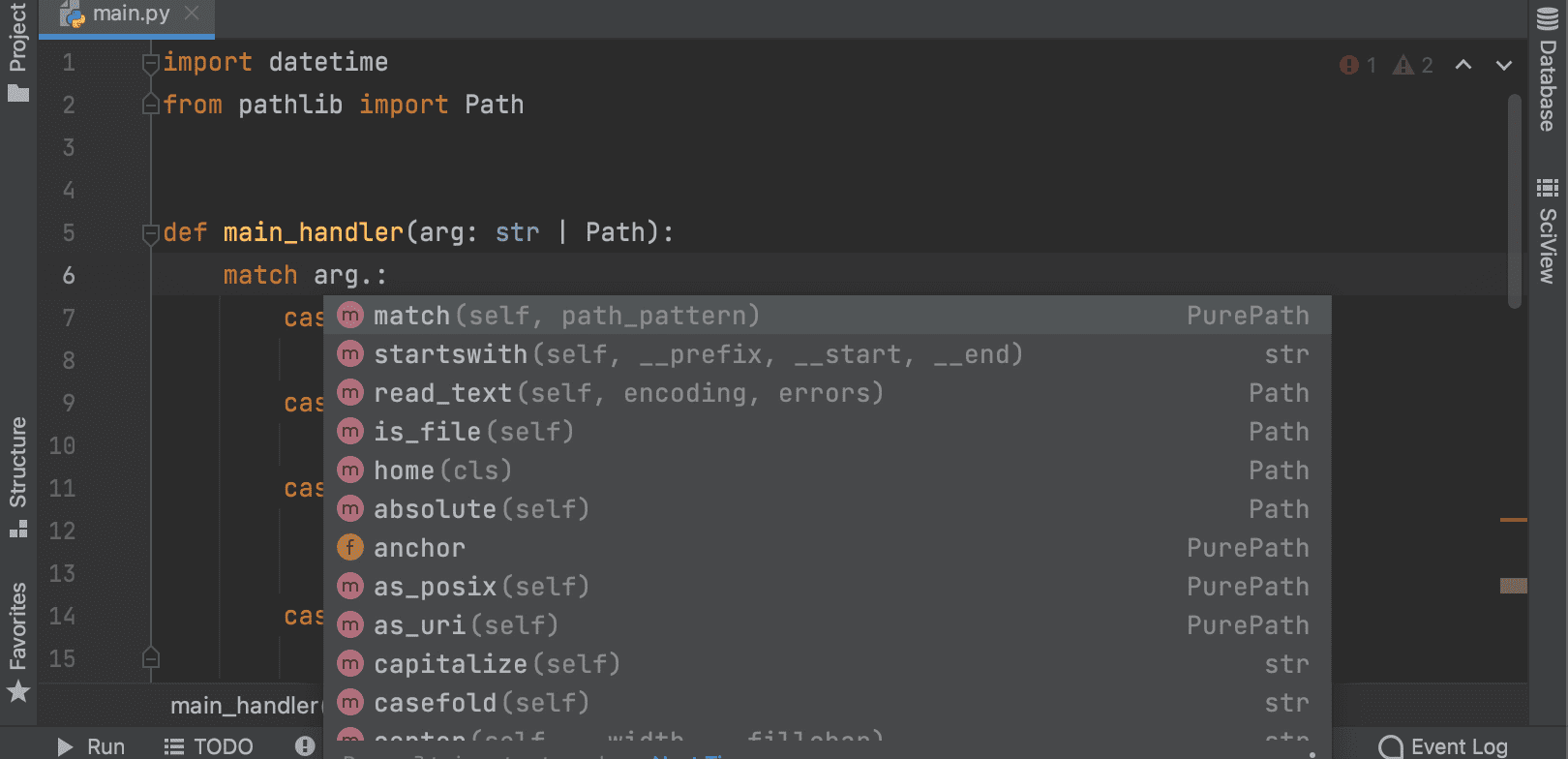
In Python 3.10 you will be able to use int | str for union types instead of Union[int, str]. This functionality is already available in earlier versions of Python through the use of from __future__ import annotations.

Union_types

PyCharm provides overall code insight for the new syntax, including intention actions and information in the Quick Documentation. PyCharm now supports type inference for isinstance and issubclass arguments with the new syntax type.

Python console support in collaborative mode

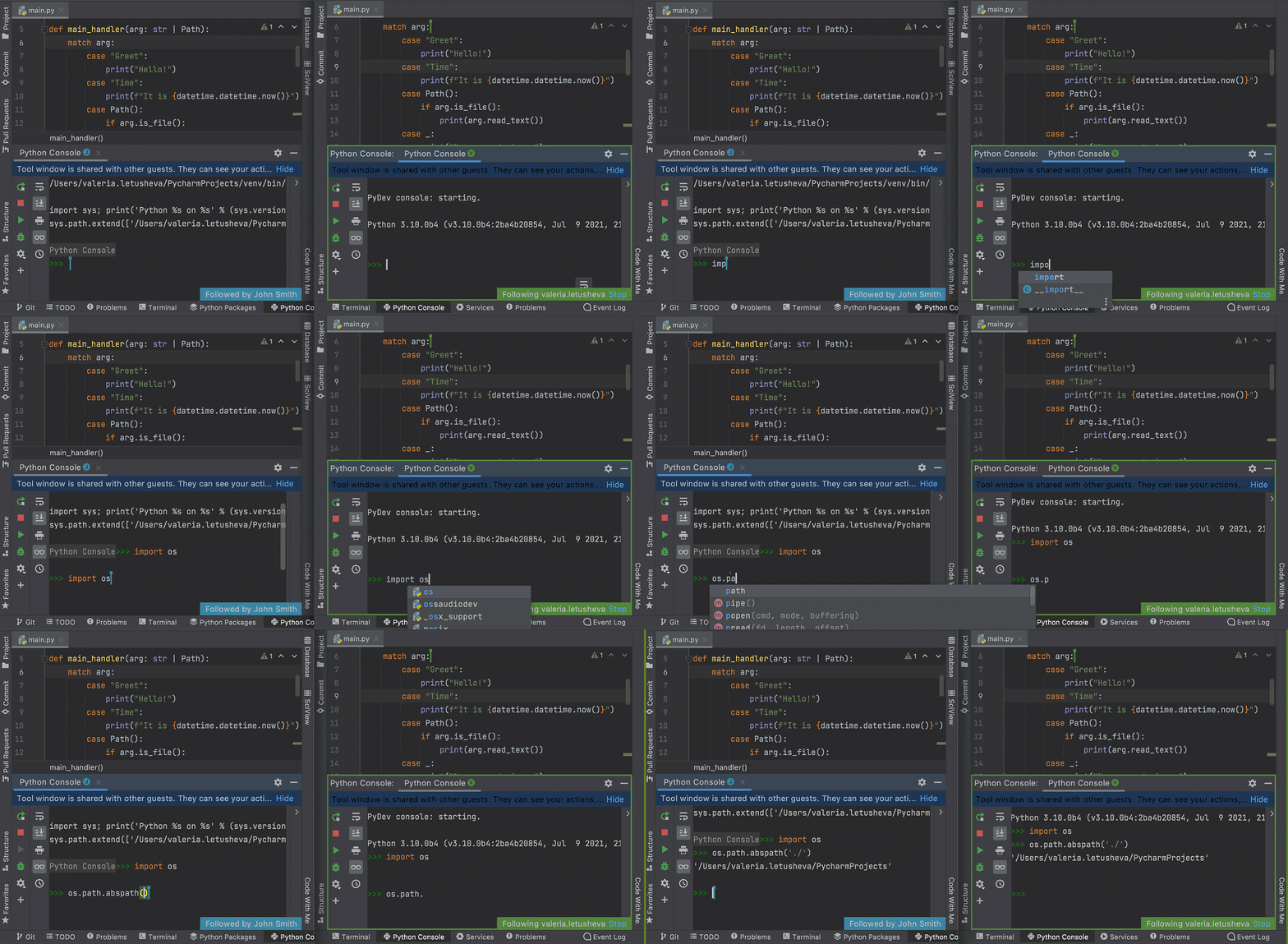
Working in the Python console is now supported on both the client machine and the host side. During a collaborative coding session, guests can review the code while the host runs it in the interactive console. Support for the Python console in Code With Me comes complete with all the usual PyCharm features, such as on-the-fly syntax highlighting with inspections and code completion.

Python_console

DOWNLOAD PYCHARM 2021.2

Databases [Pro only]

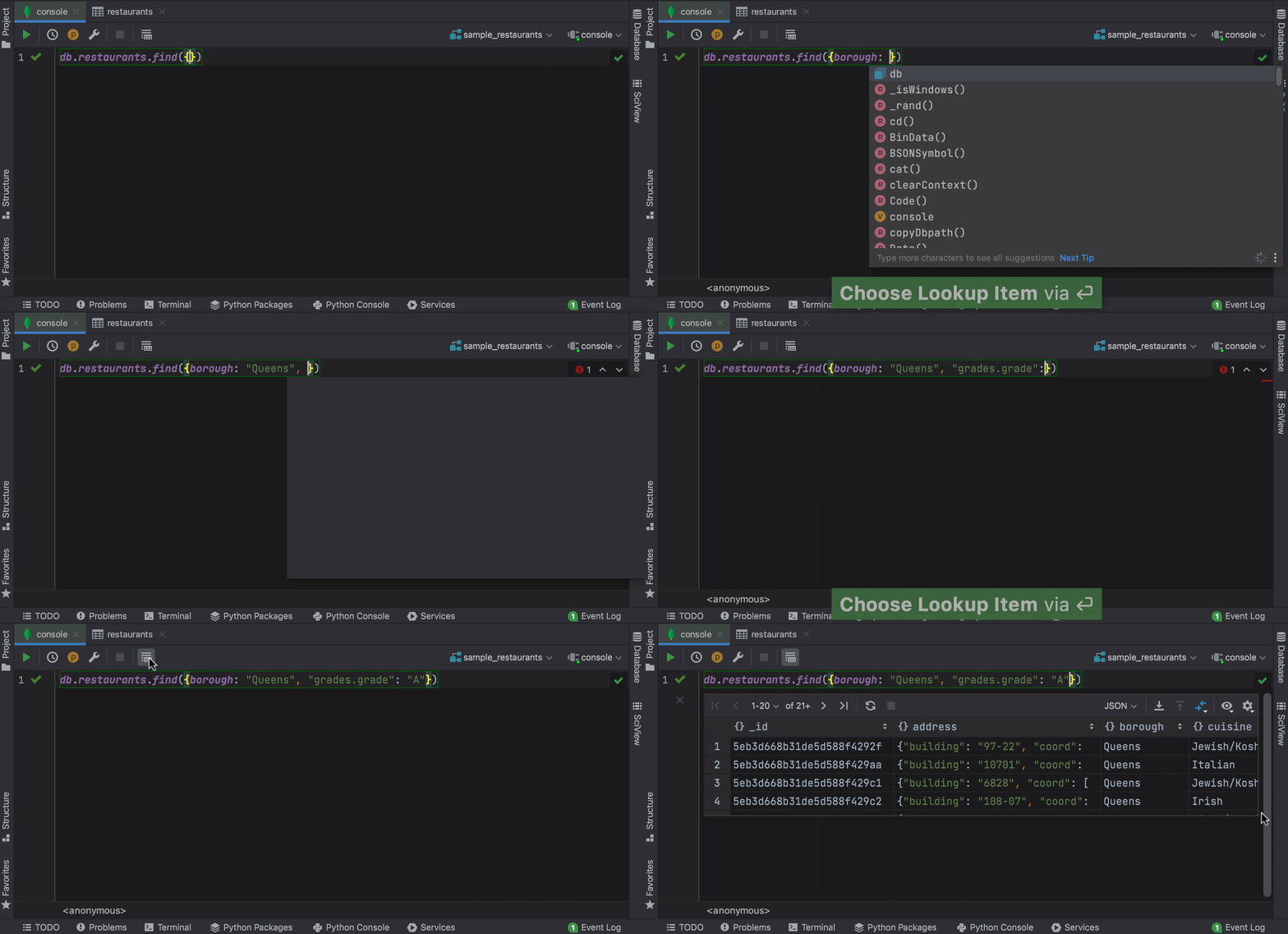
Code completion for fields and operators in the MongoDB console

Now PyCharm can complete fields, nested fields, and fields inside aggregation expressions, as well as query operators, projection operators, update operators, and aggregation stages in the MongoDB console.
mongodb

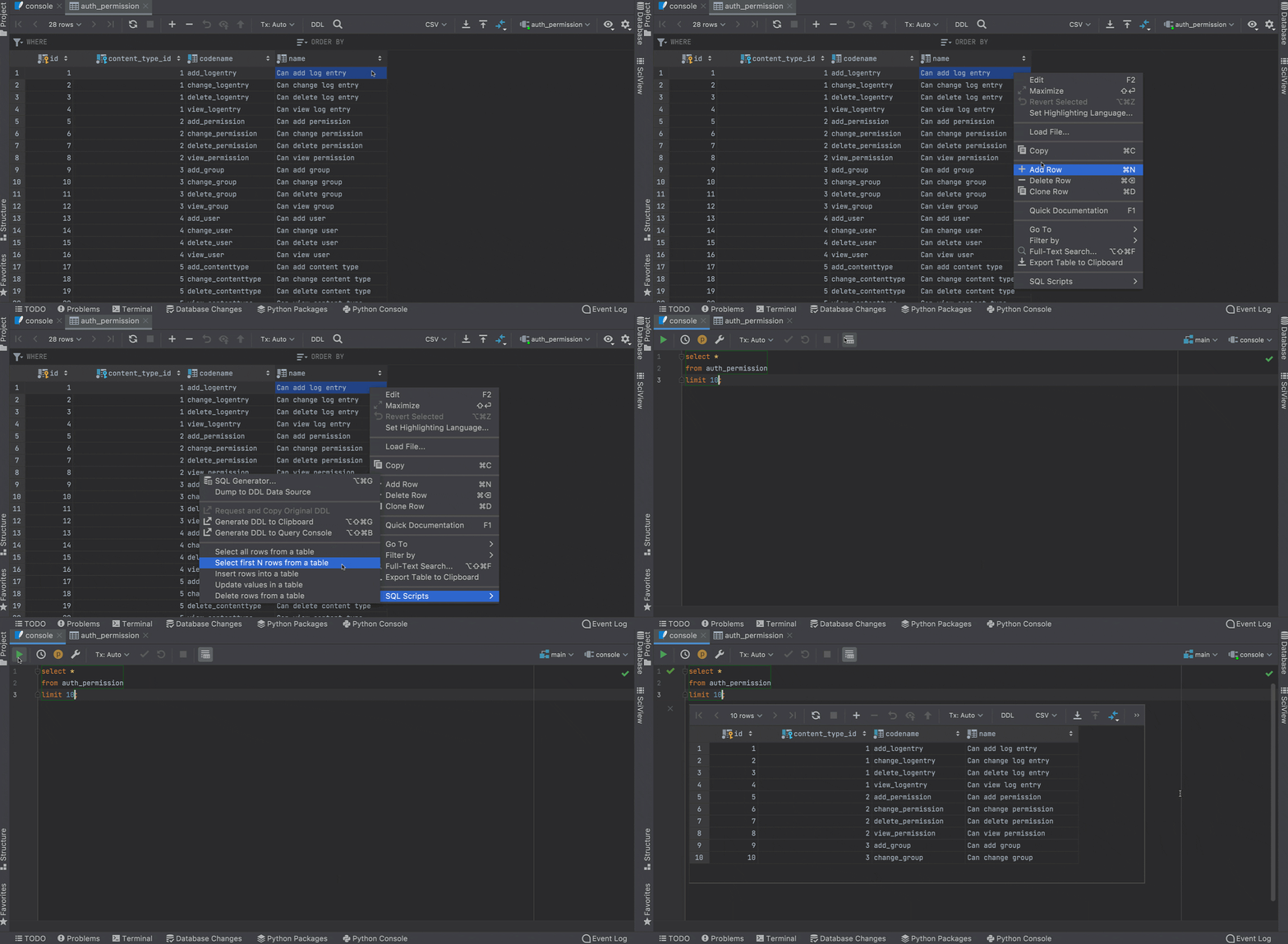
Context live templates from the data editor with SQL scripts action

Context live templates now work directly from the data editor. If you’re working with a table and you wish to query it, you can easily do so with the help of the SQL scripts action!

live_templates_sql

DOWNLOAD PYCHARM 2021.2

Frontend development [Pro only]

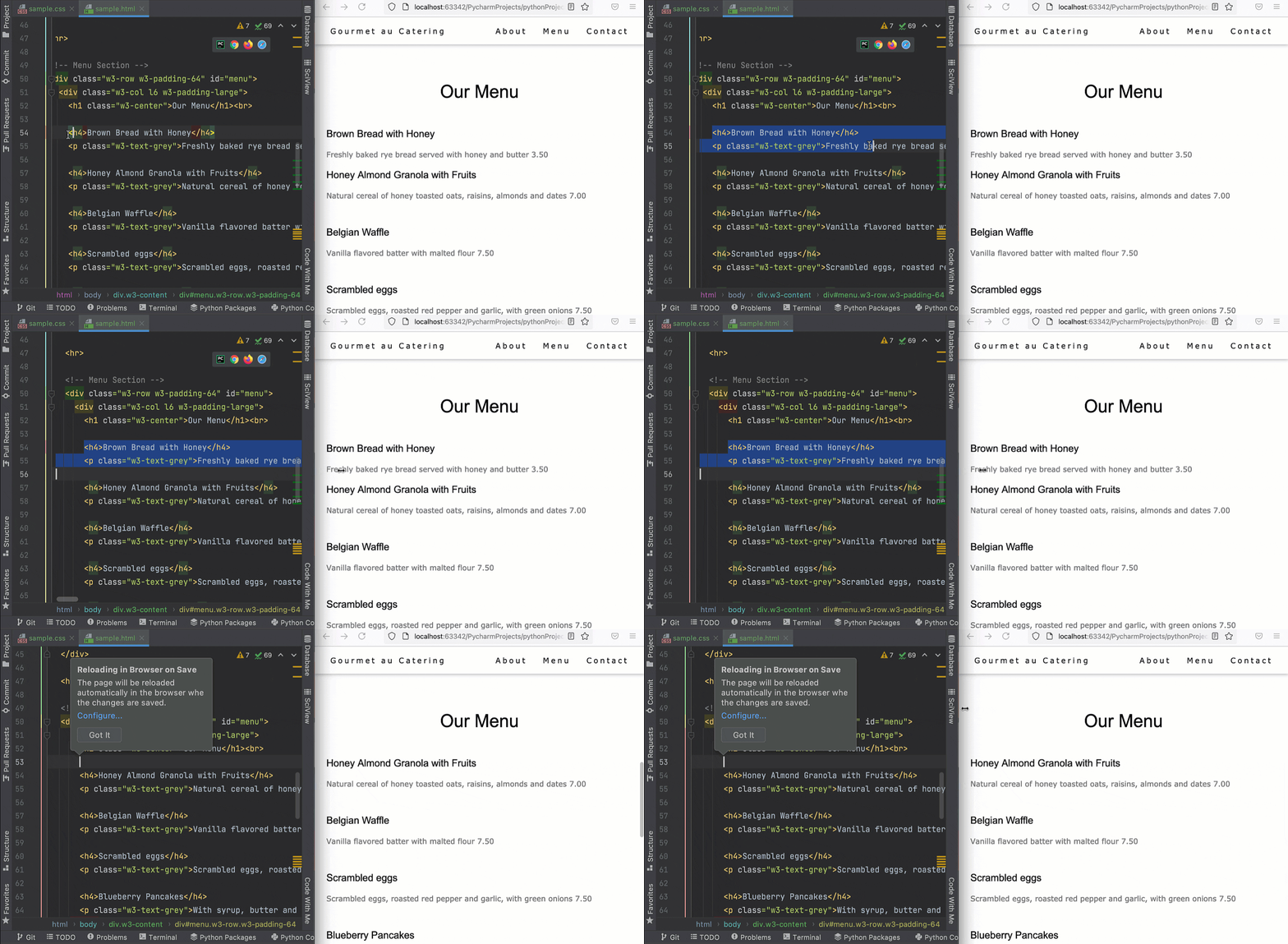
Reload pages in browser on save

PyCharm lets you preview HTML files in a browser using the built-in web server. Now it is able to automatically update the pages in a browser as you edit and save your HTML, CSS, and JavaScript files. To get started, open an HTML file in the editor, hover over the corner of the editor, and click on the icon for the browser you want to use – all browsers are supported.

html_preview

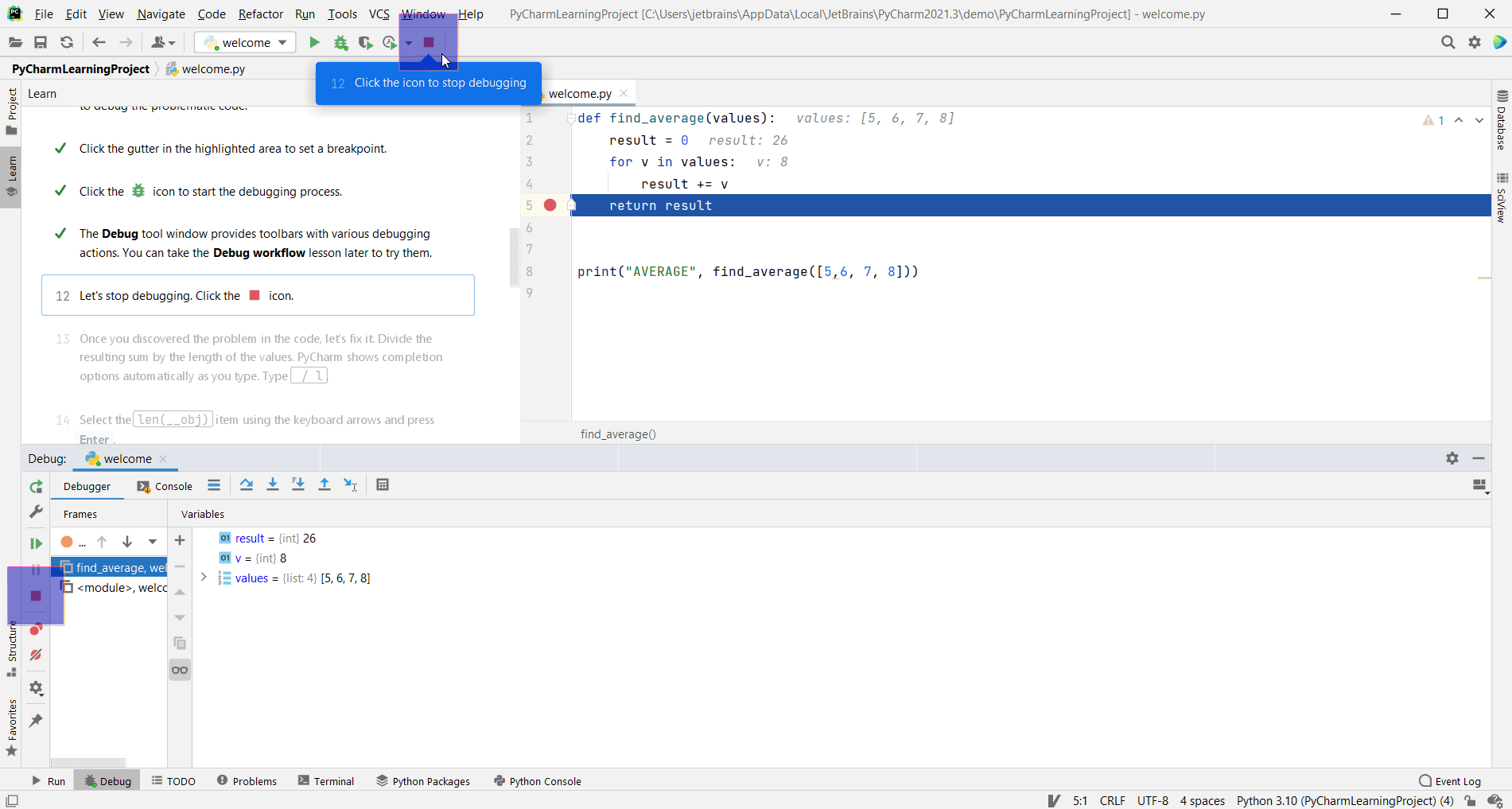
Onboarding Tour in the Features Trainer plugin

You can now take the new Onboarding Tour in the IDE Features Trainer plugin.
With this 7-minute tour, you can get familiar with the PyCharm user interface and learn how to code in Python with smart assistance! You can start the tour from the Welcome screen or from the PyCharm main menu: Help | Learn IDE Features.

onboarding_tour

DOWNLOAD PYCHARM 2021.2

Testing

Test runner auto-detection

PyCharm auto-detects when there is a test runner installed on your Python interpreter and uses it to run tests. If no specific test runner is installed, PyCharm uses unittest. Still, you always have an option to explicitly specify the required test runner in the project settings. To explicitly set the required test runner in the project settings, press ⌘, to open the IDE settings and select Tools | Python Integrated Tools, and then select the target test runner from the Default test runner list.

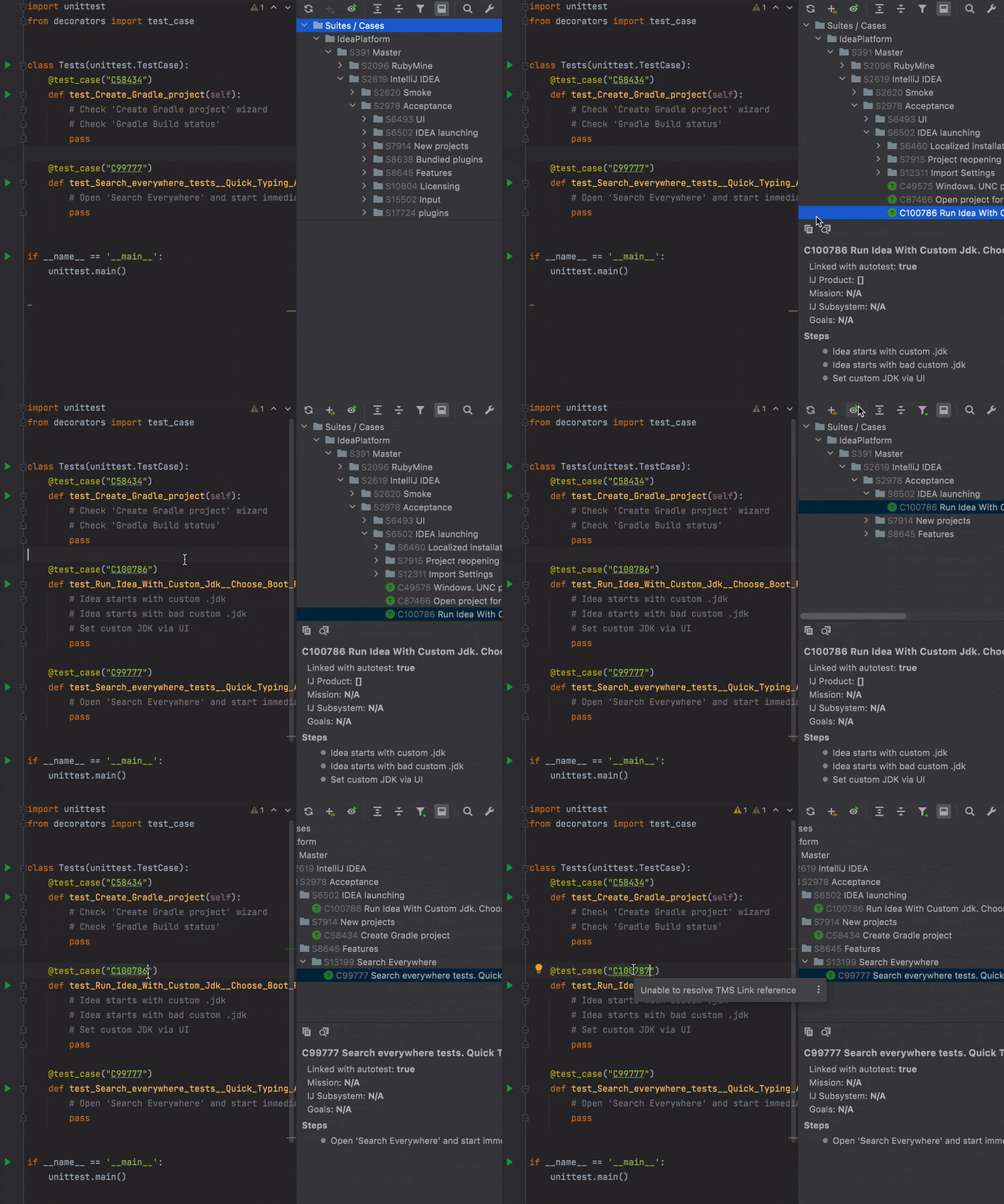
Integrate with TestRail

The Test Management plugin now includes support for Python and is available for PyCharm Community. The Test Management plugin helps keep your unit tests in sync with test cases in TMS. You can load test cases from TestRail and link them with existing and new unit tests.
When you copy and paste a test case to a Python file a copy of the unit test will be pasted. You can customize the unit test template and share it with the team. With the plugin you can find test cases that are not yet automated (not linked with unit tests) and obsolete tests.

test-runner

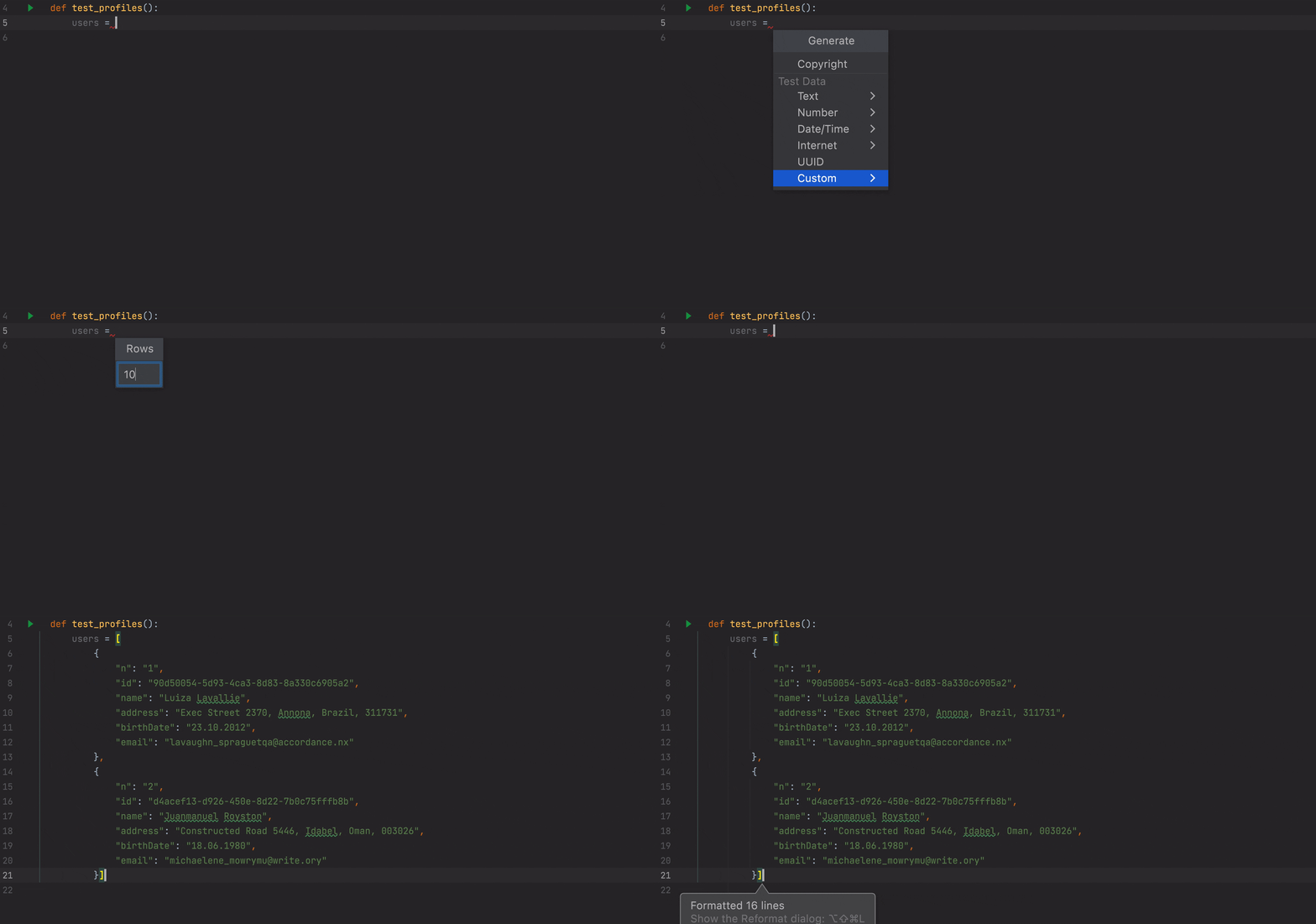
Generate Test Data

Being able to insert a randomly generated email, name, or phone number is important when developing unit tests. As a part of our Test Automation Kit the new Test Data plugin plugin brings a lot of useful actions that help to generate random data. Use the Generate menu (Cmd+N) to see all available options. If you need a specific format, feel free to create your own custom data format based on regular expression or Velocity templates. All custom data types are available in bulk mode and can be shared with your team.

test-runner

DOWNLOAD PYCHARM 2021.2

In this blog post we covered only a few major features of PyCharm 2021.2. To learn about all the other new features in PyCharm 2021.2 visit our What’s New page.


from Planet Python
via read more

Python⇒Speed: Saving memory with Pandas 1.3's new string dtype

When you’re loading many strings into Pandas, you’re going to use a lot of memory. If you have only a limited number of strings, you can save memory with categoricals, but that’s only helpful in a limited number of situations.

With Pandas 1.3, there’s a new option that can save memory on large number of strings as well, simply by changing to a new column type. Let’s see how.

Read more...

from Planet Python
via read more

10 NLP Projects to Boost Your Resume

Natural Language Processing (NLP) is a very exciting field. Already, NLP projects and applications are visible all around us in our daily life. From conversational agents (Amazon Alexa) to sentiment analysis (Hubspot’s customer feedback analysis feature), language recognition and translation (Google Translate), spelling correction (Grammarly), and much more.  Whether you’re a developer or data scientist […]

The post 10 NLP Projects to Boost Your Resume appeared first on neptune.ai.


from Planet SciPy
read more

Python for Beginners: Convert Integer to String in Python

Python strings are one of the most used data types while doing data analysis for operations like pattern matching. In this article, we will use different ways to convert an integer to string in python.

Convert integer to string using str() function

The easiest way to convert an integer to string is to use the str() function. The str() function takes the integer as input and returns its string representation as follows.

myInt = 1117
myStr = str(myInt)
print("The integer myInt is:", myInt)
print("The string myStr is:", myStr)

Output:

The integer myInt is: 1117
The string myStr is: 1117

We can check the type of input variable and output variable to confirm if the integer has been  converted to a string or not. To do this, we will use the type() function. The type function takes a python object as input and returns the data type of the input object as follows.

myInt = 1117
myStr = str(myInt)
print("The data type of myInt is:", type(myInt))
print("The data type of myStr is:", type(myStr))

Output:

The data type of myInt is: <class 'int'>
The data type of myStr is: <class 'str'>

Convert integer to string using string formatting

String formatting is a method to insert a variable or another string to a predefined string. We can also use string formatting to convert an integer to string. We will use the “%s” operator as well as the format() method to convert an integer to string in this article.

The “%s” operator is used to format a value inside a string. It is generally used to avoid string concatenation. But, we can use this operator to convert an integer to a string. For this, first we will create an empty string and put a %s placeholder in the empty string. After that, we can specify the integer which has to be converted into string. During execution of the program, the python interpreter will convert the integer into string as seen in the following example.

myInt = 1117
myStr = "%s" % myInt
print("myInt is:",myInt)
print("The data type of myInt is:", type(myInt))
print("myStr is:",myStr)
print("The data type of myStr is:", type(myStr))

Output:

myInt is: 1117
The data type of myInt is: <class 'int'>
myStr is: 1117
The data type of myStr is: <class 'str'>

In place of the “%s” operator, we can also use format() method to perform the conversion. For this we can put a {} placeholder in an empty string. After that, we can invoke the format method on the empty string with the integer given as the input to the format() method. This will convert the integer into string as follows.

myInt = 1117
myStr = "{}".format(myInt)
print("myInt is:",myInt)
print("The data type of myInt is:", type(myInt))
print("myStr is:",myStr)
print("The data type of myStr is:", type(myStr))

Output:

myInt is: 1117
The data type of myInt is: <class 'int'>
myStr is: 1117
The data type of myStr is: <class 'str'>

Conversion using F-strings

F strings are used to embed a value or an expression into a string. We can also use f strings to convert an integer into a string. 

The syntax for using f strings is similar to that of format() method. The only difference is that we can put the variables directly into the placeholders. This makes the code more readable. To put an integer variable n into a string, we simply put n into the {} placeholder as follows.

f"This is a string containing {n}"

To convert an integer to string using f strings, we will declare an empty string with only a single placeholder for the integer. In this way, at runtime, the integer will be converted to string. This can be seen in the following example.

myInt = 1117
myStr = f"{myInt}"
print("myInt is:",myInt)
print("The data type of myInt is:", type(myInt))
print("myStr is:",myStr)
print("The data type of myStr is:", type(myStr))

Output:

myInt is: 1117
The data type of myInt is: <class 'int'>
myStr is: 1117
The data type of myStr is: <class 'str'>

Conclusion

In this article, we have seen different ways to convert an integer into a string in python. We have used in-built str() method, string formatting as well as f-strings. To read more about strings, you can read this article on python string split operation.We can also write the programs used in this article with exception handling using python try except to make the programs more robust and handle errors in a systematic way.  

The post Convert Integer to String in Python appeared first on PythonForBeginners.com.


from Planet Python
via read more

Real Python: Python and REST APIs: Interacting With Web Services

There’s an amazing amount of data available on the Web. Many web services, like YouTube and GitHub, make their data accessible to third-party applications through an application programming interface (API). One of the most popular ways to build APIs is the REST architecture style. Python provides some great tools not only to get data from REST APIs but also to build your own Python REST APIs.

In this tutorial, you’ll learn:

  • What REST architecture is
  • How REST APIs provide access to web data
  • How to consume data from REST APIs using the requests library
  • What steps to take to build a REST API
  • What some popular Python tools are for building REST APIs

By using Python and REST APIs, you can retrieve, parse, update, and manipulate the data provided by any web service you’re interested in.

Free Bonus: Click here to download a copy of the "REST API Examples" Guide and get a hands-on introduction to Python + REST API principles with actionable examples.

REST Architecture

REST stands for representational state transfer and is a software architecture style that defines a pattern for client and server communications over a network. REST provides a set of constraints for software architecture to promote performance, scalability, simplicity, and reliability in the system.

REST defines the following architectural constraints:

  • Stateless: The server won’t maintain any state between requests from the client.
  • Client-server: The client and server must be decoupled from each other, allowing each to develop independently.
  • Cacheable: The data retrieved from the server should be cacheable either by the client or by the server.
  • Uniform interface: The server will provide a uniform interface for accessing resources without defining their representation.
  • Layered system: The client may access the resources on the server indirectly through other layers such as a proxy or load balancer.
  • Code on demand (optional): The server may transfer code to the client that it can run, such as JavaScript for a single-page application.

Note, REST is not a specification but a set of guidelines on how to architect a network-connected software system.

REST APIs and Web Services

A REST web service is any web service that adheres to REST architecture constraints. These web services expose their data to the outside world through an API. REST APIs provide access to web service data through public web URLs.

For example, here’s one of the URLs for GitHub’s REST API:

https://api.github.com/users/<username>

This URL allows you to access information about a specific GitHub user. You access data from a REST API by sending an HTTP request to a specific URL and processing the response.

HTTP Methods

REST APIs listen for HTTP methods like GET, POST, and DELETE to know which operations to perform on the web service’s resources. A resource is any data available in the web service that can be accessed and manipulated with HTTP requests to the REST API. The HTTP method tells the API which action to perform on the resource.

While there are many HTTP methods, the five methods listed below are the most commonly used with REST APIs:

HTTP method Description
GET Retrieve an existing resource.
POST Create a new resource.
PUT Update an existing resource.
PATCH Partially update an existing resource.
DELETE Delete a resource.

A REST API client application can use these five HTTP methods to manage the state of resources in the web service.

Status Codes

Once a REST API receives and processes an HTTP request, it will return an HTTP response. Included in this response is an HTTP status code. This code provides information about the results of the request. An application sending requests to the API can check the status code and perform actions based on the result. These actions could include handling errors or displaying a success message to a user.

Below is a list of the most common status codes returned by REST APIs:

Code Meaning Description
200 OK The requested action was successful.
201 Created A new resource was created.
202 Accepted The request was received, but no modification has been made yet.
204 No Content The request was successful, but the response has no content.
400 Bad Request The request was malformed.
401 Unauthorized The client is not authorized to perform the requested action.
404 Not Found The requested resource was not found.
415 Unsupported Media Type The request data format is not supported by the server.
422 Unprocessable Entity The request data was properly formatted but contained invalid or missing data.
500 Internal Server Error The server threw an error when processing the request.

These ten status codes represent only a small subset of the available HTTP status codes. Status codes are numbered based on the category of the result:

Read the full article at https://realpython.com/api-integration-in-python/ »


[ Improve Your Python With 🐍 Python Tricks 💌 – Get a short & sweet Python Trick delivered to your inbox every couple of days. >> Click here to learn more and see examples ]


from Planet Python
via read more
TestDriven.io: Working with Static and Media Files in Django

This article looks at how to work with static and media files in a Django project, locally and in production. from Planet Python via read...