Monday, November 26, 2018

Continuous Integration with Python: An Introduction

When writing code on your own, the only priority is making it work. However, working in a team of professional software developers brings a plethora of challenges. One of those challenges is coordinating many people working on the same code. How do professional teams make dozens of changes per day while making sure everyone is […]

The post Continuous Integration with Python: An Introduction appeared first on PyBloggers.


from PyBloggers
read more

How to get Google Home / Google Assistant to call your iOS iPhone

If you have an iPhone, Google Assistant and Google Home won't be able to call or ring your phone out of the box, since it's an Android-only feature. If you are not in the US, you cannot even use the workaround of calling your number. So what can you do, if you tend to misplace your phone around the house ? (ahem)
  1. Get an account on IFTTT
  2. Install the IFTTT app on your phone
  3. create a new applet, click on "this" and select Google Assistant
  4. select "say a simple phrase"  and enter the details you prefer (e.g. "make a noise on my phone" or "ping my phone". Note the most common "ring my phone" or "where is my phone" are reserved by Google and won't work).
  5. click on "then" and select VoIP Calls
  6. enter a message the phone will tell you if you pick up (e.g. "Glad you found me!")
  7. Save the applet.
Now, when you say that phrase to Google Home / Goole Assistant, it will ring your phone, so you can dig it out of the sofa or the Lego box (ahem).

from Subclassed
via read more

Continuous Integration with Python: An Introduction

Reuven Lerner: Last chance to save 40% on Python and Git courses

Today (Monday) is the last day to benefit from my weekend sale, with 40% off of my books and courses!  Just enter the coupon code “BF2018” for any product , and take 40% off.

This offer includes my new “Intro Python: Fundamentals” course, containing the 1st day of the 4-day training I give to experienced developers around the world.

Here are the courses I’m currently offering:

Any questions?  Just e-mail me at reuven@lerner.co.il.  But don’t delay; today’s the last day to take advantage of this sale!

The post Last chance to save 40% on Python and Git courses appeared first on Lerner Consulting Blog.


from Planet Python
via read more

Made With Mu: Contributor Focus: Zander Brown

Mu is not a solo effort. Many folks have contributed to Mu, and I will be eternally grateful for their work. With the spirit of recognising the voluntary contributions of others in mind, I’m going to write about some of our most prodigious programmers. First up is Zander Brown.

Zander, like Top Gear’s the Stig, is a bit of a mystery.

Until recently, nobody had ever met him in real life, and all interactions with Zander were via copious GitHub comments, pull requests and bug fixes.

Some said he was an alien being from another dimension, others claimed him to be a rogue artificial intellegince running rampant in random Git repositories, yet more people whispered in hushed tones that he was merely a pseudonym for Bill Gates, coming out of retirement to contribute to free software projects.

All I can say is that I’m thankful for his considerable contributions to Mu’s code base, eagle-eyed code reviews and seemingly limitless Pythonic knowledge.

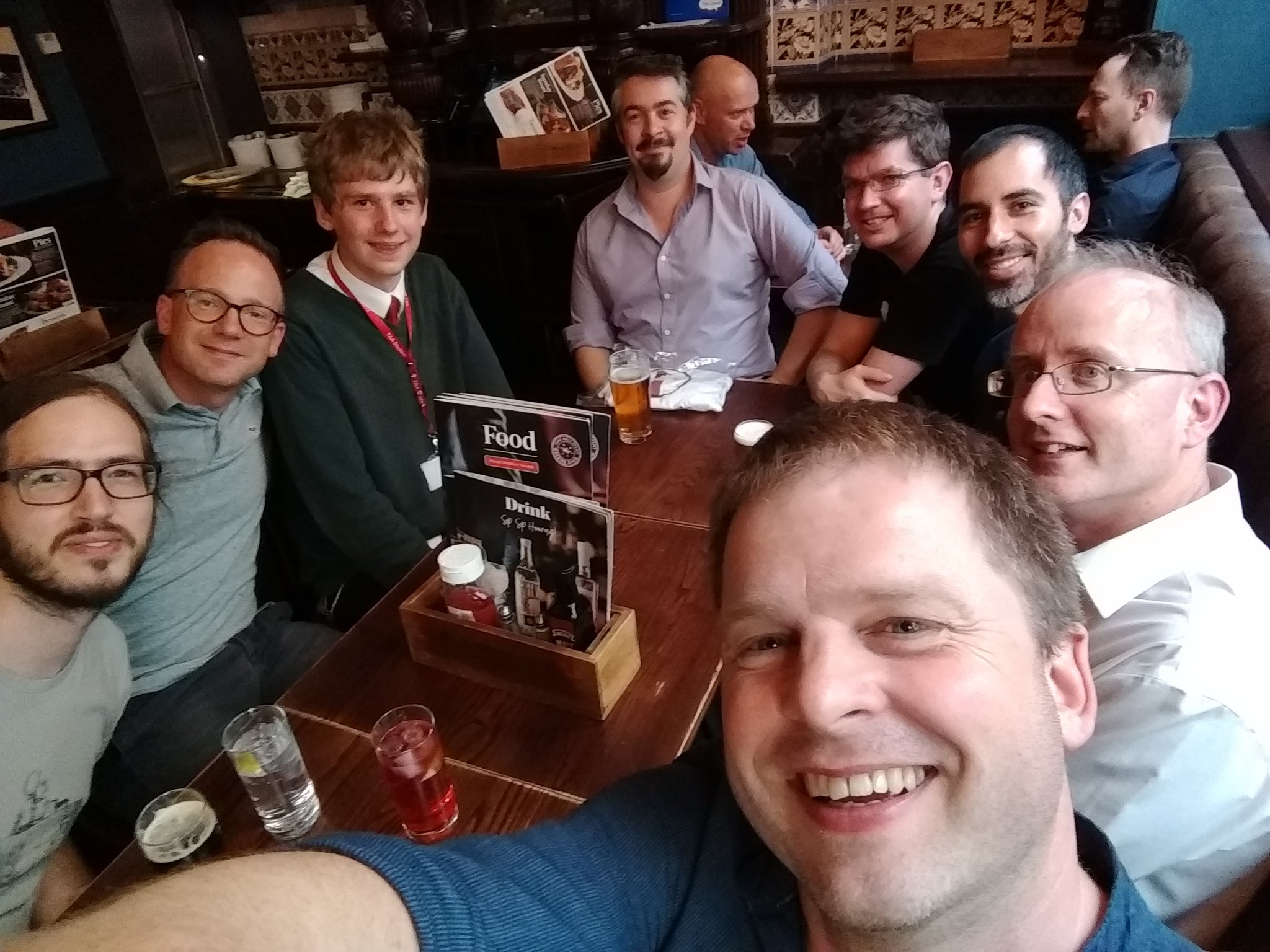
Actually, when I met Zander for the first time in July, it turned out he’s a 17 year-old studying for his A-levels (the exams teenagers sit in the UK to help them to get into university). He’s doing A-levels in Maths, Physics and Computer Science. He’s third from the left in the picture below:
I want to bring your attention to how wonderful this is ~ we have several related things going on:

  • We have a courteous, knowledgable and extraordinarily competent contributor to Mu.
  • Zander’s participation is evidence that the Mu project is welcoming, safe and supportive enough to encourage the participation of teenage coders.
  • Zander, a student who uses Mu, is helping to develop Mu. I would very much like to foster this sense of ownership in Mu’s users, be they students, teachers or professional software developers.

I recently asked Zander how he got into Mu. His reply was interesting in that he typed “micro:bit Python” into a search engine after his school had some of the early versions of the device delivered to teachers.

The head of department got the blue one, the other CS teacher had the green, leaving the yellow spare and the rest, as they say, is history…

He started coding with MSWLogo but has, more recently discovered Python and started making contributions to various open source projects:

It’s nice to work on things that help others be that the developer (fix this, add that) or the users (CS teachers!)

Recently I’ve been contributing the GNOME which has the ‘coolness’ that you are in country A working with person in country B to make something that’ll be used in A, B, C & D but also being a tad ‘meta’ when you’re fixing a bug older than you.

Right now, I feel very very old. :-)

How does he find working on Mu?

Great fun, first & only time i’ve met in person with others working on a project and the T-shirt isn’t bad either :-)

Been nice to play on a range of things within the same project from fighting QSS to walking the python syntax tree whilst knowing people are using it in the real world (TAA just switched form GCSE Java to Python so Mu is now used with the lower years)

(When we released Mu 1.0 I made sure all of the major contributors and friends of Mu got t-shirts to celebrate. Thanks to my hugely talented friend Steve Hawkes, Zander got a t-shirt with the “Stig” avatar shown at the top of this post.)

Zander, thank you for your continued contributions and best of luck with your studies (he wants to go on to study Computer Science at university). I have no doubt that wherever you end up studying will soon learn how fortunate they are to have such a talented student as you.

:-)


from Planet Python
via read more

gamingdirectional: Create an explosion manager and explosion class for pygame project

In this article we will create an explosion manager as well as an explosion class to manage the on scene explosions but first of all lets watch the raw video below which shows the explosions on the game scene. https://ift.tt/2DJhcW0 Before we create the above classes, we will create one single explosion sprite sheet which contains many...

Source


from Planet Python
via read more

Sunday, November 25, 2018

Kushal Das: Building wheels and Debian packages for SecureDrop on Qubes OS

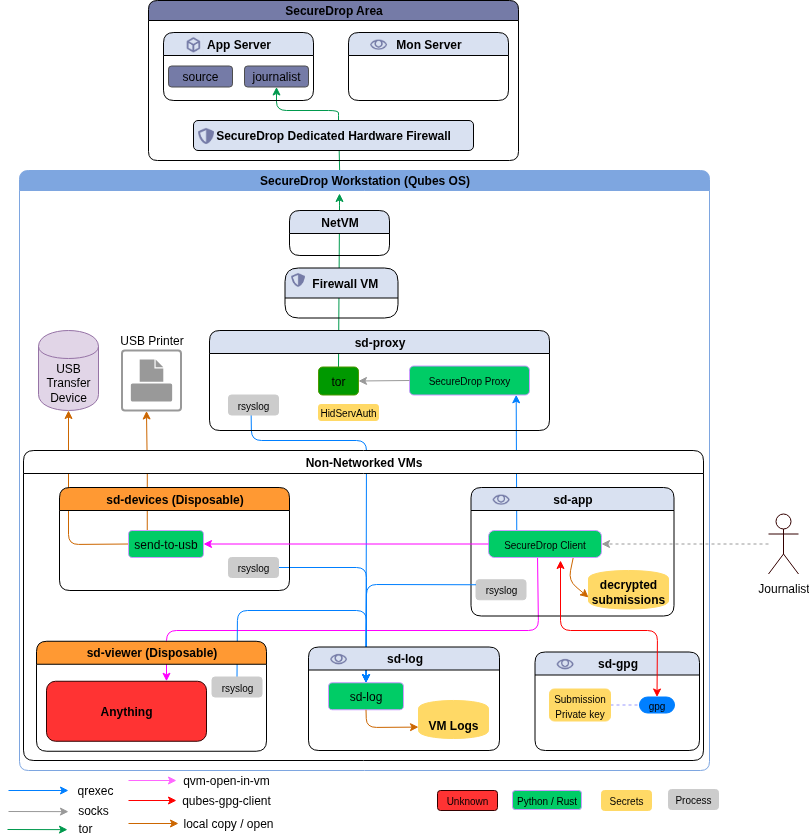
For the last couple of months, the SecureDrop team is working on a new set of applications + system for the journalists, which are based on Qubes OS, and desktop application written particularly for Qubes. A major portion of the work is on the Qubes OS part, where we are setting up the right templateVMs and AppVMs on top of those templateVMs, setting up the qrexec services and right configuration to allow/deny services as required.

The other major work was to develop a proxy service (on top of Qubes qrexec service) which will allow our desktop application (written in PyQt) to talk to a SecureDrop server. This part finally gets into two different Debian packages.

  1. The securedrop-proxy package: which contains only the proxy tool
  2. The securedrop-client: which contains the Python SDK (to talk to the server using proxy) and desktop client tool

The way to build SecureDrop server packages

The legacy way of building SecureDrop server side has many steps and also installs wheels into the main Python site-packages. Which is something we plan to remove in future. While discussing about this during PyCon this year, Donald Stufft suggested to use dh-virtualenv. It allows to package a virtualenv for the application along with the actual application code into a Debian pacakge.

The new way of building Debian packages for the SecureDrop on Qubes OS

Creating requirements.txt file for the projects

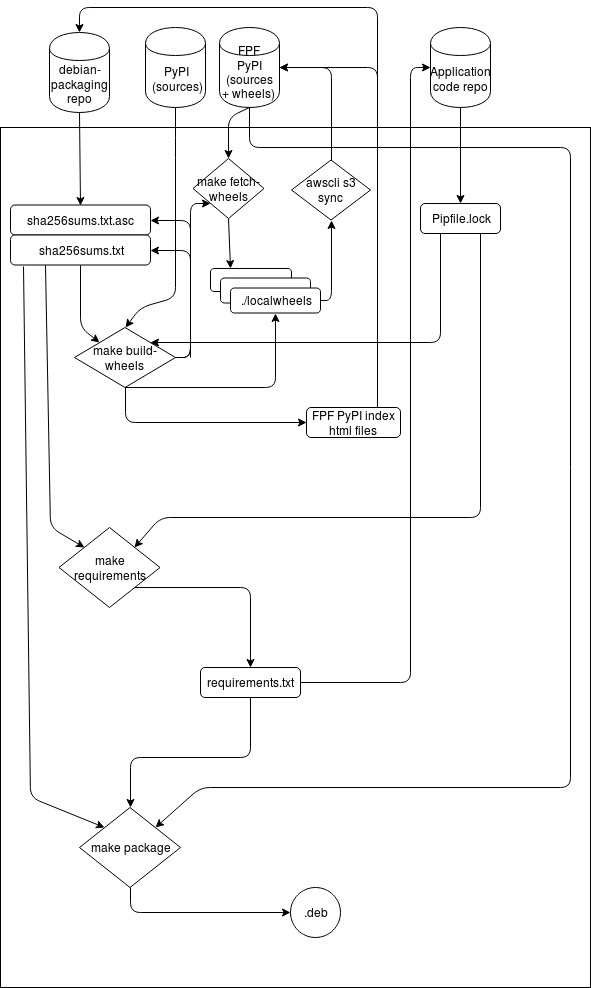
We use pipenv for the development of the projects. pipenv lock -r can create a requirements.txt, but, it does not content any sha256sums. We also wanted to make sure that doing these steps become much easier. We have added a makefile target in our new packaging repo, which will first create the standard requirements.txt and then it will try to find the corresponding binary wheel sha256sums from a list of wheels+sha256sums, and before anything else, it verifies the list (signed with developers’ gpg keys).

PKG_DIR=~/code/securedrop-proxy make requirements

If it finds any missing wheels (say new dependency or updated package version), it informs the developer, the developer then can use another makefile target to build the new wheels, the new wheels+sources do get synced to our simple index hosted on s3. The hashes of the wheels+sources also get signed and committed into the repository. Then, the developer retries to create the requirements.txt for the project.

Building the package

We also have makefile targets to build the Debian package. It actually creates a directory structure (only in parts) like rpmbuild does in home directory, and then copies over the source tarball, untars, copies the debian directory from the packaging repository, and then reverifies each hashes in the project requirements file with the current signed (and also verified) list of hashes. If everything looks good, then it goes to build the final Debian package. This happens by the following environment variable exported in the above mention script.

DH_PIP_EXTRA_ARGS="--no-cache-dir --require-hashes"

Our debian/rules files make sure that we use our own packaging index for building the Debian package.

#!/usr/bin/make -f

%:
        dh $@ --with python-virtualenv --python /usr/bin/python3.5 --setuptools --index-url https://dev-bin.ops.securedrop.org/simple

For example, the following command will build the package securedrop-proxy version 0.0.1.

PKG_PATH=~/code/securedrop-proxy/dist/securedrop-proxy-0.0.1.tar.gz PKG_VERSION=0.0.1 make securedrop-proxy

The following image describes the whole process.

We would love to get your feedback and any suggestions to improve the whole process. Feel free to comment in this post, or by creating issues in the corresponding Github project.


from Planet Python
via read more

TestDriven.io: Working with Static and Media Files in Django

This article looks at how to work with static and media files in a Django project, locally and in production. from Planet Python via read...